
lpgajkhkagnpdjklmpgjeplmgffnhhjj
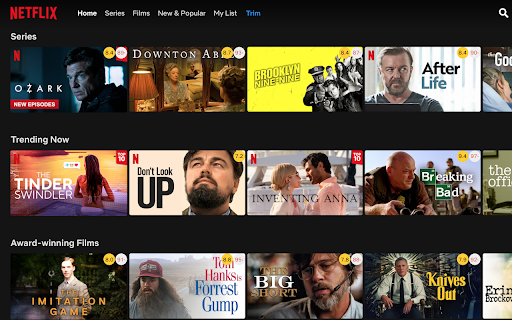


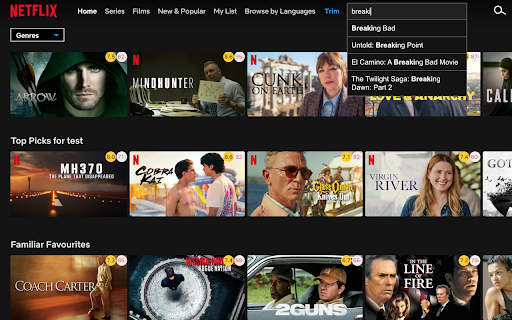
Show IMDB and Rotten Tomatoes ratings on Netflix, Amazon Prime Video, Disney+ and other streaming services Trim shows IMDB and Rotten Tomatoes ratings on Netflix, Amazon Prime Video, Disney+ and other streaming services. ★ Show IMDB and Rotten Tomatoes ratings Trim shows IMDB and Rotten Tomatoes ratings of all movies and TV shows on Netflix, Prime Video, Disney+ and other streaming services. With Trim you can fade out low rated movies or TV shows on Netflix, Prime Video or Disney+, based on their IMDB or Rotten Tomatoes ratings. With Trim you can adjust the playback speed using the keyboard shortcuts ('[' to slow down and ']' to speed up). This works on Netflix, Prime Video, Disney+ and HBO Max. Trim enables and shows an extra tab for the hidden Netflix categories. You can browse your favorite genre by quickly clicking on the drop-down menu “Genre” and selecting a favorite genre. • v8.02 - Updated extension name to highlight Disney+ support • v8.01 - Added keyword tags (e.g. "thriller", "cult favorite") to IMDB tooltip - Rotten Tomatoes tooltip shows both Critics and Audience scores - Added Reset button to fade-out filters - Added show/hide billboard option for Disney+ and Prime Video - Slightly reduced rating circle sizes • v7.60 - Per-platform rating settings: choose which ratings (IMDB, Rotten Tomatoes) to show for each streaming service. - Fixed playback speed controls on Disney+ and Prime Video. • v7.59 Add an option in the settings page to toggle the instant search feature on/off

Netflix Rating
View IMDB and Rotten Tomatoes scores inside Netflix! View Imdb and Rotten Tomatoes scores of movies and series directly in Netflix! Simple and easy to use. Version 2.1: * Add support for Browse By Lanugages. Version 1.1: * Added support for gallery view. * Added support for search.

IMDb ratings on Netflix
== NO TRACKING, We respect your privacy == It's irritating when you have to open a new tab and search for ratings of movies, while you are trying to find a movie to watch on Netflix. Using this extension you can see IMDb rating of movies directly on Netflix. Supported Ratings: 1. IMDb (along with vote count) 2. Rotten tomatoes 3. Meta critic How to use extension : https://www.youtube.com/watch?v=3T9Yqz5ivAk For any feedback please reach out to : pawanmaurya18@gmail.com ### Version 0.150 updates: Updated extension to work with new Netflix layout

RateFlix
Show IMDb, Rotten Tomatoes, and Metacritic ratings on Netflix™ Adds IMDb™, Rotten Tomatoes™, and Metacritic™ ratings to Netflix™ in the following ways: 1. Movies and TV shows will show an IMDb™ rating in the expanded card while browsing 2. Rotten Tomatoes™ and Metacritic™ ratings will also be displayed in the same way, but currently only for some movies 3. Clicking on an IMDb™ rating will open the IMDb™ page for that movie or TV show in a new tab Disclaimer: Netflix™ and IMDb™ are registered trademarks and have no affiliation to this extension. If you're enjoying the app, please support the developer by donating! You can become a patron here: https://www.patreon.com/bePatron?c=1219860 or donate directly via PayPal here: https://paypal.me/trutgers. Please also feel free to check out the project and help develop fixes or new features here: https://github.com/tanner-rutgers/RateFlix Thanks for your support!

Film Scores for HBO Max : TMDB ratings [QVI]
Not sure what to watch? Here’s our advice: don’t waste your precious time on bad productions. Now you can see if the movie is worth watching directly on HBO Max. Check what others like and increase your chances of finding real gems among the high-scored titles. Film Scores for HBOMax displays ratings from The Movie Database (TMDB) Picking something to watch has never been easier! All you need to do is add Film Scores for HBO Max extension to your browser, It's as simple as that! Disclaimer: HBO is a trademark of Home Box Office, Inc.. This website & extension hold no association or affiliation with HBO Max or any third-party companies. This extension is part of the Quality Viewership Initiative, a collaborative effort to enhance the understanding of audience engagement. It collects anonymous, aggregated viewing insights to support creators and studios in improving the quality of their content. You can stop sharing your information at any time by switching the toggle on the options page.
