
lpfooebakgdefkbahlhbhjlhnodplpeb


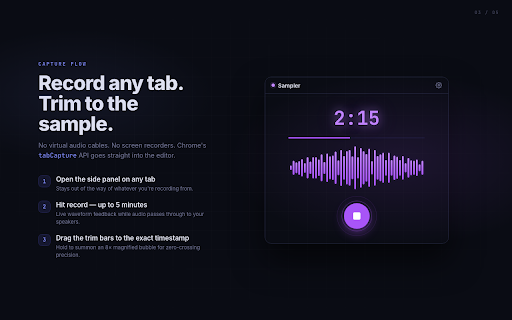


Record tab audio with waveform editing and DAW export New version updates 5/26/2026 (1.1.0): - Pitch detection added: view pitch regions for the recorded sample - Quality of life improvements for moving the cursor position on the sample - Minor bug fixes (e.g. timestamp bug) Message from dev: Hey all! This app is completely free (no annoying paywalls), and I'll be rolling out new features every two weeks. Please send feedback!! ESPECIALLY IF IT'S NEGATIVE. I want to rapidly evolve this extension to make producer workflows simpler. Heard something online that had an interesting texture or sound signature? Sampler lets you capture and mix without the friction that kills your creative flow. Click the Sampler icon, hit Record, and your active tab's audio streams directly into the side panel. When the moment is right, stop the recording, trim the waveform to exactly what you need, run it through the FX chain, and export to your downloads folder. Open it in Ableton, Logic, FL Studio, or any other DAW and start making music. Everything happens locally in your browser. Sampler has no servers, no sign-in, and no analytics. Your audio never leaves your machine. PITCH DETECT: View pitch regions for your recorded sample CAPTURE: Record any tab's audio with one click; anything playing in your tab can be used for you to flip. EDIT: Trim the waveform down to the exact timestamp you want. Loop a region to audition it before you export. FX: Use pitch shift, reverse, delay, and more while inspiration is hot so the sample is ready to export straight into your project. EXPORT: Save as WAV or MP3 to your local downloads folder. Files go exactly where you choose, named and organized the way you work. PRIVATE BY DESIGN: Recordings are stored on your device, accessible across sessions, never uploaded anywhere. PERFECT FOR: Musicians and producers who sample from the browser or anyone who needs a quick-capture tool that integrates with their existing DAW workflow

Alexis EQ
Elevate your browser audio with Alexis EQ. Fine-tune bass, vocals, and clarity for a rich, immersive listening experience. Alexis EQ is a Premium Browser Equalizer built for complete control over how every tab sounds. Whether you're listening to music, watching videos, or tuning vocals, Alexis EQ gives you the tools to shape your sound exactly the way you want. Fine-tune your audio with an advanced 11-band equalizer, apply real-time effects like reverb, compression, distortion, and pitch shift, or instantly switch between 200+ professionally crafted presets. Every tab can be customized independently, giving you a personalized listening experience across your entire browser. Explore a growing online library of ready-to-use profiles, preview them instantly, and import your favorites in seconds. Create your own profiles, save them, and switch between them effortlessly. Alexis EQ also includes a built-in visualizer, immersive spatial audio movement, and the ability to record and export processed audio as MP3. All processing happens live, so you can hear changes instantly while adjusting your sound. Perfect for music lovers, gamers, streamers, and anyone who wants richer, more dynamic audio directly in their browser.

Video Controller
Advanced video controller for YouTube and other video platforms The ultimate YouTube controller for music practice, language learning, and lecture viewing! ✅ Fixed bug where dragging loop end point skips to next track ✅ Fixed slider UI exceeding screen bounds ✅ Enhanced loop protection (0.3s → 0.5s pre-emptive, 50ms → 30ms interval) ✅ Migrated to AudioWorkletNode (removed Deprecated warning) ✅ Improved track change detection (5s → 2s interval) ✅ Removed per-song state saving (always starts with defaults) ✅ Improved global ON/OFF toggle UI ✅ Code cleanup and optimization (3KB reduction) 🎛️ Global Master ON/OFF Switch • Control all features with one click • Instantly restore to original state if issues occur • ON/OFF state is automatically saved 🚀 Precise Playback Speed Control • Fine-tune in 0.1x increments (0.25x ~ 4.0x) • Preset buttons: 50%, 60%, 70%, 80%, 90%, 100%, 110%, 125%, 150%, 175%, 200% • Quick adjustment with +/- buttons • Individual ON/OFF for speed control 🎵 Pitch (Key) Control • Adjust pitch in semitone units (-24 ~ +24 semitones, 2 octaves) • Perfect for music practice: Match song key to your vocal range • Instrument practice: Adjust original key to match your instrument • Display current note name (C, C#, D, D#, E, F, F#, G, G#, A, A#, B) • Enhanced performance using AudioWorkletNode technology • Intuitive slider: Visual section setting with drag • Precise time input: "1:30" (min:sec) or "90" (seconds) format • Current playback position: Yellow indicator • Jump to start/end point buttons 🔄 Smart Track Change Detection & Auto Reset • Detects track changes using 5 methods (title, URL, time jump, end→start, end event) • Automatically resets to default when track changes • Start fresh with clean state for each new track • Fast detection every 2 seconds 🎸 Music Practice • Loop difficult sections for focused practice • Lower pitch to sing comfortably • Slow down speed to learn fast passages 📚 Language Learning • Repeat listening sections for accurate pronunciation • Adjust speed for beginners to follow easily • Repeat important phrases for learning 🎓 Lectures/Education • Repeat important concept sections • Slow down fast lectures, speed up slow ones • Section learning for perfect understanding • Full YouTube support • Chrome Extension Manifest V3 • Modern UI built with React 18 • Latest Web Audio API technology 1. Play a YouTube video 2. Click the extension icon in the top-right corner 3. Use desired features in the popup: - Speed: Click +/- buttons or presets - Pitch: Adjust with semitone/tone/octave buttons - Loop: Set section with slider or time input → Start loop • Only works on YouTube • Some DRM-protected content may not be supported • When pitch control is active, original video is muted and converted audio plays If you encounter issues or have suggestions, please submit an issue on our GitHub repository. Your feedback helps us build a better extension! 💪 Music practice, language learning, and lecture viewing made easier! Learn efficiently with Video Controller! 🎵

GenSFX Tool
GenSFX is a cutting-edge AI Sound Effect Generator designed to transform simple text prompts into high-quality, custom sound effects in seconds. Leveraging state-of-the-art artificial intelligence and advanced audio synthesis, GenSFX caters to creators, developers, and sound designers seeking a fast, intuitive solution for generating unique audio for games, films, podcasts, and multimedia projects. Our powerful AI engine is trained on an extensive library of sound samples, enabling it to interpret descriptive text and produce immersive auditory experiences with remarkable precision. Whether you need subtle ambient tones or explosive action cues, GenSFX offers versatile options that can be finely tuned to match your creative vision. The platform’s user-friendly interface allows for quick adjustments in tone, pitch, and intensity, ensuring that every sound effect is perfectly tailored to your project's requirements. Available 24/7, GenSFX ensures that your creative process is never interrupted. Join a vibrant community of innovators who are redefining sound design with the power of AI. Discover how our AI Sound Effect Generator can elevate your projects by transforming text into professional-grade sound effects—fast, effortlessly, and for free.

Brilliance Pro
Advanced MIDI pattern generator with AI-powered Track Description Wizard and professional chord engine. Tired of your AI chat giving you lifeless, robotic chords? Brilliance Pro is the bridge between your musical ideas and professional-sounding results. We've transformed the creative process. Instead of just generating notes, Brilliance Pro teaches any AI assistant (ChatGPT, Google Gemini, Claude, etc.) to think like a real composer. Our revolutionary "Prompt Composer" helps you craft the perfect musical request, and our engine generates expressive, melodically rich MIDI files ready for any DAW (recommend Bandlab). ## What's New (v3.0.0) - 🚀 Complete Engine Rewrite:** AI Prompt Helper fully rewritten based on deep research of Suno AI algorithms - 🎤 Vocal Style Category:** New critical category with options for Solo Male/Female Vocals, Intimate, Whisper, Raspy, Ethereal, Choir, Spoken Word, Instrumental - 🎛️ Production Quality Category:** New category for atmosphere control: Bedroom Recording, Lo-Fi, Studio Master, Live Performance, Tape Saturation, Wide Stereo, Reverb-heavy - ⚙️ Suno Prompt Architecture:** Strict prompt assembly order (Anchor → Mood → Vocals → Production → Details) for maximum generation accuracy - 🛡️ Token Conflict Fix:** Eliminated reserved tokens (Chorus → Modulated, etc.) that broke generation - 🔒 Strict Negative Logic:** Negations (No, Without) now never enter the main prompt, only in Exclude Styles - 📊 Structured Output:** Output format divided into blocks: Style of Music, Exclude Styles, Tempo with clear headers - 🎯 Quality over Quantity:** Rejection of linear tag assembly in favor of logical hierarchy for quality results Key Features: 🎼 The AI Prompt Composer: Your Creative Director This isn't just another prompt generator. It's an intelligent system designed to get the best possible music from your AI assistant. Genre & Mood Selection: Choose from over 70 genres (from Lo-Fi to Cinematic) and 50 moods to perfectly define your sound. Solo or Ensemble: Need a full band arrangement? Or just a beautiful, intricate piano solo? Our "Arrangement Mode" gives you precise control. The "Humanizer" Principle: Automatically instructs the AI to add natural velocity, timing variations, and musical phrasing, ensuring your music sounds expressive and human, not robotic. The "Melody is King" Mandate: We've taught our system a core philosophy: never generate static, boring block chords. Every prompt now demands melodic movement, arpeggios, and rhythmic interest. 🎹 Smart Recommendation Engine: Your Personal Producer Don't know which instrument or effect to use? We've got you covered. After generating your prompt, Brilliance Pro provides an expert recommendation banner. It suggests the perfect instrument from BandLab's library (e.g., "Lofi Piano," "Retro Lead") and the ideal effects chain (e.g., "Tape Simulator + Room Reverb") to achieve an authentic, professional sound for your chosen genre. 🚀 Instant MIDI Generation for Any DAW Our powerful syntax engine understands everything from simple notes to complex altered jazz chords (G13#11, Fm7b5). Use the Prompt Composer to generate a detailed musical request. Paste it into your favorite AI chat. Copy the AI's response (a text pattern). Paste it back into Brilliance Pro and click "Generate MIDI". Drag and drop the file into BandLab, any other DAW. Who Is It For? Producers & Beatmakers: Instantly sketch complex melodic ideas, basslines, and drum patterns that actually sound musical. Songwriters: Experiment with harmonically rich chord progressions and melodies without getting bogged down in manual note entry. Musicians: Quickly capture and export your creative sparks into a tangible MIDI file. AI Enthusiasts: Unlock the true musical potential of Large Language Models and push the boundaries of AI-assisted creation. Why Brilliance Pro? We believe AI should be a creative partner, not just a command-line tool. Brilliance Pro is the essential layer that adds musical intelligence, philosophy, and expert knowledge to your workflow. It's 100% free, respects your privacy, and is built by musicians, for musicians. Install Brilliance Pro today and transform the way you create music with AI.
