
lojajgjddibjghmmdojgmipjligcklfp
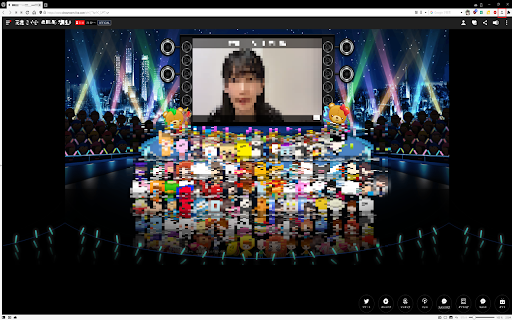

SHOWROOMをフルスクリーン再生できるようにします。 SHOWROOMを全画面再生するための拡張機能です。 この拡張機能を使用するためには拡張子が.m3u8のHLSビデオを再生できる拡張機能が別に必要となります。 Native HLS Playback ( https://chrome.google.com/webstore/detail/native-hls-playback/emnphkkblegpebimobpbekeedfgemhof?hl=ja-jp )での動作を確認していますが、ブラウザへの追加は自己責任において行ってください。 【使い方】 1. SHOWROOMで視聴したいルームへ入室します。 2. そのルームが配信中に、ブラウザ右上の「SHOWROOM FullScreener」のアイコンをクリックします。 3. 新しいタブが開きますので、元のタブは消すかミュートにします。 4. 開いたタブでは、配信を全画面で視聴することができます。 ※通常のルーム視聴より遅延が生じますが、シークバーを送っていただくことで軽減は可能です。 【更新履歴】 2022/08/02 Ver.1.0.0.0:SHOWROOM FullScreenerを公開しました。 【お問い合わせ】 不具合等がある場合は、「パブリッシャーにお問い合わせ」ボタンからメールをお送りください。 お問い合わせの際は、以下の情報をご記入いただくようお願いいたします。 ・不具合の発生日時 ・不具合の生じたルームのURL ・不具合の内容 ・不具合の生じたブラウザ及びそのバージョン ・使用しているHLS再生拡張機能の名称 ・不具合の解消のためにお試しいただいたこと(あれば)

Native HLS Playback
Allow the browser to play HLS video urls (m3u8) 'natively' This extension is a wrapper around the awesome hlsjs library: https://github.com/video-dev/hls.js Clicking on the extension icon will let you play any m3u8 embedded as a video html element in the current page. New: type m3u8, then tab, then your m3u8 URL to play the URL in the extension. Features: Enable/Disable the url catcher by clicking on the icon. Enable hls.js debug mode in the extension settings. Switch between hls.js 0.14.x to 1.6.x in the settings. Now supports subtitles! Switch between zoom and native video size in the options. Display timed metadata in the console

b站视频下载助手 bilibili video downloader
bilibili video downloader, one click to download videos easily. bilibili哔哩哔哩下载助手,一键轻松下载b站视频. b站视频怎么下载到电脑上?只需要安装b站视频下载助手,一键轻松实现哔哩哔哩视频下载。 特点: 1.免费的bilibili视频下载工具 2.支持多种分辨率的bilibili视频下载 3.操作简单,一键下载 操作说明: 1. 安装本扩展,并打开你要播放的视频页面 2. 点击插件会弹出本助手的主界面,按提示点击下载即可

InstaLiveSaver
A Chrome extension that easily saves various live streams. Chrome Extension: "Instagram & TikTok Live Saver" Introduction and User Guide Features Save Instagram Live Streams Record live streams from the beginning, even if you start saving midway through the broadcast. Save TikTok Live Streams Save live streams from the moment you start recording until the end of the broadcast. Key Features Instagram Live This extension offers a unique feature unavailable in other apps or services: the ability to rewind and save from the beginning of the broadcast, even if you start recording during the live stream. TikTok Live Save live streams seamlessly from the point you start recording until the broadcast ends. User Guide How to Save Instagram Live Streams Click the Extension Icon on the Instagram Home Page When on the Instagram home page, click the extension icon in your browser. A list of accounts currently live streaming will be displayed. Select the Account to Save Click the button for the account you wish to save. This will register the stream for saving. Automatic Download Once the live stream ends, the recorded video will be automatically downloaded to your device. How to Save TikTok Live Streams Click the Extension Icon on the Live Stream Page Navigate to the TikTok live stream you wish to save and click the extension icon. Complete the Save Registration Saving is registered with a single click. Note that the page will be automatically reloaded once to fetch the stream data. Automatic Download When the live stream ends, the recorded video will be automatically downloaded. Important Notes For Instagram Live, please perform the operation from the Instagram home page. For TikTok Live, the operation must be performed on the live stream page. Saved videos will be automatically named using the broadcaster's username for easy identification. With this Chrome extension, you can easily and reliably save your favorite live streams for future viewing!

Modelpress Image Downloader
One click to batch download the best resolution images from the current news article. A list of websites are supported including Oricon, Modelpress, Mantan Web and more, and are still growing! Visit a news article on a supported site, click on the extension icon to start the download. When you are on a website that is not yet supported, clicking the extension icon will show you the list of websites that are currently supported. If you have a website that you want this extension to support, you can: 1) Comment or DM on Twitter @mid_kumaneko 2) submit a request at Google Form https://docs.google.com/forms/d/1RVrtZfl22pGhGgvm8SFxmdTRG7yQ-er75s60-CpUK_8
