
lodjfjlkodalimdjgncejhkadjhacgki
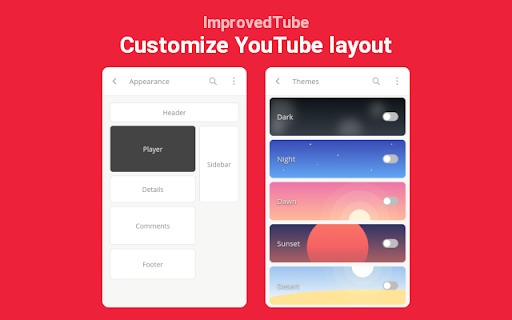

YouTube, tidy & smart? Supercharge YouTube! Give it strong features, filter only the videos you want & exactly the look you like Improve Youtube layout and add useful features to Youtube, to enjoy Youtube customized for you from now on. - !!TESTING for: https://chrome.google.com/webstore/detail/youtube/bnomihfieiccainjcjblhegjgglakjdd ) - Set up YouTube video player & YouTube theme, layout, style - once, today & enjoy that for years! With our YouTube-extension you have 85+ useful, unique features 🧰🔧. To make your experience on YouTube a whole lot better & save you a lot of clicks & time. ✔️Open-source & free charity since 2012! ✔️Extra video playback features for: Embedded YouTube & the Internet (We're now also working on Facebook, mobile m.youtube, Netflix, Twitch, Vimeo) ✔️Applies settings more conveniently than any other Youtube Extension: Live with no⌛reload 🎖️🏆 Press Reviews (2021): "Might be the best YouTube Extension Ever" (https://LifeHacker.com/this-might-be-the-only-youtube-browser-extension-youll-1846575110) "Enhances YouTube in meaningful ways" ⭐⭐⭐⭐⭐https://www.gHacks.net/2021/03/26/improved-youtube-enhances-youtube-in-meaningful-ways) ⋮⚙️⋮ Many features, some can only be found here(🦄we pioneered) 🎞️☕🎨 To List A Few: ➕ Youtube Video Description: Expand always ➕ Expand Youtube videos to your full window. ➕ adblocker you can adblock ➖ & white-list ads on your channel subscriptions ➕ Shortcut / Scroll to adjust Volume.➕ Resize YouTube videos ( Youtube player Size )➕ Youtube Screenshot (download print save a video Frame) ➕ Default/fixed Video Quality to match your Display 720p 1080p 4k 8k or bandwidth 480p 240p 144p ➕ avoid 60 frames vs 30 fps ➕ hide distraction declutter attention / teaching screenshare presentation ➕ Remove Related Videos ➕ Hide Youtube Comments ➕ Remove Header ➕ Hide Annotations ➕ Hide live chat ➕ reverse Youtube Playlist, Shuffle Playlist ➕ watch video frame by frame. ⓘ Official Accounts: • 🌱👪Community/Volunteers: https://github.com/Code4Charity/Youtube-Extension • Website: https://improvedtube.com • Twitter: @ImprovedTube ImprovedTube is lightweight 🍃 (You can expect all normal YouTube functions to work as expected!) We also don't see you (🔒 privacy): It only needs permission to access youtube visuals & runs offline (Unlike many extensions out there.) We can't care about what video you watch, just that you have a better time. ➕ Analyse your activity 📈, Block by Video (Channel tag category) ➕ Video Volume Mixer🎛️🔊🧪 ➕ Player Auto-Play: Off ➕ "Up Next": Off (Reset Youtube's "Autoplay" after every video )➖ playlist Auto-Play: On ➕ Auto-pause ➕ Loudness normalization ➕ Youtube Subtitles captions transacript always on/off ➕ Dark mode ✓ Schedule better viewing at night time ✓ Dark theme and Black theme ✓ Blue-light filter (Preserve sleep. Relax eyes) ✓ Display dim ➕Toggle Youtube Player Controls ➕Overwrite Youtube Shortcuts & Hotkeys ➕Hide YT details ➕ set YT language ➕ ImprovedTube Search ➕Tweak YT's "Scroll for details" 🌎 translated to 24 languages We♥ Youtube Extension Devs & tried many unique/friendly, notably cool, smart features • check https://improvedtube.com (what else is great?)( Compatiblity: you don't need common features (some copy our code)('adblock' 'youtube adblocker' 'dark theme for youtube' 'automatic 4K auto hd popout 'lights off' floating cinema mode, theater mode, looper replay repeater, player speed control 'video speed controller' window expander, magic actions, youtube enhancer - But you CAN just try what you need, i.e. sponsor skip adblock, besides a YT Extension works with "access youtube.com" / You dont need to accept "alerts "change privacy settings "access all websites "browser history - could be optional opt-in) 🔎Found a bug❓🐞🐛 - If you notice any issue, require help, or wish a new feature🌟🧚 please post on Github or contacting us. Or use "Support" next to "Reviews". Please don't complain in the Reviews immediately. We work hard 🏋️👩💻 to make your experience a 5/5 Stars experience. bugs@improvedtube.com 📧 ideas@improvedtube.com 📧 ⇒Status: Just Fixed: [x] Collapse YT comments [x] Channel Video counter We are not affiliated with YouTube or an official extension. This extension is independently developed for use with Youtube since 2012©️

'Improve YouTube!' 🎧 (for YouTube & Videos)
YouTube, tidy & smart? Supercharge YouTube! Give it strong features, filter only the videos you want & exactly the look you like Set your YouTube Video Player; YouTube Content Categories & Filter-rules; Tweaks; Layout, Theme & Style all at once today & enjoy that for years to come! With our enhancer you have 175+ useful / unique features🧰🔧. To make your video experience & content discovery a whole lot better & save you a lot of clicks & time. ✔️ Open-source ✔️ Applies most settings with no reload⌛ (unlike other YouTube-Extensions; draggable icon on YT) 🍃 lightweight: You can expect everything to work as expected. ✓ Non-profit & no income since 2012. (Bear with us when YouTube changes. it's been an uphill race and only gets better.) ✓ Video playback features for embedded videos (+ preparing mobile m.youtube, Facebook, Netflix, Twitch, Vimeo too) (Offline / privacy🔒: We can't care about what video you watch, just that you have a better time). 🏅Press Reviews: We are Recommended by FireFox!🦊(🏆Only 98 extensions) "Enhances YouTube in meaningful ways" - (5/5⭐ gHacks.net/2021/03/26/improved-youtube-enhances-youtube-in-meaningful-ways) "Might be the best YouTube Extension Ever" - (https://LifeHacker.com/this-might-be-the-only-youtube-browser-extension-youll-1846575110) ⋮⚙️175+ features⋮ (many can only be found here /we pioneered) 💡 Expand always: Video Description, Transcript, Chapters 🛩️ "Virtual Travel" (Switch your content-country) ✨ Dim pages until hovered ("Zen mode" ) 🤖 Auto-Pause Tabs ➕ Auto-fullscreen ➕ Pip Picture 📈 Analyse your activity 🚫 Block Videos, Channels, Tags, Category ➕ Video tabs volume Mixer🎛️🔊 🗑️ Remove Related Videos 🗑️ Remove Shorts Reel 🗑️ Hide distraction declutter attention (teaching / screenshare / presentation) ➕ "Up Next": Off (Reset YT's "Autoplay" after every video ) ♻️ Undo the new Sidebar (Description, details, comments) 🚫 adblocker (adblock & adskip or white-list ads your channel subscriptions) ➕ Channel: don't play trailer 🎨☕ Themes 🌈🌄🌇 Disable Ambient lightning (cinematics) 📅 Dark mode Schedule (also Black theme for oLed) ✓ Display dim ✓ Blue-light filter (Preserve sleepiness. Relax eyes) 📺 Video Player & Playback Features: 📷 Screenshot (save copy download any video Frame) ⏯️🔁🔀 Extra Player Buttons (optional): ➰Loop / Repeat (looper / repeater) ➕ Rotate Video 💡 Subtitles, captions & transcript Options 🔍 watch videos frame by frame. 🔄 reverse Playlist, Shuffle Playlist 🎞️ Expand videos to your full window (expander) 🎞️ theater mode 🎞️ cinema mode (turn off the lights) 🎞️ Resize videos (player Size) ➕ Default/fixed Video Quality to match your Display 720p 1080p 4k 8k or bandwidth 480p 240p 144p, auto hd, automatic 4K ➕ avoid 60 frames vs. 30 fps ➕ HDR vs. SDR ➕ Player Auto-Play: Off 💨 "Speed-watching" (Fixed Default Playback Speed) (smart video speed controller excluding music or education) 🔊 Fixed Volume or Loudness normalization ➕ Popup Player ➕ Custom Mini-Player ➕ Pop-out Player ( "always-on-top (floating popout) needs OS setting / app) ➕ Deny AV1 codec to speed up Player /save CPU electricity⚡🔌. [Old] GPUs can do [H.264] VP8 VP9 encoding (fast) (H264 h264ify Flash) 🧩⌘+⇧ Youtube Shortcuts: Set any Shortcuts / Hotkeys (mouse scroll for volume, etc. ) 🗑️ Overwrite YT's Shortcuts 🧹🧽🧼 🗑️ Hide YT Comments / fold / collapse 🗑️ Transparent Header 🗑️ Hide Annotations 🗑️ Hide live stream chat 🗑️Hide video's details ➕Toggle YT Player Controls ➕ set YT language ➕Tweak YT's "Scroll for details" ✓ Mimic retro classic Theme Style Layout ✓ Mini Player scrolling ✓ Search inside ✓ Legacy List style ➕ Channel Video counter ➕ Thumbnails .gif animation: OFF, Thumbnails: HD ⓘ https://github.com/code-charity/youtub (Twitter @ImprovedTube) (🌱👪 Community / 140+ Volunteers) 🌎 translated to 40+ languages We'd like to team with Developers for Web-Video & YT Extensions and listed some unique, friendly, cool, smart work on: https://github.com/code-charity/youtub/discussions/1881 & https://improvedtube.com ) 🔎Found a bug❓🐞🐛 - If you notice any issue, need help or wish for a new feature🌟🧚, please post on Github: https://github.com/code-charity/youtub/issues We work hard 🏋️👩💻 to make your experience a 5/5 Stars experience. (We might even read mail & "Support", next to "Reviews". Please don't complain in the Reviews immediately!) ( bugs@improvedtube.com 📧 ideas@improvedtube.com 📧 ) Compatiblity: While you might not lack features for YT with our extension (and some others copy our code), You can usually just run all else you need, i.e. sponsorblock, pockettube or extra adblocker / adskipper. (ⓘ YT Extensions work with one permission to access YT, you dont need to accept 'alerts', 'change privacy settings', 'browser history') ⓘ Not affiliated with YT. Independently developed.

Adblock for Youtube™
✓ Permissions: like common ad-blocking extensions we do need default permissions on every website to remove ads or popups for example on embedded videos and Youtube itself. ⓘ About Adblock for Youtube™ is a content filtering and ad blocking browser extension which blocks all ads on Youtube™. It allows users to prevent page elements, such as advertisements, from being displayed. Banner, Ad-Clips or even preroll ads you usually see before the actual video on Youtube are blocked by this extension. Features: + blocks ads, banner and popups + blocking of ads on external sites which loads Youtube.com + prevent preroll ads from loading on Youtube.com + you can also remove annotations from videos and musics (see options page). + loads videos and YouTube.com website faster. The technology is simply based on adblocking filterlists which blocks external ad urls on Youtube. We do not change anything on the website itself. Adblock for Youtube boosts the performance to load websites (without ads and tracking) It is free to download and use!

Adblocker for Youtube™
Block all Youtube Ads! Augment your YouTube experience with Fullscreen Theater Mode, Video Screenshot, Volume Booster and many more This software helps to removes all ads: pre-roll video ads, text & banner ads. Save time by stopping those useless advertisements. This adblocker automatically blocks all ads on YouTube ™, including pre-roll video ads, text & banner ads. Save your time by stopping those useless advertisements. In gist, by installing this extension all YouTube ads will be hidden. Made a tutorial page. Sometimes, the first video preview ad is not blocked properly and a black screen is shown on the video while the ad audio plays. The temporary solution for this is to refresh the video page by pressing Control + R and the video will play right away. The ad would be skipped once the page is refreshed. If you wish to hide the toolbar at the bottom of Youtube when you are watching videos, please click on this extension icon at the top right corner of the Google Chrome browser. there is an option called "Disable toolbar" which can be ticked on/off. Reverted back to a previous version which helps to press "skip ad" when that button is clickable. Youtube has recently made some changes, so now our extension helps save you time by pressing the skip ad button for you. We'll review the situation and see if there is a better solution in the future. Fixed a bug where the screen would turn black and the ad sound would continue playing for pre-load ads. Fixed a bug where your Youtube Watch History was not saved. Allow Users to turn the toolbar at the bottom of Youtube on/off. Fixed the ad blocking technology so it blocks all types of video ads including pre-roll. Fixed a bug where our extension was interfering with Youtube native dark mode. 1) Fixed the auto blocking of Ads settings. Now if you choose "Block All" under options/settings, the video and image ads for Youtube are blocked automatically. Side note: the toolbar for all the other useful features will fade away if you do NOT mouse over the toolbar in full screen/theatre mode etc. 1) Fixed Bugs - Toolbar kept appearing even when User used full screen mode for their video Fixed Black Screen from appearing when we block a pre-roll ad Added in Tutorial Page so users know how to begin using this extension Allow users to turn on/off the software toolbar at the bottom of the page. 2) Added in toolbar at the bottom of Youtube videos. There are 7 buttons available now. Shield Icon - Press this button whenever you want to skip a pre-roll ad manually Theater Mode - Watch your favorite videos in Theatre mode Screenshot - Take a screenshot of an exact moment. Volume Boost - Increase Volume of the Youtube Video up to 600% Picture Mode - Allow the Youtube video to become floating videos Loop Video - Loop your favorite music videos to play over and over again. You can specify the exact moments you want the Youtube video to loop over and over. Options - Change your ad-block configurations. You can block ads manually/block ads automatically. ★★★ Features ★ No configuration. No messy lists to manage ★ Block all pre-roll YouTube™ video ads on all sites ★ Blocks banner/text ads throughout YouTube™ ★ Ultra fast plus very lightweight, will not slow you down ★ 100% Free & always updated ★★★ YouTube Ad blocking benefits ★ Improve browser speed ★ Improve page load speed ★ Decrease memory / CPU usage ★ Decrease bandwidth After installing, please reload all YouTube tabs for the extension to take effect. ✓ Note Youtube™ & the YouTube logo are trademarks of Google Inc. Use of these trademarks is subject to Google Permissions. This extension is not created nor endorsed by Google inc.

GoodTube - Adblock for Youtube + Remove Youtube Shorts + Restore old UI
Undetectable Youtube adblock / adblocker! With options to Remove Youtube Shorts, Auto Set Youtube Video Quality, Remove AI and more! If you've had trouble with your other adblockers being detected by Youtube and are looking for something more reliable - this extension is for you. It also allows you to customise Youtube in many different ways. 🚀 Features - Blocks 100% of video and page ads - Restores the old video player / ui - Removes the "are you still watching" popup - Fixes "experiencing interruptions" delays - Also works on Youtube Music ⚙️ Settings - Remove all shorts - Auto set the video quality (highest, lowest or pick one) - How many videos display per row on the home page - Hide "who's still listening in 2026?" style comments - Hide info cards - Hide end screen suggested videos - Hide sidebar suggested videos - Hide comments - Hide AI summaries & "ask" sections - Hide members only videos - Always play from the start - Use black background on video player - Instant pause (no delay) 💎 How much does it cost? This extension gives you a 7 day free trial. After that it costs $2 (once only) for unlimited access on as many devices as you like. ⭐ How is this adblocker different? Normal adblockers use "filter lists". Unfortunately Youtube keeps changing how their ads look and these filters must be constantly updated. They are also easy to detect. GoodTube takes a different approach. It uses a unique method to block ads via the "front end", which cannot be easily detected or stopped by Youtube. Made with love by just one developer. Enjoy!❤️
