
lnhnllkaacmnkffnjgcnokifakeckido

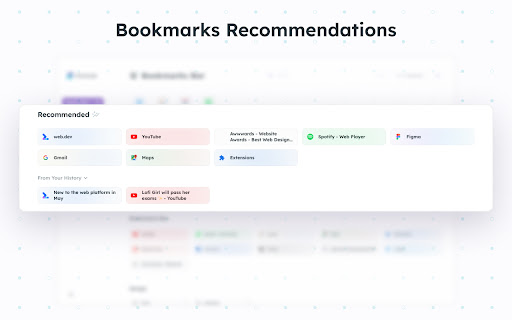
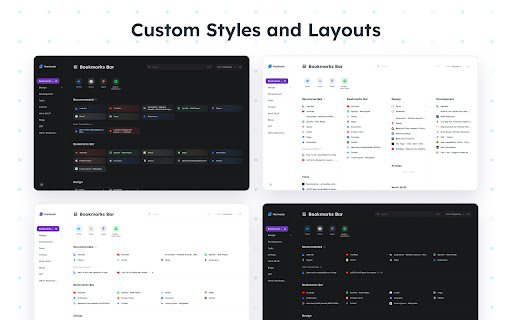
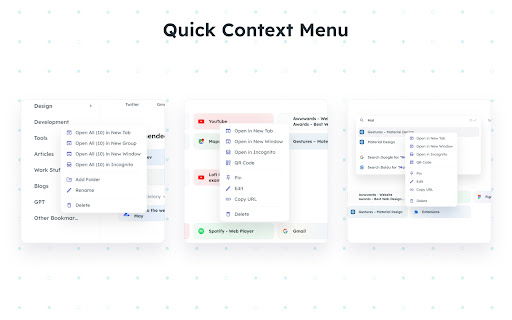

Bookmark Launcher with usage-based recommendations and full-featured bookmark management support. Markoob is a Bookmark Launcher or New Tab that brings convenience and efficiency to your browsing experience. 🌟 Bookmark Recommendations: We recommend bookmarks that you need based on your usage habits. 🔐 Data Privacy: All data will be stored in your browser, and Markoob will not transfer your personal information. There is no need to worry about the risk of data leakage. 🚀 Quick Menu: Right-click context menu allows you to quickly open, add, edit, delete, pin, and generate QR codes for bookmarks and folders. 📐 Custom Layout: Carefully designed display layout and features make it easier for you to find the bookmarks. We also offer various layouts and themes. 🔧 Handy Pop-up: In the top right corner of your browser, where you can easily manage bookmarks, view QR codes, and synchronize the title of the current bookmark.

BoTab - Favorites-based Tab
Transform your messy bookmarks into a stunning, personalized new tab page! The elegant way to organize and access your favorites. 📚 Stop spending time tweaking your homepage, start organizing your bookmarks! Your bookmark collection is a unique treasure. BoTab helps you organize it effortlessly, making your bookmarks more valuable. This browser extension redefines your new tab page, breathing new life into your bookmarks and helping you better organize and access your valuable web resources. ✨ Smart Organization & Display - Multiple card types for intuitive bookmark management - Multi-column layout transforms bookmarks into an efficient kanban board - Quick directory for easy folder navigation - Powerful search and sorting capabilities 🔄 Browser Support - Compatible with Chrome, Edge, Firefox and other major browsers - Easy sharing with link and QR code generation 🎨 Ultimate Personalization - Rich theme selection (Group, Meteor, Landscape, etc.) - Custom wallpaper support for both local and online images - Adjustable layouts and display options - Custom CSS support for complete personalization - Multiple display effects for different scenarios 🔒 Strict Privacy Protection - Full compliance with Manifest V3 specifications - All data stored locally, no sensitive information uploaded - Acts only as a bookmark "porter", records no information - Strict permission control, no remote code loading ⚡ Efficient User Experience - Keyboard shortcuts support - Smart search suggestions - Bookmark import/export functionality - Clean and intuitive interface design - Multi-select feature for batch management

Smart Bookmark
AI-powered bookmark manager with automatic tag generation and semantic search—eliminate tedious management. 🙋 What problems does it solve? This extension addresses the common pain points of bookmark management—tedious organization and difficulty finding saved content. 👬 Who is it for? Users who want to manage bookmarks efficiently, quickly find resources, and care about privacy protection. 🤖 AI-Powered Intelligence - Automatically generates accurate tags, eliminating the need for manual categorization. - Supports semantic search, allowing you to find bookmarks easily using natural language. 🔍 Efficient Search - Offers tag, keyword, and semantic search to support different use cases. - Intelligent ranking helps you quickly locate the most relevant bookmarks. 🔐 Privacy Protection - Allows you to define private domains to protect sensitive data in privacy mode. - Data is stored locally, so your information always remains under your control. 💡 More Highlights - Automatically organizes bookmarks for more efficient management. - Supports cloud sync, keyboard shortcuts, and quick access via a sidebar.

Bookmarkify - Bookmark Manager
Save, organize, and revisit your favorite websites. Bookmarkify is a visual all-in-one bookmark manager for the web. The Visual Bookmark Manager Built for Designers & Creatives Stop losing great design inspiration. Bookmarkify helps you save, organize, and rediscover websites, images, and videos — all in one beautiful visual library. Unlike boring bookmark lists, Bookmarkify shows you full visual previews of your saved content. Find exactly what you need, when you need it. Team Collaboration Save bookmarks together with your design team. Share inspiration in real-time and build a shared reference library. Design Analysis Extract color palettes and typography from any bookmarked website. Instantly see fonts, brand colors, and design systems. Keyboard Shortcuts Navigate faster with hotkeys: G (Grid), F (Fullscreen), M (Mobile), T (Three-column), L (Long), I (List), A (Assets) Redesigned Interface A cleaner, more intuitive UI that stays out of your way while you work. Save More Than Websites Bookmark websites, images, and videos. Right-click any image to save it instantly to your collection. 7 View Modes Grid • Fullscreen • Three-column • Long • Mobile • List • Assets/Moodboard Customize how you browse your bookmarks for different workflows. Bulk Download Export all images from your collection as a ZIP file — perfect for moodboards and presentations. 💼 PERFECT FOR → UI/UX Designers collecting interface inspiration → Graphic Designers building visual references → Web Designers saving layout ideas → Brand Designers analyzing color palettes and typography → Creative Directors curating team moodboards → Freelancers organizing client projects → Design Teams collaborating on shared inspiration 1. Click the Bookmarkify icon or press CTRL+D (Cmd+D on Mac) 2. Add tags and notes to organize your bookmark 3. Access your visual library anytime from the extension 4. Collaborate with your team or keep it personal Join thousands of designers who've replaced messy bookmark folders with a visual inspiration system that actually works. 📌 Install Bookmarkify now — your future self will thank you. 🔐 Privacy First Your bookmarks are stored locally by default. Team features use secure cloud sync only when you choose to collaborate. 💬 Questions or Feedback? Visit bookmarkify.io or reach out — we'd love to hear from you!

Tabme — Tab & Bookmark Manager | Save, Organize & Sync Tabs
The easiest way to save, organize & sync your tabs. Tired of tab clutter? Tabme turns your new tab page into a powerful but easy-to-use bookmark dashboard. Save open tabs instantly with drag-and-drop, organize them into color-coded folders, and find anything with fast search. No registration needed! Try as a guest for free with an unlimited number of saved bookmarks. 👆 Save Tabs With Drag-and-Drop Drag tabs and tab groups from the sidebar into any folder to save. 📦 Stash & Restore Tab Sessions Save all open tabs into a folder with one click. Reopen an entire session just as easily. 🗂 Spaces — Organize by Project or Topic (Pro) Create separate workspaces for different projects. Share spaces with your team. 📱 Sync Across Devices (Pro) Access your saved tabs from any device. No extension needed — use https://gettabme.com/app/ 📐 Vertical Tabs & Side Panel Manage your tabs in the Chrome Side Panel for a vertical Tabs (like in Arc browser) experience. 🌈 Color Coding & Visual Layout Categorize folders with colors and arrange them spatially for quick visual access. 🏷 Tags for Bookmarks Add tags to saved bookmarks to organize them across folders and find related links faster. 🧹 Close Duplicate Tabs Detect and close duplicate tabs with a single click. 🌙 Dark Mode Switch to dark mode for a comfortable, easy-on-the-eyes interface whenever you prefer it. ⌨️ Keyboard Shortcuts Navigate and manage everything without touching the mouse. ✍️ Sticky Notes Jot down ideas and to-dos right on your new tab page. 📥 Import & Export Import from Chrome bookmarks, HTML, TXT, CSV, or JSON files. Export anytime for backup or migration. WHO IS TABME FOR? • Managers organizing project docs and references • Researchers managing tabs across multiple topics • Students collecting study materials • Anyone drowning in open tabs • Teams sharing curated link collections (Pro) ⭐️ PREFER YOUR DEFAULT NEW TAB? Try "Tabme Mini" — all the same features, without replacing your new tab page: https://chromewebstore.google.com/detail/tabme-%E2%80%94-organize-tabs-and/jjdbikbbknmhkknpfnlhgpcikbfjldee Tabme 100% privacy guarantee means: 1. We respect your privacy. 2. Any usage analytics are fully anonymous. 3. We never share your data with anyone. • Install Tabme (accept replacing the New Tab page) • Pin the Tabme popup extension to save tabs from any website • Drag tabs from the sidebar into folders to save and organize them
