
lnhbnkmlkgeebjfimnbceakepeiandgg

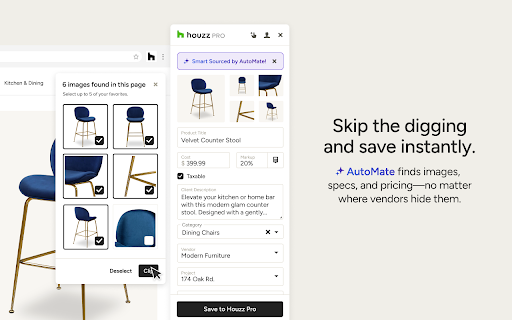


Designers, skip the copy/paste routine for product sourcing and let the Houzz Pro Clipper do the heavy lifting. Skip the tedious copy/paste sourcing routine and let the Houzz Pro Clipper with AutoMate smart sourcing do the heavy lifting for you. Clip from any website and instantly pull in images, descriptions, dimensions, pricing, SKUs, and more. AutoMate intelligently scans the entire page, finding product details no matter where vendors hide them, saving you the time and frustration of digging through dozens of layouts. Add items directly into a project room to quickly build mood boards,selections boards, tear sheets, proposals, and more. Choose exactly which details to show clients and which to keep private. Everything you clip is automatically saved to your Houzz Pro product library so you can reuse items anytime—never clip the same product twice. Join the 96% of designers who save time sourcing products online with the enhanced Clipper. By using the Houzz Pro Clipper browser extension, you agree to Houzz’s Terms of Use and Privacy Policy.

Programa Web Clipper
Use our Web Clipper to save products and inspiration from any website. Simply integrate them into your design projects. Capture full product details from any supplier website - images, specifications, pricing, and finishes - in one click. Choose to capture everything automatically or gather only the data you need. Our Web Clipper collects specifications directly into your Schedule, Product Library, or Mood Board - accurate, organized, and immediate.

Gather Web Clipper
Save FF&E and material selections 4x faster than copy-pasting. 📎 The Gather Web Clipper Tool enables interior design teams to easily and collaboratively save images and product information from manufacturer websites. Then, they can organize them and create FF&E and other specification docs in seconds. 📋 Input all specification details simply by selecting text from the page 🔗 Save PDF attachments from the page (such as cut sheets, and installation docs) Once saved to your Gather account, you can: 🗂️ Organize and categorize within projects 🗃️ Search, filter, and find selections within your firm-wide Digital Resource Library

DesignerLogic Web Clipper
Clip product specs and images directly to your favorites board and projects in DesignerLogic. Web clipper for users of the DesignerLogic interior designer project management platform. Clip images and product information from websites and add them directly to a project and/or the Favorites Board in DesignerLogic, without the hassle of downloading images and uploading them to a project. DesignerLogic’s web clipper makes it easy: there’s no need to ever leave the web page you’re on. Version 2 just released: clip multiple images, add retail prices and discounts as well as costs and markups, and also add products as components to existing items in a DesignerLogic project. Here’s how it works: once you’re on the website of a product or image you’d like to save, click the DesignerLogic logo in your toolbar, and the clipper will open over the right side of the page. Select the project and add any other relevant data. Then just right-click (on a Mac it’s 2 fingers on the touch pad) over the image to save it to your project. Other spec info can be saved in the same way. Then voila: the image, a link to the source, and any other information you entered will be added to your selected project in the DesignerLogic application.

Materio Selection Clipper
Quickly clip product photos and info from vendor websites for projects in Materio Materio's Selection Clipper saves time by grabbing prices, descriptions, and images off of vendor sites for you. Instantly save the products to your design library to use in your Materio projects. We’ve made several improvements in this new version based on your feedback and our vision for a more seamless workflow: * Non-obstructing side panel The clipper now opens in a sleek side panel that keeps the website fully visible. * Better manual image selection on top of auto-selection You can now manually choose images more easily while still benefiting from automatic image detection. * Auto-matching vendor and ability to create a new one on the spot The clipper will try to detect the vendor automatically, and you can quickly add a new one if needed. * Add to a library category group—and create one if needed Categorize your selections more effectively with new options to assign or create library groups. * Add to a project Selections can now be tied directly to an active project from within the clipper. * Improved reliability for image and attachment uploads Uploading visuals and files is now more consistent and stable across sites.
