
lmooejaflnjmggfhabbokpkpkmfdgdcn
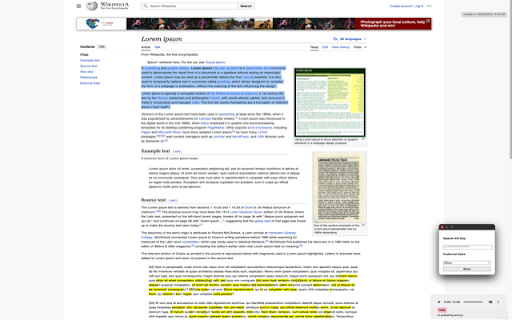
You use your own API Key and select the voice you want to use from the extension popup.… You use your own API Key and select the voice you want to use from the extension popup. Then you just highlight any text you want from the browser, right click it and select "Read this text aloud".

Human Reader, powered by ElevenLabs
Listen to any text in the web in a human voice. A simple extension powered by ElevenLabs to convert any text to speech. A Chrome extension that let's you listen to any text on the web in a human voice using elevenlabs.io. To use the extension you need to give access to the following when creating/editing your API Key: From there you can either 1. paste the API Key itself or 2. In https://elevenlabs.io/app/developers/api-keys, you can click the 3 dots in the right-most column of your API Key and click 'Copy Key ID', and paste this instead.

ReadText (Text to Speech Reader)
Single-click text-to-speech magic directly in your browser. Multi-task and customize in 30+ languages, effortlessly and for free. Ever feel like there's just too much to read and not enough time? I get it. That's why I created ReadText during my weekends – to help folks like us who love to learn, want to get work done faster, and hate the eyestrain. == Here's what ReadText can do for you == ➤ Turn any webpage into your personal audiobook Just click the ReadText icon, and boom – your browser starts reading to you. It's like magic, but without the pointy hat. ➤ Jump around the text like a pro See an interesting bit? Hover, click, and ReadText starts right there. No more losing your place or scrolling endlessly. ➤ Make it sound just right Speed it up when you're in a hurry, slow it down when you need it to. Change voices when you get bored. It's all right there in the reading bar. ➤ Your browser just learned new languages With over 30 languages and 100 accents, ReadText is ready for your next international adventure. (Also, there is way to add new languages seamlessly by you) ➤ All the good stuff, none of the bad Everything's free. No ads, no sneaky upgrades, no "premium" features. Just straightforward, helpful tech. ➤ Your secrets are safe with You! We don't know what you're reading, and we don't want to. Your data stays on your computer where it belongs. Also!, I'm just one person working on this in my spare time because I believe reading should be easier for everyone. If you run into any problems or have ideas to make ReadText even better for you and your friends, let me know! I'll do my best to fix issues and add cool new stuff as quickly as I can.

TTSGPT Text to Speech Extensions
TTSGPT Extension Introducing "TTS GPT," a revolutionary Chrome extension that redefines the landscape of text-to-speech capabilities. Unlike traditional solutions, TTS GPT goes beyond mere conversion, leveraging the power of AI to translate, edit, add, review, or even rewrite any text seamlessly. Powered by the cutting-edge ChatGPT 3.5 Turbo and TTS API, this extension ensures a sophisticated and natural-sounding speech synthesis. With TTS GPT, users can experience the next level of text-to-speech technology, unlocking the potential to enhance, refine, and personalize content before it transforms into speech. The integration of AI not only ensures accuracy but also provides a dynamic and intelligent approach to text manipulation. For those seeking the pinnacle of audio quality, the full version of TTS GPT offers access to the TTS-HD API. This high-definition API delivers crystal-clear, low-noise sound, providing an unparalleled auditory experience. Elevate your text-to-speech encounters with TTS GPT, where innovation meets precision. Purchase the full version today and embark on a journey of enhanced communication and clarity.

Voice Rankings: Text to Speech Reader (BYOK)
Bring your own API keys (OpenAI, Google, etc.) to listen to the web. Premium text-to-speech, direct pricing, no subscriptions. Listen to the web with premium AI voices. Voice Rankings allows you to connect your own API keys from services like OpenAI, Google Cloud, Deepgram, Inworld, and more. Pay providers directly for audio generation and be in full control of your TTS cost and usage. 🔑 Bring Your Own Key (BYOK) Use your own API keys from supported providers. Audio generation occurs directly between your browser and the chosen service. 🎙️ Wide Voice Selection Browse voices from multiple TTS providers in one interface. Voice availability and quality depend on the provider. 📖 Read Content on Websites Highlight text or select paragraphs to listen to articles, documentation, blog posts, and other supported on-page content. ⏯️ Playback Controls Adjust reading speed (0.5x–2.0x), pause, resume, and jump to selected text. 🔄 Voice Sync (Optional) If you use VoiceRankings.com, saved voices and collections can sync to the extension after signing in. 🔒 Local Key Storage API keys are stored locally in your browser using Chrome Storage. They are not sent to Voice Rankings’ servers. ⚙️ Developer Mode Use your own API keys with no additional usage charges from Voice Rankings. Provider fees, if any, are billed directly by the provider. 🪙 Optional Voice Credits If you prefer not to use API keys, you can use paid credits for audio generation within the extension. Credits do not expire. A small set of free tokens is included for testing basic functionality and previewing voices. Free tokens regenerate after a short cooldown if you run out. VoiceRankings.com is a community-driven directory focused on organizing information about AI audio tools and voices. Users can browse voices, compare options, and share feedback to help others choose suitable voices for their projects.
