
lmidmepgdbipmebgdalghmbehpiobiie


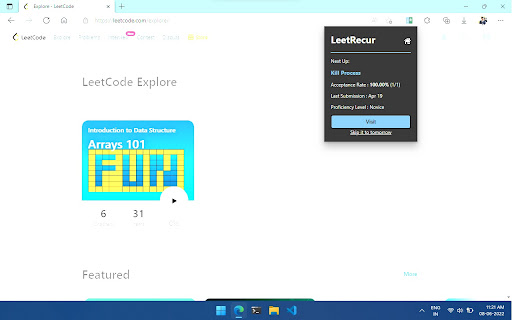
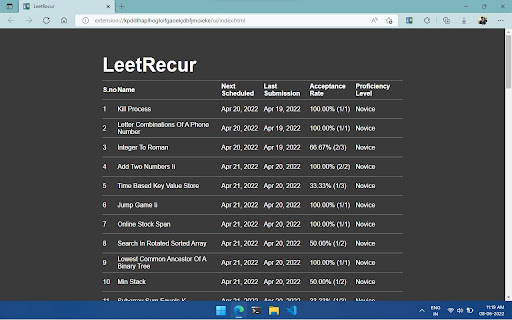
Manage, track and revise your solved leetcode problems - all hands-free. Yet another extension that allows you to keep track of your leetcode problem submissions and makes easier for you to revise solved questions through spaced repetition! Salient Features: * Easy Submission Management: LeetRecur tracks your leetcode submissions and manages all the relevant statistics for you, making it completely hands-free. Now you can focus on problem solving instead of managing your submissions and pondering which problem require more of your effort. * AI Powered: It accurately predicts your proficiency for each problem based on your activity while solving it and automatically schedule its revision using Spaced Repetition - a proven evidence-based learning technique. Gone are the days when you had to worry about forgetting hard learned concepts. * Minimal: It includes a minimal popup which shows you what questions you should retry, based on spaced repetition algorithm. It also includes a home page where you can view your stats on your submission in the order of queue. Changelog: Major changes from v0.0.4 * Changed storage from sync to local to fix overflow bug. * Fixed bug where sometime problem submission could not be intercepted. * Fixed scheduling bug, where sometimes problem scheduled on a specific day would not appear. * Problems are now scheduled at the beginning of the day. * Problems in homepage are now shown earliest scheduled first.

LeetCode Video Solutions
Watch free LeetCode video ▶ solutions on the problem page itself. MASSIVE UPDATE (again) 🎉: I have completely updated the extension to work with the NEW UI of LeetCode, including the dynamic UI layout. This has been long time coming and has been requested so many times by you guys. Thanks for supporting the extension so much and yeah, keep LeetCoding! (Stay tuned for more new exciting features) With LeetCode Video Solutions extension, you can watch helpful video solutions of a problem without leaving the problem page! Now you don't have to be distracted by watching cat videos on YouTube when you should be solving a LeetCode problem! When using the extension, you can see the solution videos' duration, upload date, views, channel and other information. The solutions are sourced from all over the internet and they are in different programming languages and cover different solving techniques and algorithms. Report any bugs/ suggest features to the developer: Soumya (@geekysrm) on Twitter 🐜 Don't forget to give a review on the Reviews tab if this extension helped you! :) ⭐ Buy Me a Coffee if you really love this and want to support me: https://coffee.soumya.dev/ ☕

Leetcode Analyzer
Add a graph for visualization of number of question per tag and also add a contest history table Features: - simple design - update on every reload - Graph visualization with hover effect of showing tag name - User can check how many question already done on specific tag just by hovering on it - A Table which shows Contest history with rank and score - Faster updation than leetcode real contest time graph Because Leetcode officially doesn't provide any feature by which user get to know how much question already solve by them on specific topic so by this extension we can have that feature on Leetcode account page and this extension doesn't require any username and password.

LeetHub v2
Automatically integrate your Leetcode & GeeksforGeeks submissions to GitHub What is LeetHub v2? A chrome extension that automatically pushes your code to GitHub when you pass all tests on a Leetcode problem. Re-built from the original popular LeetHub extension, it improves and expands upon the original, now featuring support for the new Leetcode UI. Why LeetHub? 1. Recruiters *want* to see your contributions to the Open Source community, be it through side projects, solving algorithms/data-structures, or contributing to existing OS projects. As of now, GitHub is developers' #1 portfolio. LeetHub just makes it much easier (autonomous) to keep track of progress and contributions on the largest network of engineering community, GitHub. 2. There's no easy way of accessing your leetcode problems in one place! Moreover, pushing code manually to GitHub from Leetcode is very time consuming. So, why not just automate it entirely without spending a SINGLE additional second on it? 3. Completely secure! The extension runs entirely on your device and only makes 3rd-party API calls to GitHub for authentication. How does LeetHub work? After installing the extension and launching LeetHub, it's as simple as: 1. Click on "authorize with GitHub" button to automatically set up your account with LeetHub. 2. Setup an existing/new repository with LeetHub (private by default) by clicking "Get Started" button. 3. And that's it 🎉 ...begin Leetcoding! To view your progress, simply click on the LeetHub icon! BONUS: Star LeetHub v2 on GitHub for further development of features @ https://github.com/arunbhardwaj/LeetHub-2.0 Let's see you ACE that coding interview! UPDATES: ** Nov. 19 2025 ** - Fixes mismatch with problem numbers. Now uses the proper id numbers visible on LeetCode. ** Jun. 2 2024 ** - Manual submission button (beta) - fixes GitHub rate-limit issue with problem/topic organization README feature ** May. 30 2024 ** - fixes issue where submission sometimes does not upload to GitHub - fixes upload progress spinner not appearing - fixes issue with submissions not going through on study plan pages ** Jul. 24 2023** - fixes an issue preventing submission to GitHub for LeetCode submissions due to UI change

Competitive Companion
Parses competitive programming problems and sends them to various tools like CP Editor and CPH. Competitive Companion parses competitive programming problems and contests and sends the parsed data to various tools like CP Editor and CPH. At the moment it supports 117 online judges, including most major ones like AtCoder and Codeforces. Using it is very simple. Just install the extension, make sure you got one of the supported tools open, navigate to a problem page and click on the green plus icon in the top-left of your browser. On websites where Competitive Companion is able to parse contests, navigating to the page with all the problems and clicking on the green plus icon will download and parse all problems in the contest at once. You can also use the Ctrl+Shift+U shortcut instead of the green plus icon (configurable on chrome://extensions/shortcuts).
