
lmgkjhgaljpeojmhnelhpnllmplgkipk
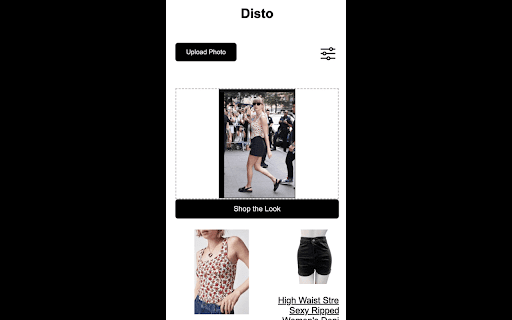

Have you ever seen an outfit you love and wish you knew where to buy it from? Disto can help! Upload a photo of any outfit to Disto, and it will detect near identical items you can buy. It also lets you filter by your preferred stores, budget, and sizes, so you can shop similar pieces that you can actually buy.

VCU - The Co-Browsing Network
VCU is a social network that connects and shares in real-time where all users are on the internet. ● BACKGROUND The internet is everywhere, simultaneously connecting billions of people worldwide. Yet, paradoxically, browsing the internet today is a solitary experience. The websites you visit may have thousands of concurrent visitors, but the user and the site alone seem to exist in a vacuum. In cases where the website does not provide a local platform for communication, such as a chat platform or a commenting system, the browsing visitor has no means of interacting with the other people visiting the same website at the same time. This invention connects people concurrently using the same website, if they so desire, without any changes needed for the website. ● SUMMARY VCU is a novel method for visualizing and connecting concurrent website visitors with each other. In a universal communication layer across all websites on the internet. Using the popularity and the amount of activity of each website, the invention is also able to generate ranked and sorted link-lists of where everybody currently are and what websites currently are the most popular.

Design Copilot
AI powered design feedback on any website. Your personal design copilot. 📷 Capture Screen --> Design Feedback (Powered by AI!) ✅ Activate the extension 📷 Click the "Capture Screen" button 👇 Drag and release to draw the area to capture 🤖 Receive instant AI design feedback for the website - Capture any part of a webpage with an easy-to-use screen capture tool - Receive immediate design tips from advanced AI analysis - Improve layouts, colour schemes, typography, and more - Works on public websites, localhost, and development servers - Learn design principles as you browse - Applicable for designers, developers, and anyone interested in UI/UX - Activate UI Copilot from your Chrome toolbar - Follow the instructions to get a free Google Gemini API key - Use the intuitive selection tool to capture any portion of a webpage - Within seconds, receive a detailed list of design suggestions tailored to your selection Who is it for? 🧙 Whether you're a professional designer looking for a second opinion, a developer wanting to enhance your UI skills, an entrepreneur, or just curious about good design practices, UI Copilot is your personal design assistant for the web. UI Copilot is completely free during our Beta period, offering almost unlimited feedback requests. Take advantage of this opportunity to refine your designs and boost your UI/UX skills without any cost! Your early feedback is critical in shaping the roadmap of the tool. The tool uses the powerful Google Gemini LLM models (Pro and Flash)! Personal API Keys are stored in your Browsers Sync Storage, accessible only to this extension. The key is only used to perform API calls to the Google Gemini LLM service. Without this special step, the extension can't work! By bringing your own API Key, we are able to offer this extension at no cost to you, and operating within the rate limits of the LLM models! Upgrade your design intuition and create better user experiences with UI Copilot - your AI-powered design partner, available anytime, anywhere on the web. Install UI Copilot today and start receiving expert design feedback on any website or web application!

Ask on Video: 1-Click Capture & Ask
Ask on Video is a browser extension that lets you capture a video frame and ask GPT-4Vision a question about it. Easily ask questions directly on YouTube or other video websites. We have the ability to comprehend video content (Powered by GPT-4Vision) in subjects like Math, Economics, Programming, and more. Simply click the ICON or Shortcut, and you can ask your questions without leave the video.

AI Event Scheduler
AI Event Scheduler: quickly create Google calendar events by selecting details and clicking a button. Use an LLM model to quickly create Google Calendar events by simply selecting text with event details and clicking a button.
