
lmffeiofldbdfahndommhemembdepbbc
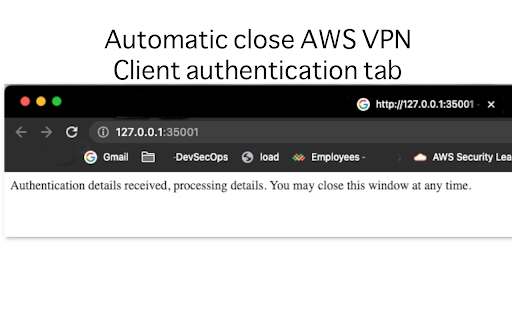
Auto-Close authentication browser window. Companion to AWS VPN Client - SAML Authentication. Bought to you by: devforops@gmail.com

Internxt VPN - Free, Encrypted & Unlimited VPN
Internxt free VPN for Chrome: an encrypted, secure VPN built to protect your privacy. Are you tired of being blocked by websites? Do you want to avoid the risks of Public Wi-Fi and keep your data protected while surfing the web? This VPN extension for Chrome hides your IP address, encrypts your data, and keeps your browsing experience private, secure, and unrestricted. We also encrypt your internet connection to scramble your data, keeping you safe from network attacks and leaks. Encrypting your traffic with a private VPN also stops hackers from viewing sensitive information. Download for free and instantly start browsing in complete freedom and peace of mind, knowing that your privacy is protected. Benefits of the VPN include: - Free VPN: 100% free. No credit card details are required. - Unlimited VPN: Truly unlimited. No session, speed, or bandwidth limitations. - Simple: You will instantly connect to a new location once you click connect. - Secure VPN: Our military-grade post-quantum encryption allows you to browse anonymously and securely. How the Internxt VPN protects you online - Prevent targeted ads - Bypass annoying Geo-restrictions - Protect your online privacy - Strict no-logs policy - Increased online privacy - Surf the Web Anonymously. - Quick, easy to use, and 100% free. Download for free, connect, and start surfing securely. It’s that simple! How do I enable the VPN? - Add the VPN browser extension to your browser - Click the Internxt VPN icon in the top right of your browser - Click the toggle button next to “VPN Protection” to activate - You're done! You can now securely and privately browse the internet! About Internxt Internxt provides a suite of internet services that protect your privacy online with our post-quantum zero-knowledge encrypted products. This VPN is part of our mission to provide everyone with a more secure, private online experience. Download it for free to keep your data safe from hackers, data breaches, and tracking. Privacy Policy Internxt values the privacy of our users. We protect your data with our free VPN and our other product suites; we do not store or collect your data. Our zero-knowledge encryption policy ensures that no hackers, businesses, or even Internxt can view your encrypted data. We do not share data with third parties, and we do not include any ads in our services.

ExtremeVPN - VPN proxy for enhanced privacy
Best VPN proxy extension for security & privacy. Go online safely with ultra-fast speed. Access content anywhere and spoof location. Surf the web online and be secure with the fastest VPN proxy extension for Chrome. Mask your location, access locked websites, keep hackers at bay and manage your ExtremeVPN app from anywhere. What is a VPN Chrome Extension? A VPN for Google Chrome is the best way to get a safe and secure browsing experience directly from Chrome. It seamlessly integrates with your Chrome browser, and it benefits you like a regular VPN app. The only difference is you don’t need to open the ExtremeVPN app on your device but rather on Chrome browser as an extension. Install our VPN extension on Google Chrome and protect your sensitive data while enjoying internet freedom. Why You Should Get ExtremeVPN’s VPN Extension for Chrome? - To guard your internet traffic from snoopers - To deactivate WebRTC and prevent leaks - For online security and privacy - To conceal your IP address and location - To unblock geo-blocked content globally Why Does ExtremeVPN Stand Out as the Best VPN for Chrome? ✔️ Best-in-class Encryption and Security ExtremeVPN offers elite-level security for its users. Our robust VPN servers and 256-bit AES encryption are what make us the best Chrome VPN extension today. These features protect users from cyber threats and hackers and help them achieve the best privacy online. ✔️ Enhanced Privacy at All Times Hide your IP address with a single click with ExtremeVPN’s Chrome extension. You will get a new IP address different from your real one so that no one can see what you're doing when connected to the internet. ✔️ Fast VPN Network One prime feature of our Chrome browser extension is the fast speed we attain because of our widespread server network. Choose from our 6500+ servers from over 78 countries worldwide, and you’ll be connected in no time. ✔️ Easy to Setup No extra requirements are needed. Just download, sign up, and connect. Our VPN browser extension is user-friendly, and it only takes a click for you to encrypt your browser traffic and data. ✔️ No Data Caps or Limitations ExtremeVPN’s browser VPN offers unlimited bandwidth and never restricts or disturbs your web browsing. You can securely stream popular titles or shows from anywhere without any limits. ✔️ A Name of Trust There are many free VPN Chrome extensions available on the internet, and all of them come in different shapes and forms. However, not every software is what you should trust. ExtremeVPN’s proxy extension provides a safe, fast, and unrestricted connection so you can enjoy the full internet experience with peace of mind. ✔️ Strict No-logs Policy ExtremeVPN prioritizes user privacy and security, and we don’t collect or store any of your activities or data. Our extension ensures that whatever you do online must be limited only to you. ✔️ Compatibility with Devices Our extension works perfectly with all devices having a Chrome browser, including Windows, Mac, or Chromebook. So whether you’re using a laptop, mobile, tab, or PC, you can get ultimate VPN protection from anywhere. ✔️ 5-star Customer Support Get immediate answers to your queries. Connect us via email, or live chat and ask us anything, anytime. Our customer support team is available to assist you 24/7. ✔️ Security on the Go No matter where you're, using public Wi-fi, or private connection, ExtremeVPN offers VPN solution for all networks. What are the Features that ExtremeVPN’s VPN Proxy Extension Offers? ✔️ 58+ Locations Worldwide The ExtremeVPN’s extension comes with 3200+ VPN locations optimized for faster speeds that allow you to connect from 58 countries globally. Just select your desired country server and it will change your IP address within seconds. ✔️ WebRTC Leak Protection WebRTC is a technology that facilitates real-time communication between browsers. However, it can leak the IP of users. Our proxy for Chrome disables WebRTC and prevents your IP from falling into the wrong hands. ✔️ Wide Language Selection Our website is available in 5 different languages. You can switch to any language you want to get the best online experience. ✔️ Bypass Proxy Feature Bypass proxy is a built-in VPN technology that makes your browsing experience convenient and effortless. Our secure VPN proxy service protects your privacy online while allowing you to disable VPN traffic on specific websites of your choice. It’s easy. Just follow the steps, and you’re good to go: 1. Go to the Chrome web store and download the ExtremeVPN app by pressing the “Add to Chrome” button. 2. Get a VPN subscription. 3. Sign in to your ExtremeVPN account. 4. Select “Country,” and you will be connected to the VPN. 5. Enjoy a secure and private VPN connection. Unlike free VPNs, ExtemeVPN is a premium VPN service offering advanced features. However, you can test all of our features using a free VPN extension trial that we offer. This VPN trial is available on Android devices and Apple iPhone, and a single account works on all devices and platforms. Sign up for an ExtremeVPN account using the App Store or Play Store and use your credentials for the Chrome extension if you want to try it for completely free. Enjoy a 30-day, no-questions-asked money-back guarantee with your purchase. Learn more about VPN features and benefits: https://extremevpn.com/ Terms of service: https://extremevpn.com/tos/ For Support Guides: https://extremevpn.com/support/ Get answers to frequently asked questions: https://extremevpn.com/support/faqs/ To understand our Privacy policy: https://extremevpn.com/privacy-policy/ To get help: support@extremevpn.com

Safum free VPN
Safe, unlimited, and free VPN service. Change your IP addresss with free VPN The Safum Free VPN service allows you to change your IP address. You can unblock geo-restricted websites and access blocked websites. Features: Multiple countries Completely free and unlimited. We don't offer any premium plans. Find the "Extensions" (Puzzle) button Find the "Safum Free VPN" item in the menu (Optionally) Pin the "Safum" so it's visible by default Open the popup Select a country and click the "Connect" button If some country doesn't work - switch to another.

WikiVPN - Free VPN
Free and secure browsing with our free VPN extension. WikiVPN is a Chrome extension designed to offer free, secure, and easy-to-use VPN services. It's crafted specifically for users who need quick access to different global internet regions while ensuring their online activities remain private and secure. The extension features a sleek, intuitive interface that integrates seamlessly with the Chrome browser. - One-Click Connection: Users can connect to a VPN server with just one click, making it incredibly user-friendly for those not familiar with VPN technology. - Global Server Access: Offers a wide range of servers across various countries, allowing users to bypass geo-restrictions and access content from around the world. - No Log Policy: WikiVPN guarantees privacy by not tracking or storing any user activity logs. - High-Speed Connection: Ensures a fast internet connection, minimizing the lag often associated with VPN usage. - Secure Encryption: Utilizes strong encryption protocols to protect user data from hackers and third parties. WikiVPN is ideal for individuals who prioritize online privacy, need to access region-specific content, or want an added layer of security on public networks. Its free service model, combined with robust features, positions it as an attractive option for Chrome users seeking a reliable VPN solution.
