
lmcihljnbdgdanndnpkjgnnccjeghblf
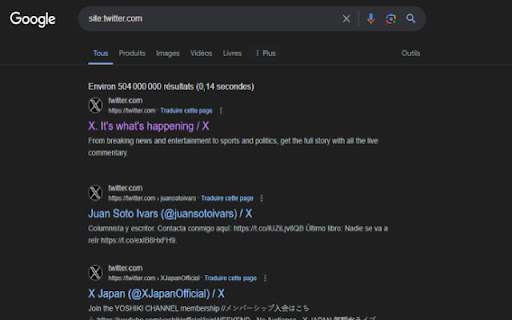
Enhance your Google search experience with the Display Results Number extension. Instantly know how many search results are… Enhance your Google search experience with the Display Results Number extension. Instantly know how many search results are available for your query without scrolling to the bottom. Key features: Quick Insight: Displays the total number of search results right at the top of the Google search page, so you can instantly assess the relevance and scope of your search. Seamless Integration: Blends naturally into the Google search page, preserving the look and feel you're accustomed to. Time Saver: No need to scroll or guess the search results volume, saving you time and effort. Customizable Display: Adjust the display location and style according to your preference for a personalized experience. Lightweight & Fast: Consumes minimal resources, ensuring a smooth browsing experience

SEObserver Metrics Toolbar
SEO metrics for a domain ***The most efficient replacement for Google PR Toolbar.*** Free version: When you click on the icon, you get the TrustFlow and Topical TrustFlow of the current domain you are browsing. Premium version & SEObserver customers: No action needed, the icon of the extension changes with the actual value of the domain you are browsing. The icon's color also changes accordingly to the Topical TrustFlow. Upon clicking on the icon, you get a complete identity card of the current domain with the most important metrics including number of referring domains and top keywords.

Docteur SEO
Docteur SEO est une extension Chrome premium qui analyse en temps réel et en profondeur les éléments SEO de vos pages web. Notre outil offre une interface intuitive et puissante qui transforme des analyses techniques complexes en recommandations claires et actionnables pour améliorer votre référencement naturel. 🔧 **MODULE 8 : TECHNOLOGIES** Identifiez les technologies utilisées sur la page : • Détection des technologies web par catégories (CMS, analytics, CDN, frameworks, etc.) • Preuves associées pour chaque technologie détectée • Vue synthétique pour auditer la stack technique • Repérage des scripts et librairies tiers ⚙️ **MODULE 9 : PARAMÈTRES** Pilotez l'analyse et personnalisez l'extension : • Options de lancement de l'audit et périmètre d'analyse • Gestion du cache des snapshots pour des rechargements plus rapides • Options d'affichage et préférences (thème, densité, etc.) • Mode standalone pour une utilisation en fenêtre dédiée

DomfoRat - Find Available Expired Domain Names
Easily find expired and available domain names, ready to be registered. 🚀 DomfoRat is the ultimate Chrome extension for SEOs, webmasters, domainers, and website creators who want to detect expired domain names in real time, still available for registration. With a smart alert system, powerful filters, and integrated tools, you can spot SEO opportunities before your competitors and save valuable time. 🔔 Live alerts: Automatic notifications whenever a new available domain is detected. 📊 Advanced filtering: Sort by Domain Authority (DA) and extension (.fr, .com, .org, etc.) to target only the most relevant domains. ⭐ Favorites management: Save your findings for later review and export. 📂 One-click export: Export your favorite domains in JSON, CSV, or XLSX to share or integrate into your SEO tools. 📜 History & monitoring: Automatically compares the current list with previous ones to highlight only new opportunities. 🛠 Built-in tools: Direct access to Netim, Wayback Machine, and Haloscan to check a domain’s history and SEO strength. 🎯 Exclusive packaging: Visual display of special packs and offers, with real-time “sold out” status. 🌍 Multilingual: Interface automatically translated based on your Chrome language (French and English included). - Save time: No more manually digging through expired domain lists. - Maximize your chances: Get notified before others to secure the best domains. - Boost your SEO: Acquire domains with existing history and authority. - Clear and modern interface: A sleek popup with tabs, filters, and easy-to-read stats. - Install the extension and open it from the Chrome toolbar. - Browse the list of expired domains and filter by your criteria (DA, TLD). - Receive notifications as soon as a new domain appears. - Save your favorites and export them for quick registration. Perfect for: - SEOs hunting for high-potential expired domains. - Domainers investing in rare and valuable names. - Web entrepreneurs seeking premium domains for new projects. - Agencies automating domain monitoring for clients.

Google SERP Counter – SEO SERP Checker Tracker
Track and Display Search Result Positions Instantly! SERP Counter is a lightweight and powerful Chrome extension that helps you track the exact position of search results on Google. It automatically adds visible position numbers next to each search result, making it easier to analyze and monitor your search performance without manual counting. Automatically assigns a visible position number next to each search result on Google. Works seamlessly with both organic and paid search results. ✅ Real-Time Tracking: Instantly updates the position numbers as you scroll through search results. Accurately counts all results, including featured snippets, knowledge panels, and ads. ✅ Simple and Clean Interface: Minimalistic design that blends naturally with Google’s search page. No clutter or complex settings—just install and track! ✅ Lightweight and Fast: Designed to have minimal impact on browser performance. Works instantly when you open a Google search page. ✅ Customizable Settings: Option to enable or disable numbering based on user preference. Works with different Google search result layouts and themes. 💡 Why Use SERP Counter? No more manual counting of search results—save time and effort. Ideal for SEO professionals, marketers, and website owners. Instantly see how your website ranks on Google and adjust your SEO strategy. 👉 Track your search rankings effortlessly with SERP Counter—install it now and start optimizing your SEO performance!
