
lmaonnpepldfnbkbmhkkficpmjdlojnn

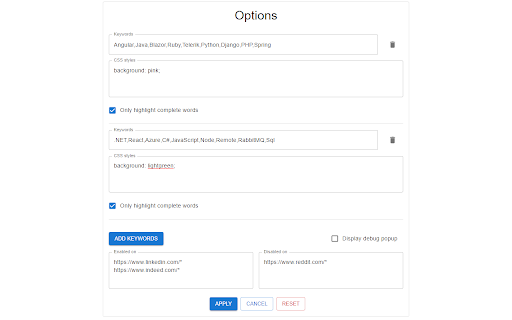
a chrome extension that highlights keywords on web pages, making it easy to find or skip information Introducing Keyword Highlighter - the must-have Chrome extension for anyone who wants to quickly and easily find or skip information on web pages. With Keyword Highlighter, you can highlight keywords of your choice on any webpage, making it a breeze to find the information you're looking for. Whether you're a job seeker scanning job descriptions for specific keywords or an HR professional searching for qualified candidates, this extension is the perfect tool for you. You can highlight both positive and negative keywords, giving you the power to easily filter out irrelevant information and focus only on the content that matters to you. Plus, the extension is incredibly easy to use - simply install it and start highlighting! But that's not all - Keyword Highlighter also comes equipped with a variety of features to make your browsing experience even better. You can easily customize the colors and styles of your highlights, create and save multiple highlight sets for different use cases, and even set up automatic highlighting rules for certain websites. Don't hesitate, install Keyword Highlighter now and enjoy effortless web browsing!

Auto Highlight
Auto Highlight is text highlighter with RegExp support 🟨 Auto Highlight a fully automatic and easy to use text marker / highlighter / eraser / searcher / style fixer with RegExp search support (regular expression). No need to use search anymore to find important information, it will be marked when page loads! ⭐ TOP FEATURES: - highlight keywords (metadata) like: 1080p, HDR, 4K, x265, BluRay, etc. - hide text - by changing font size to zero or by making it transparent - advanced search options using regular expressions (regexp), exact match, ignore diacritics and more - change style - background, text size and color of all marked words - automatic synchronization 🔄 to all your devices (using native Browser Sync.) - highlight "Free shipping", "Out of stock", pricing or discount labels - doing research about specific topic? Use "Temporal highlight" feature to highlight keywords on every page (without using search all the time) ☕ I'm extension developer since 2016 and my goal is to build powerful extensions for your web-browser to make you more productive. If you think I'm doing a good job, please donate :) - Ko-Fi.com: https://ko-fi.com/fastaddons - PayPal.Me: https://paypal.me/fastaddons/ - Patreon.com: https://www.patreon.com/fastaddons 💥 Thank you for supporting my work!

Highlight This: finds and marks words
Automatically finds and highlights words and phrases on the web page according to your list - No registration required - Organize your search words in groups and lists - Use Regular Expressions (Regex tokens) - All data stored locally - Auto-refreshes highlights on page reload and content changes - Unlimited words and lists - Synchronise lists between your browsers Highlight This! comes: - as a Free version, limited to 200 words and limited highlighting styles - an Unlimited version with affiliate partner link highlighting https://highlightthis.net/PartnerLinks.html - 2 paid versions. Easy to use Chrome Extension that automatically searches for defined words in the current browser tab and marks them in a text. Many more advanced features available through settings: - Create color-coded keyword lists - Disable highlighting on certain sites - Export or import your settings and keyword lists - Define click action - Use lists from Pastebin, Google Sheets ** New in 6.3.10 - Fix: Issue with lookbehind regex ** New in 6.3.7 - Fix: Minor fix in detecting words after lower quotation marks - Fix: Incorrect highlighting with Regular Expressions that contain \b ** New in 6.3.6 - Fix: lists are not sorted anymore - Fix: breaking highlights due to specific control for "flex" containers ** New in 6.3.4 - Fix: an issue with sequence of Regex words - Fix: an issue with invalid characters in a wordlist - New: You can now order lists of words to give priority in highlighting if there are duplicate words ** New in 6.3.1 - Fix: zip file issue when installing extension ** New in 6.3 - New: Better support for languages which have no spaces or punctuation between words - New: Better support for languages with diacritics - Fixed: Sync with Google Sheets has been fixed ** New in 6.2.3 - New: You can now put a border around input fields if there is a matching word inside ** New in 6.2.1 - Fixed: an issue with highlighting in shadow-root elements ** New in 6.2 - New : Improved performance on large webpages - Fixed: an issue whereby words could disappear while filtering the list of words ** New in 6.0.10 - Fixed: an issue with highlighting of web components - Fixed: an issue with look behind regular expressions ** New in 6.0.6 - Fixed: highlighting on Single Page Apps - New: Form to send a bug to the developer ** New in 6.0.5 - Fixed: issue with corrupted synchronized lists which breaks the rendering of the lists ** New in 6.0.4 - Fixed: issue with restoring backups - New: ability to reset all data and settings ** New in 6.0.1 - Fixed: issue with transforming Synchronized lists ** New in 6.0.0 - Extra styles for highlighting : Bold, Italic, Underline - Ability to change highligting by selecting rounded corners, padding, shadow - Ability to define a zone on a page for highlighting - Switch to Manifest v3, which better protects user security - Subscriptions - Fixed: speed of editor - Fixed: various small issues with remote lists ** New in 5.3.6 - Fixed: an issue with scrolling to highlight tags ** New in 5.2 - Define click actions for highlighted words - Support for loading words from Google Sheets - Define download frequency for remote lists - Fixed: Negative reverse lookup regex - Fixed: Issue with Highlight overview - Fixed: Issue with download button ** New in 5.1 - Support for case sensitive matching - Manage words from context menu ** New in 5.0 - New editor to manage your words (filter, select, delete, move) - Support for Regex tokens ** Define words ** Easily specify words and phrases you want to be highlighted. ** Highlighting ** Highlights the words and phrases on the page Shows how many words have been highlighted ** Works on Ajax pages ** The extension detects changes to the page and re-highlights the words.

Keyword Highlighter
Highlight keywords in red and green and retain them after reload. The Keyword Highlighter extension is a powerful tool designed to enhance your browsing experience by helping you quickly scan and identify key content on any webpage. Here's why you should install it: Features and Benefits: 1. Highlight Keywords: You can highlight up to three groups of keywords, each separated by a comma. This allows you to categorize and differentiate between various sets of keywords effortlessly. Persistent Settings: The extension remembers your keyword groups even after a page refresh, ensuring that you don't have to re-enter your keywords every time you visit a new page. 2. Customizable Appearance: Choose your preferred highlight colors and font sizes for each keyword group. This customization helps you visually distinguish between different types of information at a glance. 3. Efficient Content Scanning: By highlighting important keywords, the extension enables you to quickly scan through large amounts of text and identify the key points, saving you valuable time and effort. 4. Work and Educational Tool: The extension is not only useful for professionals but also serves as a valuable educational aid. Whether you are learning new terminology in your field of study or mastering a foreign language such as English, highlighting target terms can significantly enhance your learning process. 5. Use Cases: 5.1 Research and Reading: Easily identify and focus on specific terms while conducting research or reading articles, making it easier to gather relevant information. 5.2 Learning and Education: Highlight key terms for quick revision or language learning. It's a great tool for students and educators alike. 5.3 Productivity Enhancement: Save time by quickly spotting the information you need on any webpage, improving your overall productivity. The Keyword Highlighter extension is an essential tool for anyone looking to optimize their web browsing experience, streamline their research process, or enhance their learning. Install it today and start benefiting from a more efficient and focused way of reading online content.

Highlight Magic
*The tool went through a slight overhaul, please check the "What's new 1.1.3" below! - Assign color for each word - Import from raw list or text file - Group your words into lists for easier organization - Sync function to transfer your lists across devices. - Import/Export your lists. - Sort your lists *new* - Quickfind, ctrl-shift-f to bring up quickfind and search instantly, save later. - Each word in the list can be case sensitive - Can use regular expression tokens - Blacklist sites and pages - Can match complete words or part of a word - Stylize your words in Style tab - Dark mode If you have any issues please ask & I will help you out! If you found a bug report it and I'll fix it as soon as possible! Ideas how to make the extension better are encouraged! What's new: 1.1.5: Features - Added expand button on lists to view highlight stats - Added a save button that enables you to store changes without having to press enter - Added sorting methods (Ascending, Descening, By background color, By text color) - Added a warning in custom settings that when enabled the global settings are overriden - Removed character limit in excluded/exclusive lists Bug Fixes - Badge indicating number of words highlighted now works more consistently and less prone to breaking - Fixed issue where if single color is selected you couldn't change the color individually for each word - Effectively inform users that global settings won't be enabled for lists with custom settings enabled - Clear filter when closing lists - Toggling the tool or a list off will less likely break a page and also work a bit faster - Fixed a bug where changing the title of a list, returning to list menu and clicking the same list, the sheet would show the old one 1.1.4: Some bug fixes that manifested when updating from 1.1.2 to 1.1.3. 1.1.3: -Optimized highlighting and fix slowdowns when new elements are added to the page. - Added import options for raw lists and text files - Can copy (crtl-c) & paste (ctrl-v) words directly to the list editor - Press ctrl-a to select all visible words - Filter words - Made all lists a single random color by default, can be changed in style settings - New style tab that let's you customize your highlighted words - Dark mode! - Made some stylistic changes to the GUI to make it a bit more modern looking 1.1.2: Bug fix: Replaced additional event paths that broke the mass action option when ticking the a word's checkbox. - Toggling a list on/off now disables/enables the highlighting in the active tab. 1.1.1: Bug Fix - event path property is undefined, replaced event paths with composedPath method. 1.1.0: - Lists are now available! Group your words into lists. - Sync function to transfer your lists across devices. - Import/Export your lists. - Quickfind, ctrl-shift-f to bring up quickfind. - Bug Fix: contentEditable incompatibility elements no longer crash page. - Highlights in iframes. Extension icon and promotional tiles by Maria Gregoriou behance.net/MariaGregoriou
