
lllooecllhclgioajjfakhgdchncgpjh
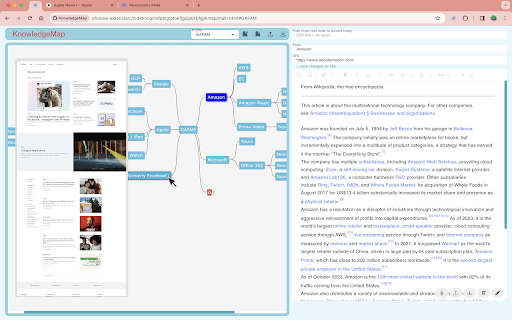


A bookmark management tool that combines mind map (jsmind) and richtext editor (lexical). ## Overview This app displays a hierarchy of bookmarks as a mind map and allows you to save notes at each node of the mind map. ## Features * You can create multiple mind maps as profiles * You can save notes in rich text format (images, tables, etc.) for each node of the mind map * If you save a full screen capture from the context menu, the image will be displayed as a preview when you hover over the node of the mind map * export/import each profile (Note: exclude preview images) * Import bookmarks from browser (supports Chrome / Microsoft Edge) * Import exported file ## Shortcut Keys ### Extension Launch * Ctrl+K (Mac: Command+K): Open extension popup ## Usage (Mind map operations) * Drag and Drop: Move a node's position * Double click: Edit a node topic * If you delete the trash node, all the nodes under it will be completely deleted (others) * Press the edit button at the bottom right of the screen, edit a note, then press the save button to save the note * After changing the URL field while the node is selected, the changed URL is saved when the focus is off * Cross-profile navigation: Copy node key with Ctrl+C/Alt+C and paste it into another node's URL field to create links across profiles * Click on the “Capture Full Page for Preview” context menu on the opened page to save the preview image * Since this app use Chrome debugger function, “KnowledgeMap started debugging this browser" is displayed. (automatically turns off after a few seconds)

Bookmark Plus by Vidura
Bookmark Plus (a.k.a Bookmark+) elevates bookmarking experience by automatically categorizing bookmarks into accurate topics using AI. Bookmarks are transformed into a powerful mind map 🧠 for accessing bird's eye view. One can also easily access "Recently Bookmarked" web pages from extension. Install, Bookmark, and Generate Knowledge for free! → Does Bookmark Plus correctly predicts the topic of my bookmark ? Yes, it can even differentiate a music video vs an education video on YouTube. So it understands the context and groups your bookmark correctly. Bookmarks are best way to save information for later, but just saving information can lead to a huge pool of unused information. To overcome that a user can sort bookmarks manually. It is not practical in the long run and in most cases users give up and stores everything in one single folder. → How Bookmark Plus fixes the manual sorting fatigue ? Bookmark Plus uses generative AI to attach contextual topics and sub-topics to bookmarks in the best possible way. In addition, we provide better bookmarking experience to Chrome users by implementing two main features: 1. See how your bookmarks are connected with a mind map 2. Search bookmarks faster with more visual information (thumbnails, descriptions etc.) than traditional ones. Not much. Once the extension is installed, a user can start bookmarking via extension/context manager option and they will see new folders dynamically created with predicted topic in their bookmarks manager. This is essential for mothballing the bookmarks for later use.

ThinkGPT:Universal LLM Bookmark Manager-ChatGPT,Gemini & More
Bookmark Manager that integrates with ChatGPT,Grok,Gemini ,Perplexity ,DeepSeek and more Adds a native bookmark button to responses on Major AI LLM platforms: chatgpt.com gemini.google.com perplexity.ai Mistral.ai Grok.com and More , for all supported platforms please visit : https://thinkodeai.com/ Save and organize your most valuable ai results with just one click. Instantly return to any saved message, copy important responses, or export them for later use. Adds a native button for quickly bookmarking AI replies within AI platforms. Features a clean, intuitive interface with both light and dark modes - Clutter free extension (No complications - Adds a native bookmark button within chats) -Doesn't force you to manually type in titles or tags for quick bookmarking -Fliter bookmarks based on platforms -Search via any keyword to retrieve the responses -Extension expands in a full screen for easier navigation -Generate powerful powerpoint presentations from any responses you saved -Weekly updates to add in features and improve the extension Perfect for: Students capturing and retrieving study materials and explanations Researchers saving and searching through valuable insights and data points Professionals organizing and quickly accessing project-related information Software Developers saving code snippets, debugging tips, and architecture discussions Writers collecting and finding ideas and inspirations Anyone who wants to make the most of their ChatGPT conversations! Install ThinkGPT and navigate to Chatgpt , Gemini , Perplexity or other supported platform. As you chat, click the bookmark icon underneath any message response you want to save Access your bookmarks anytime through the ThinkGPT extension popup, which you could also expand in full page Use the smart search feature to quickly find specific bookmarks by keywords or topics Easily jump back to any bookmarked conversation with a single click Click on Generate presentation button to select responses and generate a powerpoint presentation within seconds.

MindPane
Turn any web page into a mind map with clean, distraction-free reading mode Welcome to MindPane, your ultimate tool for transforming the way you read and navigate web content. Designed as a Chrome extension, MindPane takes any web page you are reading and visualizes it as an interactive Mind Map. With this innovative approach, you can quickly grasp the main structure of a document, explore key topics, and jump between sections with ease. * Pleasantly read the document in a Mind Map * Ads are eliminated in the Mind Map * 16 Mind Map themes can be chosen * 8 Mind Map Layouts can be chosen * Export the Mind Map as a high quality PNG image In today's fast-paced digital world, skimming and comprehending web content efficiently is more important than ever. Traditional methods of reading through long articles or reports can be time-consuming and often lead to missed details. MindPane changes this by offering: - Instant Visualization: Get a clear and concise Mind Map of the web page content, so you can understand its structure at a glance. - Easy Navigation: Jump seamlessly between topics and sections without losing your place or focus. - Enhanced Retention: Visually organized content helps improve information retention and comprehension. - User-Friendly Interface: A clean and intuitive design that makes browsing content effortless and enjoyable. ## Who Is It For? MindPane is perfect for: - Researchers and Students: Quickly gather insights from academic articles or long papers. - Professionals: Speed up your workflow by navigating complex reports or documentation with ease. - Avid Readers: Enhance your reading experience with a better overview of articles and blogs. After installing this extension, pin the MindPane extension to the browser toolbar. According to the rules of the Extensions Store, extension can not work on the store pages and home page. Please open any other article pages (for example, https://en.wikipedia.org/wiki/OpenAI) after installing this extension and click the MindPane icon from the browser toolbar to check how the extension will work on it. Thanks for checking out MindPane - we'd really love to know your impression about this Chrome extension. Please don't hesitate to let us know your thoughts and suggestions! All notable changes to this extension will be documented in this section. ### Version 1.3.3 - Improved options page accessibility by opening it in a new tab instead of inline popup - Made host permissions optional for floating icon feature - Disabled floating icon by default for better privacy ### Version 1.3.2 - Implemented a new floating icon on each page - Implemented a new context menu item: "Show/Hide MindPane" - Added new options to toggle the floating icon and context menu item - Improved the styles of the welcome page - Miscellaneous bug fixes and improvements ### Version 1.3.1 - Improved compatibility to support a wider range of web pages - Enhanced app view and title bar styling - Improved parsing and display of article content for better readability - Refined article page styling for PDF export and printing - Added an Options page to configure user preferences ### Version 1.3.0 - Rewrote the Mind Map renderer to improve performance and reliability. - Added the ability to expand/collapse nodes in the Mind Map. - Made it more robust and consistent across different web pages. - Other bug fixes and improvements. ### Version 1.2.1 - Enhanced styling of preview content for better readability and presentation. - Resolved issues with jump links, ensuring smoother navigation and link accuracy. ### Version 1.2.0 - Enhanced the reliability of content parsing and display from web pages. - Resolved issues to ensure the preview and Mind Map reload each time the extension icon is clicked, capturing the latest content even after navigating to a different page. ### Version 1.1.0 - Added print support for preview content - Fixed bookmark links issue for some websites - Improved Mind Map text drawing algorithm ### Version 1.0.4 - Improved the design of interaction between extension and web page - Fixed code block display issue in the preview area ### Version 1.0.3 - Improved preview layout by not showing elements with empty text content ### Version 1.0.2 - Fixed issues of show Mind Map on Sentry documentation pages and Github gist ### Version 1.0.1 - Save user preferences of theme, layout, and splitter position - Added a Discord community link on the sidebar

Mind Map Maker
Create and share lightweight mind maps directly in your browser—offline, private, and exportable. It gives you a distraction-free canvas inside the browser where you can drop nodes, drag them, link them, and export the result as a portable JSON file—all running offline, with no signup, no tracking, and now a fully internationalized interface. Instant Pop-Up Launch Click the toolbar icon and a streamlined pop-up appears with a single “Open Mind Map” button Drag-and-Drop Node Creation Double-click anywhere to create a node; then just drag to reposition. When Link Mode is active, clicking two nodes draws a smooth Bezier connection—perfect for mapping hierarchies or workflows. Undo / Redo History Up to 20 levels deep, bound to Ctrl + Z / Ctrl + Y. Brainstorm freely without the fear of losing a layout you liked two steps ago. JSON Import / Export Press Export to download a mindmap.json file; your colleague imports it, tweaks the structure, and sends back a new file. This turn-based workflow is simpler than real-time sockets yet still collaborative. Target User Groups Students and Educators Outline essays, summarise lecture notes, or build revision mind-maps. The offline mode means no Wi-Fi needed in exam halls or lecture theatres. Product Teams and UX Designers Sketch information architectures, feature hierarchies, or customer-journey maps, then pass the JSON to the next sprint lead. Writers and Journalists Plan article structures, story arcs, or investigative timelines without exposing drafts to cloud-based tools. Agile Retrospective Facilitators Capture “Start / Stop / Continue” ideas live, rearrange them into themes, export, and attach to the sprint wiki.
