
llhihpdinhfoaboingpihgkappocchco

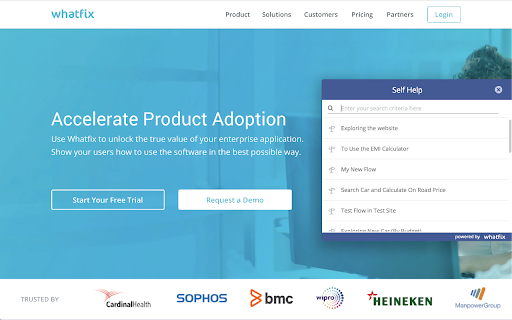

Whatfix provides in-app guides and walkthroughs to Ease User Onboarding of Service Cloud. Whatfix is a digital guidance and engagement platform that helps companies deliver modern and easy onboarding, effective training and better support to users through contextual content displayed at the time of need. With Whatfix users get a personalized experience of the software application, starting from onboarding and training to continued engagement. You can use Whatfix across all web-based applications and its available as a simple, easy-to-install browser extension. Personalized User Onboarding- Access personalized and contextual in-app content to make it simple and intuitive for you to use the software application. Walkthroughs guide you, step-by-step for the completion of activities in the system. In-App Help and Guidance- Whatfix eliminates the need for you to approach your support staff for 'how to' queries. Our help content can be personalized based on where you are in the application, to provide you with relevant information whenever you need it. On the Job Learning- Our automatically-generated multi-format content makes for more engaging and effective training compared to traditional training. Videos, pdf, slideshows can be pulled into your LMS with SCORM integration to use as a part of your learning plan.

Linkster.ai
Transform your video experience: AI summaries, mood insights, & trending highlights in one plugin! Leveraging the latest in AI technology, this plugin provides a comprehensive suite of features designed to enhance the online video viewing experience. It enables users to instantly grasp the essence of video content and explore audience reactions in a nuanced way. Key Features - AI-Generated Video Summaries: This core feature provides users with concise, accurate summaries of video content, making it possible to quickly absorb the main points without watching the entire video. It supports a wide range of languages, catering to a global audience. - Sentiment Analysis of Comments: Beyond summarizing video content, the plugin offers an in-depth analysis of viewer comments, classifying them into positive or negative sentiments. This insight allows users to understand the general reception of the video, adding an extra layer of engagement. - Channel's Trending Videos: A unique feature that curates a list of a channel's most popular videos, facilitating effortless discovery of engaging content. This ensures users are always just a click away from the best that each channel has to offer. User Experience The plugin is designed for ease of use, integrating seamlessly into the user's browsing experience as a Chrome extension. It provides quick and easy access to its features, making video content more accessible and engaging. Privacy and Accessibility With a strong focus on privacy, the plugin ensures all user data and interactions are handled with the utmost care and confidentiality. It is available for free, with additional premium features unlocked through subscription plans designed to enhance the user experience.

Select Star
Select Star is a data discovery platform that automatically analyzes & documents your data. ⭐️ Select Star (https://selectstar.com) is a data discovery platform that automatically analyzes & documents your data. Many data scientists and business analysts spend too much time looking for the right data, often having to ask other people to find it. Beyond a data catalog, Select Star provides an easy to use data portal, where data teams can govern their data and share the knowledge base with all data consumers inside the company. 🔍 Find the needle in the haystack Cut through the noise of countless datasets & dashboards to quickly find the data you’re looking for. 📝 Capture the tribal knowledge in data Easily tag & update descriptions. Anyone can ask questions, and search other discussions related to the dataset. 📖 Understand where your data is being used, and how Get an up-to-date snapshot of where the data is coming from, who is using the data, how they are using the data, and which dashboards are built on top of it. 👁 Get visibility into where your sensitive data Use column lineage to find out exactly where the data is going to. Propagate PII tags to the downstream columns where it’s being used as is. 🚛 Migrate any data model in confidence Find out which dashboards may break and who may get impacted if you change the data, down to the column level.

Kompositor
Design web animations with ease. Dive into 3D transformations using mouse control to transform and captivate your creations Discover Kompositor, the powerful and user-friendly web extension that revolutionizes the way you create animations and visual effects for your web projects. Design and implement stunning motion graphics, digital visual effects, and compositing applications with just a few clicks. From dragging elements to creating nested 3D transformations, Kompositor offers a world of possibilities for web designers and developers. a. Effortless animations: Craft engaging animations by simply dragging elements into place. Build visually striking designs without the need for complex coding. b. Easy HTML element transformations: Quickly and effortlessly transform any HTML element using your mouse. The extension supports both 2D and 3D transformations, allowing you to create truly immersive and dynamic web experiences. c. Nested transformations: Achieve even more with nested transformations, where transformations sum up from ancestor to child elements. Unlock new creative possibilities for your designs through this advanced feature. d. SVG elements support: Bring your vector graphics to life with support for SVG elements. Animate and manipulate your SVG designs to create interactive and visually appealing web content. e. Animate plain JS objects: Go beyond HTML and SVG elements, animating plain JavaScript objects for a flexible and versatile solution to all your animation needs. Upon completing your design and animations, export your work to the GreenSock Animation Platform (GSAP) effortlessly with just one click. Generate GSAP-ready code to seamlessly integrate your stunning animations into your web projects. Unleash your creativity and transform your web designs with Kompositor. Experience the power of intuitive and dynamic animation creation right at your fingertips.

GitHub File Diff
View diffs of files and directories on GitHub. To use this extension, go to a file or directory in GitHub and click the **History** button. Then, click on any commit. The extension will override the click to show the diffs of only the relevant files instead of GitHub's default behavior of showing the entire commit's diff. This is especially helpful when a commit is very large and GitHub only shows a partial diff or none at all. To get the regular view, simply refresh the page.
