
llelgapflianaapmnpncgakfjhfhnojm


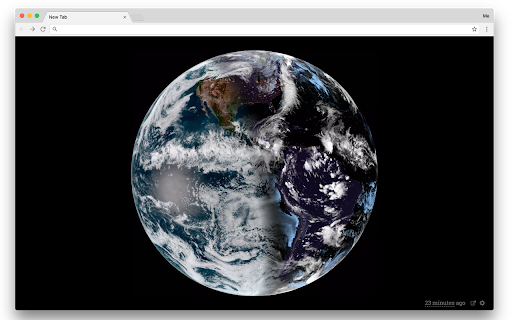
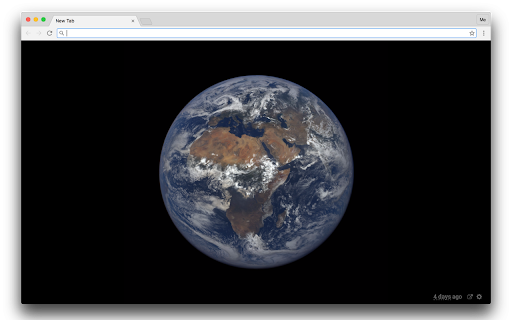

Experience the latest image of Earth from a satellite every time you open a new tab. This extension displays the latest image of our planet Earth as seen from the Himawari 8 Satellite every time you open a new tab. The satellite has been deployed by the Japan Meteorological Agency and takes photographs of Earth every 10 minutes. The extension also supports images from the GOES, DSCOVR, and Meteosat satellites. 0.23.0 Update URLs. 0.22.0 Update to new proxy, add GOES 19 and Himawari 9. 0.21.0 Update RAMMB URL format. Move to manifest v3 for Chrome. 0.20.0 Support natural variant for GOES 17 west. 0.19.1 Fix Himawari base URL. 0.19.0 Disable unreliable image cache in extension 0.18.1 Fix GOES URLs. Thanks to @mattijn. 0.18.0 Remove d3-request and d3-queue and instead use fetch and async 0.17.0 Add GOES 17 0.16.1 Store large images with reduced quality until they fit 0.16.0 Add Meteosat images thanks to @erget 0.15.0 Add GOES 16 natural image thanks to @TheNeuralBit 0.14.0 Remove GOES 13 and 15 as NASA does not support them anymore 0.13.1 Faster time ago update 0.12.0 Improve animation initialization 0.11.1 Faster animation 0.11.0 Add GOES 16 and animation 0.10.0 Firefox support 0.9.0 Fix web extension compatibility. Immediately load new image when settings change. 0.8.0 Compatible with web extensions for Firefox 0.6.1, 0.7.0: Fix GOES caching 0.6.0: Add GOES 13 and GOES 15 images (see options). Fix issues with DSCOVR. 0.5.0: Fix issues with DSCOVR. Add enhanced images for DSCOVR. 0.4.3: Fix issue with latest date for himawari color image 0.4.2: Fix DSCOVR EPIC base url 0.4.0: Add DSCOVR images and link to explore online 0.3.2: Improve styling 0.3.1: Fix issue with options.html and options.js missing 0.3.0: Add option to choose infrared image 0.2.5: New proxy server 0.2.2: Better layout 0.2.1: Faster loading, offline support * Loads the latest image, updates automatically. * Automatically loads images at the optimal resolution (incl retina resolutions). If more than one image is needed, automatically downloads tiles. * Uses Google's caching to take the load from the image servers * Caches last version in local storage (compressed jpeg) and immediately displays it when you load the page. Then loads the latest image. * Full offline support * Images are drawn on a canvas so that we can cache and load it easily. Switch between visible light and infrared images from Himawari 8 and images from the EPIC camera on the or DSCOVR satellite. The Earth always stay centered, thanks to CSS magic.

GPT Privacy: Anonymize your Chat GPT prompts
Anonymize your Chat GPT prompts and safeguard your privacy. Automatically swap your prompts data with custom placeholders. Elevate Your Data Privacy with Anonymized Prompts GPT Privacy is a easy to use Chrome extension designed to safeguard your interactions with GPT-based services like ChatGPT. With a strong commitment to your data security, the app ensures that your chats and inquiries remain confidential and protected. 🔒Real-Time Anonymization: Automatically or manually anonymize sensitive data in your prompts, ensuring that your personal information stays private. 👍User-Friendly Experience: Seamlessly integrates into your browsing experience, offering intuitive controls and clear visual feedback. 🏠 Local Anonymization Processing: All anonymization processes occur locally within your browser. Rest assured, your data never leaves your device or gets transmitted over the internet. 🏠 Local De-Anonymization Processing: All deanonymization processes occur locally within your browser. ⚙️ Customizable to Your Needs: Choose between automatic and manual anonymization modes, tailoring the level of privacy protection to your preference. Perfect for Privacy-Conscious Users Whether you're discussing personal matters, sharing sensitive information, or simply seeking an extra layer of privacy, GPT Privacy is your reliable companion. It's particularly beneficial for users who frequently interact with AI-powered chatbots and want to maintain the confidentiality of their conversations. 1. Install the extension with a click. 2. Select your preferred mode - 'Automatic' for hassle-free anonymization or 'Manual' for specific control. 3. Set your Anonymization Rules Enjoy peace of mind knowing your prompts are secure. We Value Your Feedback Got suggestions or feedback? We'd love to hear from you! Click the "Share Feedback" button to tell us how we can improve. Install Privacy Prompt today and experience a new standard of privacy in your AI interactions!

PromptEasily ChatGPT - HDTeam
PromptEasily ChatGPT - HDTeam adds a list of curated prompt templates for SEO, SaaS and more to ChatGPT. Try today. PromptEasily ChatGPT - HDTeam adds a list of curated prompt templates for SEO, SaaS and more to ChatGPT. Try today.

Tanuki Utilities
Provide useful utilities for GitLab users. * Change the GitLab favicon to a project icon; you can easily distinguish many GitLab tabs. * Move "Copy reference" button on top bar; the button is always shown for your easy access. This extension tries to change favicons in the **all** sites by default. You can specify which GitLab site (e.g. gitlab.com or your self-hosted site) you would like to change favicons. #### Change the GitLab favicon to a project icon

BoostPic - Google Reverse Image Search on the fly
Uncover the possibility to perform Google Reverse Image Search quickly and incredibly, with clip & paste. With this extension users can search google images simply with clip & paste. The following is how it works. 1. For win10/11: win+shift+s to clip an image even outside the browser, and for mac: shift+control+command+4; 2. Click at the input box below(select another visual search engine other than Google Images at the bottom if you prefer), and then press ctrl+v or command+v; 3. Wait a moment until it returns an URL. If timeout error happens, please delete the error message and ctrl+v or command+v again.
