
lkhpdekefookichfjfenhopbjcnddedb
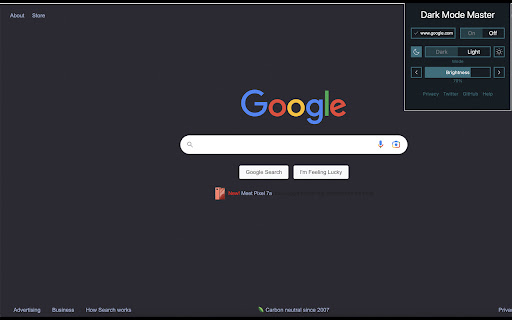


A Dark theme for any website. Dark Mode Master is an extension that helps you quickly turn the screen to dark at any time. Dark mode extensions for Google are browser add-ons that allow you to switch the color scheme of Google's websites from the standard white or light gray to a darker, more muted color palette. These extensions work by applying a custom CSS stylesheet to the page, which overrides the default colors and styles.

Dark Mode Extension
Save your eyes and browse in comfort with Dark Mode Extension! Transform any website into a sleek, dark theme that's easy on the eyes, especially at night. Reduce eye strain, improve readability, and create a more relaxing browsing experience. Universal Dark Mode: Works on all your favorite websites! Customization Options: Choose from mild to strong inversion, adjust brightness and contrast, or even enable grayscale or sepia mode. Easy to Use: Simple one-click activation and deactivation from the toolbar. Take control of your browsing experience and Embrace the Dark Side with Dark Mode Extension!

Blackfy
Dark Reader for Chrome. Apply dark theme & night mode on all websites with Blackfy. Transform your browsing experience into a relaxing, customizable, and eye-friendly journey with DarkMode for Chrome! This easy-to-use extension offers dark mode, night mode, and many other options to protect your eyes and enhance your browsing experience. Important Disclosure: This extension uses affiliate links to recommend hotel deals. We may earn a small commission if you make a booking through the links provided. Thank you for supporting us! Key Features: Dark Mode & Night Mode: Activate a full dark mode or customizable night mode for comfortable browsing in the dark. Light Mode: Easily switch between dark mode and light mode to adapt to any lighting environment. High Contrast & Grayscale: Choose high-contrast or grayscale modes for an optimized visual experience. Website Exception List: Add your favorite websites to the exception list to keep them in light mode or customize them individually. Eye Protection: Reduce brightness and adjust colors to protect your eyes, even in low-light conditions. Universal Compatibility: Works on any website, including Google Chrome, Google Search, Sheets, and many more. Advanced Customization: Tweak colors, brightness, and contrast to create the perfect dark theme for you. Easy Installation: Just a few clicks to activate dark mode and start browsing comfortably. Why Choose DarkMode for Chrome? Accessible & User-Friendly: Perfect for everyone, from beginners to advanced users. Optimized for Chrome: Works seamlessly on Google Chrome and Chrome Browser, offering smooth integration. Protection & Comfort: Reduce blue light and adjust colors to protect your eyes and enhance your browsing experience. Full Customization: Change colors, adjust brightness, and create the perfect browsing experience tailored to your needs. Google Chrome, Chrome Browser, Browser Extension Perfect For: Nighttime Browsing: Ideal for those who use Chrome at night or in low-light environments. Eye Protection: Reduce eye strain and protect your eyes from bright light. Advanced Customization: Create the perfect browsing experience tailored to your preferences. Install DarkMode for Chrome today and enjoy a better, more comfortable, and eye-friendly browsing experience! What’s New: Light Mode: Added the ability to switch between dark mode and light mode. Website Exception List: Highlighted the functionality to add websites to an exception list.

Dark Mode Everywhere
Simple dark mode for all websites (results may vary).

Dark Mode
Adds a dark screen over everything A translucent screen will be added over your screen with a click of a button in your toolbar. Other Dark Mode extensions use high contrast which could mess with the overall look of websites. This extension does not change a websites' styling.
