
ljociicifligbnfpobemibmmecnbbmla

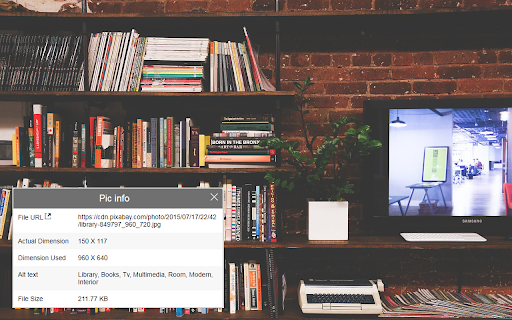

Gives a detailed info about the image like URL, alt text, file size and dimension The below details of an image are shown when hovered over it >shows the file url/path and a link to open it in a new window >shows original image width and height >shows actual image width and height used >Shows alt text if available >shows actual file size of the image(doesn't work for local image path) Note: >Pic info box can be dragged around website for user convenience >Hovering over image which has CSS overlay effect may sometimes cause the extension not to display image details, remove those effects to view image info v_2.0 => rewrite of code and migrated to v3 manifest V_1.5 => Added support to show ALT text for images if available V_1.4 => Added support for background images to show its info V_1.3 => bug fix for local file access alert V_1.2 => works without refresh on first time install and fixed css overide issues in some websites V_1.1 => bug fix and image updation

Image Data
Show image resolution, file type, and file size on mouse over Features: - Display an image's: resolution, scaled resolution, file name, file type, file size, alt text, mime type, domain, pixel total, modification date - Works with images on a webpage, in a new tab, and even local files - 6 position settings: over, before, or after the image, fixed, follow cursor, or tool tip - Keyboard shortcuts and toolbar button to easily enable or disable the add-on - Display of data fully customizable with CSS Permission: Access your data for all websites - Used to read and display image data on a web page.

Alt Attribute Viewer
Apps display the alt attribute while browsing the web site.

IPTC Photo Metadata inspector
Right-click on any image and select "View IPTC Photo Metadata". IPTC's GetPMD tool shows all metadata embedded in the image. Many images on the web contain embedded metadata such as creator, location, copyright and licensing information, even people and products depicted. IPTC's Photo Metadata Inspector tool lets you see embedded metadata in many image files. For eligible images, a context menu will appear when you right-click on the image. Select "View IPTC Photo Metadata" and you will be taken to IPTC's Get Photo Metadata (GetPMD) tool which will display all metadata embedded in the image file. NOTE that this tool needs to download your image from the web to process it. Therefore it does not work with local images accessed via file:// URLs.

Image Size Info
Inserts option in the browser's image context menu to view image width, height and file size. Image Size Info is a lightweight Chrome extension that lets you instantly view the dimensions (width × height) and file size of any image on any website. Simply hover over an image to see its natural resolution or right-click and select “View Info” for precise details. Designed for web designers, developers, content creators, and SEOs, this tool streamlines the process of image inspection without opening DevTools. It automatically detects dynamically loaded images and ensures your privacy by running 100% locally with no data collection or tracking. Enhance your workflow with fast, easy, and stress-free access to essential image size information directly from your browser. Instantly check the size of any image on any website — just by hovering or right-clicking. This powerful yet lightweight extension displays image dimensions (width × height) directly on the page when you hover your mouse over any image. Need even more precision? Just right-click any image and select “View Info” to see its exact dimensions. Perfect for developers, designers, content creators, and anyone who wants quick insights without opening DevTools. ✅ Features: 🖱️ Right-Click to View Image Size – Simply right-click any image and get size info instantly. 🖼️ Hover to See Dimensions – View natural image resolution on hover (e.g., 1280 × 720). 🔁 Works with Dynamic Content – Auto-detects new images as they load. ⚡ No Setup Needed – Just install and go. Works everywhere. 🔒 Privacy-Friendly – No data collection. No tracking. 100% local. 💼 Ideal For: Web designers verifying layouts Content creators checking uploads Developers debugging images SEOs reviewing image optimization Make image inspection fast, simple, and stress-free — right from your browser. 💎 Premium version available for just $9.99 LIFETIME ACCESS
