
ljbjhmajkmjknjifacdcheegakmhpfca
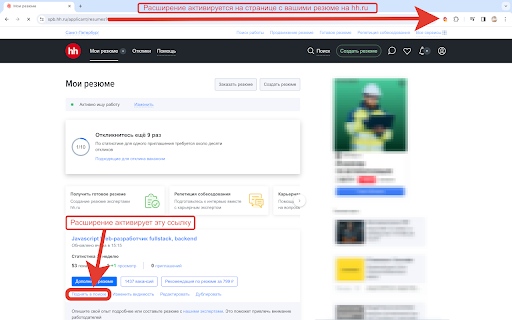
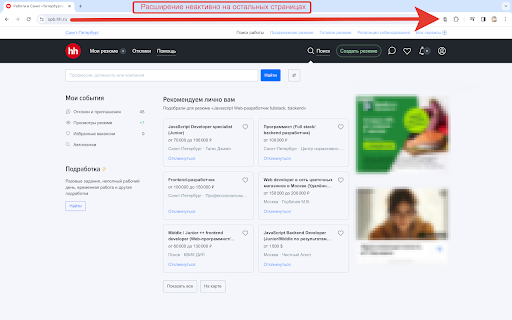
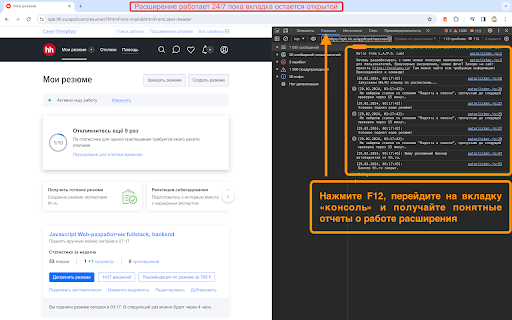
Простейший автокликер для автоматического подъема ваших резюме на для сайтов hh.ru и superjob.ru. Разработано @2024 L.A.P.S. Lab Автоматический подъем всех активных резюме аккаунта на HH.RU и superjob.ru Если есть вопросы по установке и работе расширения - с радостью отвечу в специально созданном канале техподдержки в Telegram. https://t.me/c/2101490043/2/6 🤓 Это расширение – простейший автокликер для автоматического подъема ваших резюме в поиске работодателей на сайтах для поиска работы hh.ru и superjob.ru. Свободно распространяемое расширение для браузера Google Chrome. Автоматически включается на странице ваших резюме на сайте hh.ru или superjob.ru и каждые 1 минуту ищет ссылки на поднятие резюме в поиске и, если они появились, активирует их программно. После подъема резюме сайт hh.ru открывает всплывающее окно - попап с предложением платного продвижения. Расширение закрывает этот попап - и снова засыпает на 1 минуту. Расширение работает в фоновом режиме всегда, когда в браузере открыта вкладка сайта с резюме, при этом он не обязательно должна быть активной. Лог последних изменений: - в версии 0.3 обновлены все рабочие скрипты, поменяли название расширения Данный проект является логическим развитием проекта пользовательского скрипта для расширений типа GreaseMonkey/TemperMonkey, оригинальный код которого можно найти на github или на сайте L.A.P.S.Lab. Разработано @2024 L.A.P.S. Lab

HireCraft – Job Match Analysis for hh.ru
Evaluate your resume match for hh.ru job postings, create cover letters and optimize your applications. "HireCraft – AI Job Match & Resume Analysis for hh.ru" - an extension for automatic job match analysis and improved responses to vacancies on hh.ru. Instantly assess your resume's fit, generate personalized cover letters, and optimize your applications—all directly on hh.ru. - Automatic analysis of your resume’s match to job requirements and responsibilities - Resume optimization for each specific vacancy on hh.ru - Generation of tailored cover letters based on your optimized resume 1) A “Check Your Fit” button appears next to the “Apply” button on hh.ru. 2) HireCraft analyzes job requirements and compares them with your resume. 3) You receive a visual report with actionable recommendations. 4) Instantly generate an adapted resume for each vacancy (as a copy of your current resume). 5) When applying, you can generate a personalized cover letter for the job. Due to recent changes on hh.ru, the official Job Seeker Resume Management API is no longer available. As a result, some features related to creating or editing resume copies directly on hh.ru are temporarily limited. We are actively working on an update that will allow users to continue using HireCraft without being affected by this limitation. A workaround solution will be introduced in upcoming versions. - All data is processed and stored only with your consent. - Secure authorization via HireCraft and hh.ru accounts. - The extension is isolated and does not interfere with hh.ru functionality. For any questions, contact: support@hirecraft.app Good luck with your job search!

Расширение для откликов на вакансии hh.ru
Забудьте о рутинной работе по отклику на вакансии! Наше расширение делает процесс поиска работы проще и эффективнее. Устали от рутины и хотите увеличить свои шансы на успех в поиске работы? Тогда установите наше расширение и убедитесь в его эффективности! * Автоматический отклик: Заполните шаблон один раз, и расширение будет автоматически заполнять ваши данные в формах отклика на вакансии. * Сохранение времени: Экономить время - значит увеличить количество откликов, а значит и шансы на успех в поиске работы! * Простой интерфейс: Наш сервис прост в использовании и не требует специальных знаний. 🫡 Обновления: 08.10.24 - Обновили визуальную часть, улучшили отклик на вакансии. Добавлена возможность оставления отклика с одним резюме. 01.06.2025 - В вакансиях другой страны появлялся блок ""Вы откликаетесь на вакансию в другой стране", который мешал откликам, теперь при его появлении расширение переходит дальше к непосредственно отклику. 13.09.2025 - Пофиксили баг, плюс добавили, чтобы отклики не стопорились если всплывали дополнительные параметры для выбора в вакансии 10.11.2025 - Перенесли логику работу на новый дизайн, чтобы поддерживался и на новой и на старой версии. 23.03.2026 - Добавили новые контактные данные и просмотр даты завершения подписки в интерфейсе. 03.06.2026 - Добавили расширенные настройки Следите за обновлениями в нашем канале 👇 https://t.me/exstension

VK Next - functions for VK
The best add-on for VK with many features, some of which are exclusive. Among the features: • Disable ads • Hide community ad posts • Hide posts with source • Make feed wider • Hide stories block • Post filters • Disable people recommendations • Disable post recommendations • Disable community recommendations • Disable clips recommendations • Disable VK Video recommendations • Disable story recommendations • Disable service recommendations • Disable game recommendations • Themes • Accents • Page background • Emojis • Logo customization • Custom font • Alternative site header • Alternative scrollbar • New "Communities" interface • Compact community list • Compact friends list • Compact stories block • Garland above the logo • New Year logo 2023 • Falling snowflakes effect • Garland on the site header • VK SquaRE+ • Animated splash screen on load • Rounded design elements • Change corner radius • Change sticker size • Inline commands • Show deleted messages • Show disappearing messages • Show message edit history • Ignore incoming calls • Confirm before calling • List of online members in chats • Highlight chat admins in messages • Transcribe messages • Expanded message action menu • Don't mark voice messages as listened • Ghost mode (unreads) • Typing hider • Classic interface • New media viewer • Old message read indicator style • Disable server reconnection indicator • Change reactions to Apple emojis • Alternative input bar view • Reduce graffiti size • Button to open Favorites • Message templates • Jump to start of chat • Display my mentions in chat • Message encryption • Download chat history • View chat statistics • Send graffiti • Send audio messages • Send video messages • Hide NFT avatars • Hide emoji statuses • Hide names and avatars • Hide quick chats • Hide recent communities block • Hide unviewed reactions indicator • Hide unhideable sections • Custom links • vk.cc link shortener button • Display current online status • Fix left menu position • Rename section titles • Alternative menu view • Make menu more compact • Name and avatar instead of "My Profile" • Avatars instead of icons for favorite communities, games, and apps • Hide section titles • Hide settings gear icon • Hide counters • Hide additional pages under the menu • Hide recommendations • Don't mark stories as viewed • Notification ghost mode • Partial offline • Manage online hiding via VK Messenger • Bypass online hiding • Display verification badges next to names • Set custom verification badge • Animated profile cover • Alternative profile view • Additional info in profiles and communities • Disable tracking • Highlight friends with selected color • Highlight mutual groups with selected color • Telegram stickers • View and set all emoji statuses • Number tracks when downloading playlists • Add ID3 tags to music • Insert lyrics from Genius into track metadata • Alternative player view in site header • Block ads while listening to music • Show track bitrate next to duration • Disable away.php • Show poll results without voting • Scroll through photos with mouse wheel • Photo spoofing button • Display media download buttons • Disable analytics • Disable tracking/telemetry • Clean up friends • Clean up followers • Clean up chats • Clean up blacklist • Clean up wall • Clean up photo albums and much more.

Scripty - Javascript Injector
Inject your Javascript into the webpage The Scripty extension allows you to inject custom javascript to a webpage. Features: 1. Inject script based on URL, host or regex. 2. Download script from Script Store. 3. Run the script directly from the context menu. 4. Publish script on Script Store. 5. Share script with other users. 6. Enable/Disable the scripts How To Use: 1. Add your custom script in the Scripty extension. 2. Select the execution mode: Manual/Automatic 3. To run a script: - Open the extension and click the play button. Or - Run a script from the context menu. Right Click > Select Scripty > Select your script. 4. Automatic scripts run automatically based on provided configuration.
