
ljahidjjldpfofafdiehghcgmeglolho
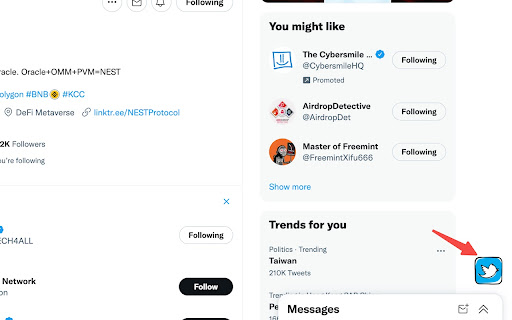
a useful extension helping mass follow or unfollow A extension to help you mass follow / unfollow on Twitter. 1. Log into twitter.com 2. Go to a page with profiles (followers, following, search, list members, likes/retweets) 3. The extension icon should appear at the right buttom of the page 4. Click the icon 5. Choose the function you like Please carefully read the Twitter following rules and best practices. To prevent account suspension/locking increase the wait, limit your follow sessions and take a longer break between the sessions.

Superpowers for X
Mass follow, mass unfollow, mass like, mass unlike, mass retweet and mass unretweet on X with powerful options. Mass follow, mass unfollow, mass like, mass unlike, mass retweet and mass unretweet on X with powerful options. = MASS FOLLOW = It works on the followers, following, likes, retweets, list members/subscribers and search view. = MASS UNFOLLOW = It works on your following view. = MASS LIKE/RETWEET = It works on the list and search view. It also works with the advanced search and saved searches. = MASS UNLIKE = It works on your likes view. = MASS UNRETWEET = It works on your profile view. = AUTOPILOT = Performs a series of actions and repeats them after a certain pause. = CUSTOMIZE WITH POWERFUL OPTIONS = At the top right click the icon (bird) and then click Options. Note: You need to add the extension first. = CAUTION = Please carefully read the X rules and best practices. Please find FAQ and Changelog on the website https://www.clemensteichmann.com/superpowers-for-twitter Superpowers for X is free to use. You can also buy the PRO version (https://www.clemensteichmann.com/superpowers-for-twitter/pro). Please activate your PRO on the extension options page.

Twitter auto follow
Automation to help auto follow (You can use for slave method Unlock a new level of social interaction with our cutting-edge Twitter Auto-Follow feature. Seamlessly connect with individuals who share your interests and vision by automatically following the followers of accounts you admire. This intelligent tool simplifies the process of building a meaningful network, helping you engage with like-minded individuals effortlessly. Effortless Networking: Connect with people who resonate with your interests and passions effortlessly. Our Auto-Follow feature streamlines the process, so you can focus on meaningful interactions. Targeted Engagement: Follow users based on the accounts you admire. Whether it's influencers, thought leaders, or industry experts, our tool ensures you're connecting with the right audience. Enhanced Visibility: Maximize your presence on Twitter by broadening your network. By following the followers of accounts you value, you're more likely to be seen by individuals who appreciate your content. Customizable Settings: Tailor your auto-follow preferences to suit your unique networking goals. Set filters based on location, interests, or specific keywords to ensure your connections align with your vision. Safe and Secure: Rest easy knowing that your privacy is our priority. Our tool operates within Twitter's guidelines, ensuring a seamless and secure experience. Real-Time Updates: Stay in the loop with instant notifications. Receive updates on new connections, allowing you to engage with your expanding network promptly. Elevate your Twitter experience today with our Auto-Follow feature. Forge valuable connections, expand your reach, and engage with a community that shares your passions. Embrace the future of social networking. Try it now!

Twitter Follower
Steps for following/unfollowing: 1. Visit twitter.com 2. Browse any page with profiles (followers, search, lists,...) and public "Follow" buttons 3. Use the plugin to "Follow/Unfollow them all!" Steps for liking several tweets: 1. Visit twitter.com 2. Browse any page with public tweets (timeline, search,...) and public "Like" icons 3. Use the plugin button to "Like them all" For more details, watch the video: Try it 10 days for free, then upgrade to keep on using it. MANAGE YOUR SUBSCRIPTION: https://billing.stripe.com/p/login/7sIg1TgrvbHi76gdQQ To avoid being banned, read and follow rules and best practices.

X (Twitter) Unfollow,Follow All 2026
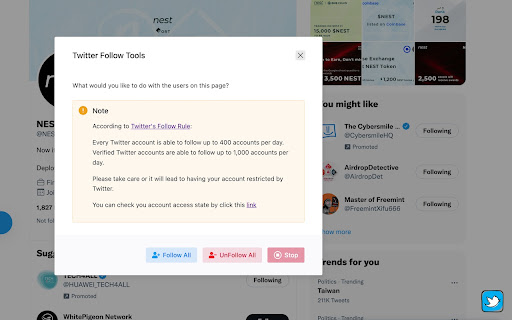
Quickly unfollow all and follow all! 🚀 Save time by managing your following list with just one click. ✅ Advantages ⏱️ Time-Saving: With just a single click, you can unfollow or follow everyone on your list. This feature eliminates the need for manual selection, allowing you to quickly manage large follower lists in seconds. 👤 User-Friendly: The extension is designed with simplicity in mind. After installation, all it takes is clicking the extension icon and selecting the desired option. No complex setup is required. ⚡ Efficiency: Instead of spending hours unfollowing or following people manually, this extension automates the task in a few clicks, freeing up your time for more important activities. 🎁 Free Trial with Limits: You can try out the extension with a free trial limit of 5 actions. This allows you to explore the features before deciding on the full version. 🔧 Versatile Control: The extension gives you complete control, offering two options: unfollow or follow all. This flexibility helps you manage your account effortlessly based on your needs. How the Extension Works: 1️⃣ Install the extension from the Chrome Web Store. 2️⃣ Click on the extension icon to open the menu. 3️⃣ You will see two options: one to Unfollow All and another to Follow All. 4️⃣ Select the option you need and let the extension do its work. 5️⃣ If you want to stop the process, simply click the red Stop button in the circular popup at the bottom of the page. ❗ Note: This extension is not authorized or endorsed by X (formerly Twitter). It is an independent tool designed to help manage your following list more efficiently. ⚖️ Copyright Notice: This extension and all associated UI, design, logic, and source code are proprietary and protected works; any unauthorized reproduction, modification, redistribution, reverse-engineering, or commercial use is strictly forbidden.
