
liofmdplmickalghfcokjdeohefnnofc
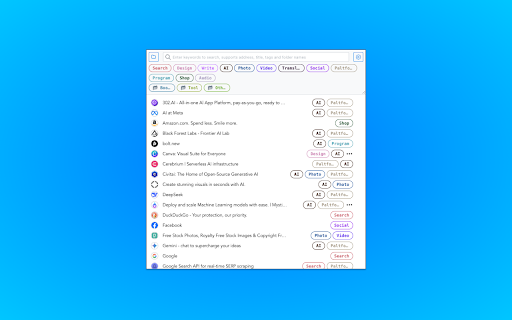


Rebuild your bookmarks with tags Add tags 🏷️ to your bookmarks 🔖 for easy filtering and management, perfect for heavy bookmark users to alleviate bookmark anxiety. * Click the edit button on a bookmark to edit it (select tags, add tags, modify title, delete, etc.) * Click the configuration button in the top-right corner for quick settings (language, theme, bookmark sorting, display options, etc.) * Use the top search bar for keyword filtering (name, URL, tags, and folder, including all parent folders) * Click tags at the top or behind a bookmark to filter * Click the folder in the top-left corner to filter by folder * After filtering, click the [Add Tags to Filtered Bookmarks] button at the bottom to batch-add selected tags to bookmarks * Right-click the extension to open the sidebar mode * Right-click the extension or click the text link in the edit menu to open the options panel for detailed configuration (tag display, storage mode, etc.) and tag management (adding tags, editing colors, deleting, etc.) * Use shortcuts cmd|ctrl+shift+O to quickly open the extension and cmd|ctrl+shift+K to quickly add or edit bookmarks * Trigger OmniBox search with the `tb` keyword in the search bar for quick bookmark search (supports name, URL, tags, and folder) This extension does not store any user information. Tag data is saved in the original bookmarks in a specific format and can be searched directly in the search bar. If there are data sync issues, it’s likely Chrome’s problem—consider backing up when organizing a large number of bookmarks. More features are being developed and updated regularly.

Colorful Bookmark
Enhance your Chrome bookmark experience with colorful tags and quick search Add tags to your bookmarks, manage them the way you want. This enhanced bookmark manager allows you to: * Search bookmarks smoothly * Tag any bookmarks with intuitive default colors * Customize your new tags with any text and color * Filter tags instantly * Switch themes between day and night

Bookmarks Plus 2025 - Save to Multiple Folders, Tags, Emoji 😀 ...
Your bookmark data is still managed and synced by Chrome/Edge browser, while additional metadata (tags/notes) is stored locally. Works fully offline with zero data import required, ready to use right after installation, and extremely lightweight - the entire extension is only 400KB in size. ⚡ Bookmark Faster & Easier: • Context menu to save current page/open manager • Quickly jump to bookmarked folders from current page • Customized saving interface • Fast folder search and location • Recently used folders 🚀 Save Bookmarks to Multiple Folders: • Use tabs to quickly save bookmarks to multiple folders • Set different Tags, Notes, and Emoji labels (⭐) for bookmarks in different locations 📖 Powerful Bookmark Manager - Quick Preview, Custom Sorting, Custom List View...: • Quick bookmark detail preview with complete titles, links, tags, and browser IDs • Custom sorting: sort by date added, last used time, ID, etc. • Custom list view • Support for multi-select and drag-and-drop 🔎 Enhanced Search: • Local search: search only within specified folders, with option to include/exclude subfolders • Search enhancement: search titles, URLs, notes, tags, and even emoji labels 🏷️ Tag Filtering: • Filter by tags to show only bookmarks with specific tags • Support for filtering by multiple tags simultaneously • Local tags: show only tags in current folder, with option to include/exclude subfolders 📦 Batch Operations: • Select multiple bookmarks to batch set Tags, Notes, and Emojis • Also supports batch deletion and moving, including subfolders Privacy & Security: • Your bookmarks stay in browser storage - we never access your actual bookmark data • We only request bookmark IDs to associate with your annotations • All additional data (tags/notes/emojis) are locally stored • Full offline functionality

Easy Bookmark Viewer
Advanced bookmark management with powerful features Easy Bookmark Viewer transforms your new tab page into a beautiful, organized dashboard for all your Chrome bookmarks. Enjoy a clean, modern interface that makes managing and accessing your bookmarks effortless. ● Modern Grid Layout: Clean, structured grid view. ● Smart Grouping: Auto-sort into categories. ● Visual Clarity: Icons and titles for easy recognition. ● Powerful Search: Find bookmarks instantly. ● Customizable Themes: Switch between light and dark modes. ● Quick Actions: Add, edit, or remove bookmarks. ● Most Visited & Recently Added: Display popular and recent bookmarks. ● Chrome Native: Works with existing Chrome bookmarks. Easy Bookmark Viewer is designed to streamline your workflow and make your browsing experience more productive and enjoyable.

Bookmanize - Advanced bookmark manager
Advanced bookmark manager provides tagging, instant sorting, and filtering among all bookmarks on a full list view. Bookmark manager with a clean user interface where all bookmarks can be easily accessed in one full list view with tagging, instant sorting, and filtering. Organize your bookmarks with custom tags and faster navigates between them. We are an independent team of developers who love what they do:) If you want to improve or expand anything - email us bookmanize@gmail.com Support us with a cup of coffee - https://www.buymeacoffee.com/bookmanize ★ All bookmarks on one screen ★ Fast access to all main functions ★ Instant searching, filtering, sorting, adding, deleting bookmarks ★ Drag n drop bookmarks and folders All the features that the default bookmarks have (add, delete, sort, drag and drop bookmarks) in a more user-friendly interface with high performance for a large number of bookmarks Note: Your data (history and bookmarks) is not saved or stored anywhere else but on your computer. Hotkeys: - ctrl+shift+f or command+shift+f — focus the search field
