
limolckbnbcnahehoilfocmdgngednoj


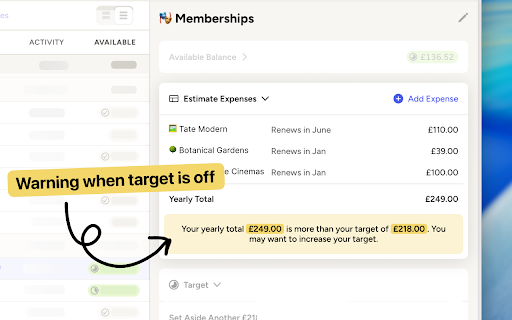
Add a mini spreadsheet to YNAB category sidebars for calculating recurring expenses Target Calculator for YNAB adds a flexible mini‑spreadsheet directly into your category sidebar, so you can keep track of the math behind each target. 📝 Keep track of recurring expenses in a category 📈 Instantly add up regular expenses to decide what your target should be ✅ Create a record of when and how you came to the budgeted amount 💡 Quickly tell if you need to adjust your target Instead of creating dozens of separate categories or doing the math in Notes or a separate spreadsheet, you get a small, purpose‑built calculator that lives right where you budget. • Remembering which recurring expenses live in a category • Forgetting how you arrived at a target in the first place • Targets becoming out-of-date as prices change • Re‑doing the same mental math every month This extension fixes these problems by make it easier to see all your predicted expenses at a glance. 🧮 Mini spreadsheet in the category sidebar Add individual line items for all the recurring expenses that roll into a category. 💴 Support for different currencies Works with whatever currency your YNAB budget uses. 🗓️ Support for monthly and yearly targets Automatically detects what type of target you have and adjusts accordingly ⚠️ Target vs. reality alerts Get a subtle alert when your estimated expenses exceed your current target, so you know to revisit the number. 📝 Memos for each expense Add a small note (like payment date, service name, or billing cycle) to each line. ⏯️ Exclude or pause expenses Temporarily exclude an item from the total when a subscription is paused, without losing the line for later.

Amplecap Beta
Amplecap helps capture the best of the internet into your Amplenote notes, to-do lists, and bullet lists. This release includes the following capture types: *Screenshot selection* Pick an area of the page to capture, we'll also grab the URL of the page and any notes you want to store with it. All text in the screenshot can optionally be searched or pasted into your Amplenote notebook via built-in OCR. *Page excerpt* Drag to select quotes, phrases, or information you want to remember from any web page. A list of all quotations selected is captured by Amplecap for you to optionally edit before saving. The URL of the page and time of capture is automatically recorded to your note along with the list of citations. *Full page capture* Capture the entire scrollable contents of the current web page. We perform two passes of the page to ensure that dynamically loading content will be loaded & visible in your full page screenshot. *Quick Note* If you want to capture a to-do item not necessarily related to the page you're browsing, and send it to your Amplenote to-do list without opening the app. *URL* Capture the URL of the current page -- usually in a to-do item for later follow up, or as part of a bullet list of bookmarks to assemble on a particular topic. All of these types of content can be captured into the body of a note, a bullet item, or a to-do item. You can also insert the captured content into a new note or existing note. New for this release, you can also capture your content to the copy buffer so you can paste it at a specific point in your note. This release also introduces the ability to capture to Rich Footnotes, when you have "Clipboard" selected as the capture destination. This allows quickly snap screenshots or take excerpts, in a format that remembers the URL of the page and can easily be pasted into a research note or a to-do item.

Percentager for YNAB
Calculate and assign Profit First percentages in two clicks. Check out the screenshots. Calculating your Profit First percentages every time you add income to your YNAB budget can get tedious. That's why I built this Chrome extension. I didn't like the back and forth, going between a calculator and my YNAB window. Now that process is so much faster! Faster than a calculator, faster than a spreadsheet. Install Percentager for YNAB and make your workflow that much smoother. It's completely free.

YNAB Flag Highlighter
Highlight rows in your YNAB transaction list based on Flag color YNAB accounts page allow you to flag transactions with a color, this extension enhances the functionaltiy by highlighting the entire transaction row with a lighter version of the same color.

Hipinion Paster
Automatically generate bbcode when you paste links into a hipinion post. Users can hide threads and superkill foes as well. - Automatically generate bbcode for tweets, images, youtube, instagram, and soundcloud. - Hide threads - "Superkill" boarders in your killfile so that you don't even see the "display this post" option or quotes by them. Plus, you can "Megakill" them and threads created by the boarder will also be hidden. - Explore one of hipinion's hidden gems: custom smilies. With our extension you can use the custom smiley browser to see all the cool homemade smileys that your fellow boarders have created, all while avoiding those pesky emojis. Smileys are better than emojis!!! By: Autarch and Marza change log: 7.0.0: upgrade to manifest v3 6.8.3: update mod list 6.8: Ignore blank smileys 6.7: Add unlimited storage permission to fix 31g's bug 6.6: major improvements to smiley browser, including keyboard shortcut, better focusing, arrow key navigation, quick entering of smileys (with enter key) and exiting out of smiley browser with escape. 6.5: bug fix 6.4: Add custom smiley browser, disable posting emojis, refine emojiblock so that posts are not hidden, but emojis are not displayed. 6.2: bug fix 6.1: bug fix 6.0: hide all emojis, including entirety of all posts and thread titles containing emojis in order to preserve hpn culture. 5.5: minor bug fix 5.4: Add ability to block mods and admins with superkill and megakill 5.3: remove backwards compatibility with wysiwyg editor in order to fix tweet and spoiler bugs 5.2: Fix broken spoiler tag 5.1: Add compatibility for @ mentions 5.0: Parse/format posts from nathan's wysiwyg editor 4.4: Hide quotes by superkilled users 4.3: bug fix: filter store version out of hidden threads. 4.1: Separation of Superkill and Megakill. Superkilling hides the "display this post". Megakilling hides threads created by the user. A boarder must be superkilled in order to be megakilled. 4.0: Add ability to superkill users 3.1: Add ability to paste imgur links, even without file extension 3.0: Add ability to hide threads (not available on firefox for android) 2.2: Add keyboard shortcut (windows: Ctrl+Shift+K, mac: Command+Shift+K), bug fix. 2.0: Add support for Firefox for Android. Android (and desktop) functionality is available through browserAction. 1.1.3: Add support for images and remove params from tweet links 1.1.2: automatically remove queries from instagram links 1.1.1: Add firefox compatibility 1.0.1: updated alert, more strict regular expressions
