
lihkebanehfbggghcpepjmeeconidjoa
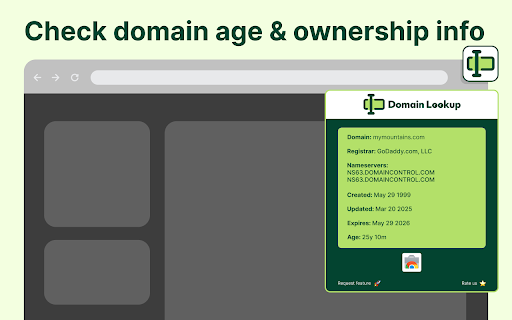
Quick access to domain details - view registration dates, age, ownership info, and nameserver data with one click. 🔍 Domain Age Lookup is a convenient tool that lets you instantly retrieve key information about domain you're currently visiting. With just a click, find out details like domain registration, expiry dates, registrar info, domain age and availability for common domains such as .com, .ai, .net, and .org. Whether you're an aspiring domain buyer or just curious about a website's age and ownership, this extension helps you get the details without any hassle. 🎯 Think of it as your domain "truth checker" - a quick and easy way to know everything you need about a domain you're interested in. ⭐ Key Features: 🔷 Retrieve registrar information for the domain 🔷 View nameserver details 🔷 Find the created, updated, and expiry dates of the domain 🔷 See the age of the domain, including years and months 🔷 Simple, clean interface that works seamlessly in your browser 🚀 How to Use: 1️⃣ Install the extension from the Chrome Web Store 2️⃣ Click the extension icon when you're on the website you want to look up 3️⃣ Instantly see all the domain registration details without leaving your current page 🤔 What does this extension do? 📍 It shows you key domain registration information, such as the registrar, nameservers, created date, expiry date, and domain age. This helps you understand the ownership, status, and background of any website you visit. 🎯 Why do I need this extension? 🔍 Whether you're buying a domain, managing a website, checking the legitimacy of a domain, or researching a competitor, this extension provides instant domain age and registration information. It helps you understand if a domain is actively managed, when it might be available, and which organization currently owns it. 🌐 Does this extension work on all domains? ✅ This extension works on many of the most common domains such as `.com`, `.net`, `.ai` and `.org`. However, support for other TLDs is being added continuously. 🛡️ Is this extension safe to use? ✅ Yes, domain checker only retrieves publicly available domain registration data via secure channels such as RDAP WHOIS. It does not collect or store any personal data. 📊 What information can I see with this extension? You can see several key pieces of information: 📌 Registrar name 📌 Nameservers used by the domain 📌 Domain creation, last updated, and expiration dates 📌 Domain age (in years and months) ⏰ When should I use this extension? Use it whenever you: 🔸 Need to verify domain ownership details 🔸 Want to know when a domain will expire or become available 🔸 Are researching a domain for SEO value and want to check its age 🔸 Are trying to verify the legitimacy or active status of a website ⚡ Will this extension slow down my browsing? ✅ No, the extension only works when you click on it and uses minimal resources. 🌐 Domain Age Lookup is your quick way to understand everything about a domain without any fuss. Get detailed domain registration info, see ownership details, and easily verify domain status and age - all with just one click!

Domain Checker
Check domain name availability instantly across more than 100 top-level domains with this powerful domain checker Chrome extension. This tool helps you find available domains for your website, business, or project by checking multiple TLDs simultaneously as you type. Stop wasting time checking domains one by one on different registrar websites. Are you searching for the ideal domain name for your new venture? Do you struggle to find available domains when your first choice is already taken? Need to quickly verify domain availability before someone else registers it? This domain checker Chrome extension solves these problems by providing real-time availability checks across all popular domain extensions in one unified interface. 1️⃣ Check 100+ domain extensions simultaneously as you type your desired name 2️⃣ Real-time results with color-coded availability status appear within seconds 3️⃣ Results organized by category including Popular, Premium, Tech, Business, and Country codes 4️⃣ Fast DNS-based checking using DNS-over-HTTPS technology for high accuracy 5️⃣ One-click access to domain registration directly from available results 6️⃣ Does not save search history; checks use DNS-over-HTTPS providers such as Cloudflare DNS and Google DNS 7️⃣ Clean minimal interface that stays out of your way until needed ➤ Open the extension using any of three convenient methods described below ➤ Type your desired domain name without any extension suffix ➤ Watch as availability results appear instantly organized by category ➤ Green color indicates available domains ready for immediate registration ➤ Red color shows domains that are already registered by someone else ➤ Click any available domain to open registration page at a registrar ➤ Press Esc to clear your search and start checking a new domain name This domain availability checker uses advanced DNS-over-HTTPS technology for fast and accurate results. Unlike traditional WHOIS lookups that can take several seconds per domain, this extension provides near-instant feedback on domain availability across all major TLDs. The technology queries authoritative DNS servers to determine if a domain has any DNS records configured. Domain categories checked by this extension include: ▸ Popular extensions like com, net, org, io, dev, and co for mainstream websites ▸ Premium domains including ai, co, me, tv, and fm for memorable branding ▸ Tech-focused TLDs such as app, dev, cloud, software, and digital for startups ▸ Business domains like agency, company, services, consulting, and solutions ▸ E-commerce extensions including shop, store, market, buy, and sale ▸ Media and creative TLDs such as design, studio, art, and photography ▸ Country code domains for over 40 countries including uk, de, fr, jp, and au Who should use this domain checker Chrome extension: • Entrepreneurs and startup founders searching for the ideal brand domain name • Web developers and agencies checking domain availability for client projects • Digital marketers researching domain options for new campaigns and landing pages • Small business owners establishing their online presence for the first time • Domain investors looking for valuable available domains across multiple TLDs • Anyone starting a new website, blog, portfolio, or online project Access this domain checker instantly using the ShiftShift command palette. Three convenient ways to open the extension from any webpage you are browsing: 1. Press the Shift key twice quickly for instant access from anywhere 2. Use Cmd+Shift+P on Mac or Ctrl+Shift+P on Windows and Linux systems 3. Click the extension icon pinned in your browser toolbar for quick access Navigate the interface efficiently with these keyboard shortcuts: - Arrow keys Up and Down to move through domain results and categories - Enter key to select a domain and open the registration page - Esc key to clear your current search and go back to empty state - Type anywhere to start a new domain search immediately Customize your experience in Settings accessible from the command palette. Choose your preferred theme from Light mode, Dark mode, or System automatic switching. Select your interface language from 52 supported languages for global accessibility. Sort your tools by frequency of use with Most Used or alphabetically with A to Z sorting. ShiftShift recommendations: the command palette may show other ShiftShift tools that fit your workflow. These recommendations are separate from the domain check and can simply be ignored. How accurate are the availability results? The extension uses DNS queries to authoritative servers which provide highly accurate availability information. Green results indicate domains that are very likely available for registration at any accredited registrar. Which TLDs and domain extensions are supported? Over 100 domain extensions are checked including all popular generic TLDs, new gTLDs introduced in recent years, and major country code domains from around the world covering most registration needs. Can I register domains directly from this extension? Yes, clicking on any available domain opens a registration search page where you can compare prices and secure the domain immediately at your preferred registrar. Does this extension store my search history? No, the extension does not keep a domain search history in browser storage. Availability checks send the domain being checked to DNS-over-HTTPS services, using Cloudflare DNS first and Google DNS as a fallback. Clicking an available domain opens Namecheap in a new tab. Finding the ideal domain name is crucial for your online success and brand identity. A memorable domain helps customers find you and builds trust. This Chrome extension makes it effortless to discover available domains across all major extensions without visiting multiple websites. The color-coded results make it easy to spot available domains at a glance. Green means available and ready to register immediately. Red means taken and already registered by someone else. Gray indicates the check is still in progress. Install this domain checker Chrome extension today and simplify your domain name search process. Stop checking one TLD at a time on multiple registrar websites. Start finding available domains instantly across all popular extensions with just a few keystrokes. Your ideal domain name is waiting to be discovered.

DNS Checker Pro
DNS Info Viewer for the current website DNS Checker Pro is a powerful Chrome extension that provides instant, comprehensive insights about any website you visit. With a single click, you can access crucial domain information right in your browser. This tool is perfect for web developers, IT professionals, digital marketers, and anyone curious about the technical details behind websites. 1-WHOIS Information: Quickly view registration details, including domain owner, registration and expiration dates, and registrar information. 2-DNS Records: Access a full breakdown of DNS records, including A, AAAA, CNAME, MX, NS, SOA, and TXT records, giving you a complete picture of the domain's DNS configuration. 3-MX Records: Easily check mail exchanger records to understand the email setup for the domain. 4-SSL Certificate Details: Get in-depth information about the domain's SSL certificates, including issuer, validity period, and encryption algorithms used. 5-User-Friendly Interface: All information is presented in a clean, easy-to-read format directly in the extension popup. 6-One-Click Access: Simply click on the extension icon while on any website to instantly view its domain information. 7-Link to More Tools: Direct access to additional web tools on HTTPFY.io for further analysis and information. Whether you're troubleshooting website issues, conducting security assessments, or just satisfying your curiosity about web infrastructure, Domain Information Viewer provides valuable insights at your fingertips. Install now to enhance your browsing experience with instant access to comprehensive domain information!

Domain Age Checker | Site Age Checker
Free WHOIS extension to instantly check domain age and details—perfect for digital marketers, SEO specialists, and web analysts. Domain Age Checker, a WHOIS tool, is designed to instantly reveal the age and other related information of any website or domain with just one click. What is Domain Age? The age of a domain shows the time passed since it was first registered until the present, providing insights that are crucial for SEO, competitor analysis, and general research. 🆓 Free Chrome Extension: Easy to install and always free to use. No Copy-Pasting: Automatically detects the domain of your active tab. Universal Compatibility: Works with HTTP, HTTPS, WWW, and subdomains. One-Click Simplicity: Instant information with just a click. Reliable and Fast: Quick response, no need to navigate away. Extensive TLD Support: Now with over 1250 supported TLDs and CCLDs. SEO and Research-Ready: Ideal for digital marketers, content creators, and researchers. Feature Requests: Request new features or upgrades easily within the extension.

Domain Age Checker | Site Age Checker by Dotpapa [Free]
Domain Age Checker shows any website's age instantly when you open the popup. Fast, accurate & privacy-friendly WHOIS lookup. Instantly check any domain's age with one click. Perfect for SEO analysis, domain research, and digital marketing professionals who need fast, reliable WHOIS data. Key Features: One-click domain age lookup on any website Instant WHOIS registration date display No login or signup required Completely free to use Works on HTTP and HTTPS sites Lightweight and fast performance Real-time accurate data Perfect For: SEO specialists, digital marketers, content strategists, backlink analysts, domain investors, and web researchers who need quick access to domain information. How It Works: Simply visit any website and click the extension icon to instantly view the domain registration date and calculate the total domain age. No complex setup or configuration needed. Comprehensive Coverage: Powered by WhoisFreaks WHOIS data, supporting over 1,526 top-level domains (TLDs) including generic TLDs (gTLDs), country-code TLDs (ccTLDs), and thousands of second-level domains (SLDs) for unparalleled accuracy. Privacy & Performance: This extension is lightweight, secure, and respects your privacy. No personal data collection, no tracking, no hassle. Need Bulk Checking? If you need to check bulk domain age checking then you can use our free tool For multiple domain lookups, visit: https://dotpapa.com/domain-age-checker/ Essential SEO Tool: Domain age is a valuable metric for evaluating website authority, competitor analysis, and identifying quality backlink opportunities. Get the insights you need instantly while browsing. You can our extension direct from chrome web store and also you can Download and add now and streamline your domain research workflow!
