
lihipjdkljkjhpnpcnemeccebcgigcjl
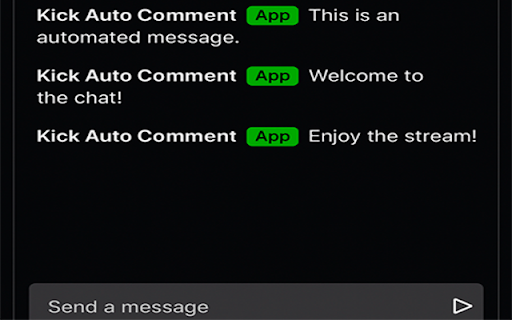
Bot de comentarios automáticos para Kick Nombre: Kick Auto Comment Descripción: Automatiza tus comentarios en Kick con Kick Auto Bot, la extensión perfecta para streamers y espectadores activos. Configura mensajes personalizados, ajusta los tiempos de envío y deja que la extensión haga el trabajo por ti. Ideal para promocionar contenido, interactuar con la comunidad o simplemente mantener activo el chat. 🔹 Funciones: ✅ Agrega y administra mensajes personalizados. ✅ Configura el intervalo de tiempo entre cada mensaje. ✅ Soporte para múltiples cuentas (según el plan). ✅ Interfaz fácil de usar y diseño moderno. Descarga ahora y mejora tu experiencia en Kick 🚀

Kick Auto-Comment
Auto-comment bot for Kick (Support multiple channels/chats). Best for lurking and not ruining KCIP. Automate your Kick channel interactions with ease! Kick Auto-Comment allows you to schedule and send messages automatically to your channel followers, saving you time while keeping your community active. Perfect for streamers and content creators who want to stay engaged without constant manual effort. Features: 🔓 Secure Access: Use a daily key to unlock the extension. 📥 Get Key Easily: Click “Get Key” to generate your daily access key from our website. 📝 Custom Messages: Add multiple messages, one per line. 🎲 Randomized Sending: Optionally send messages in random order for natural engagement. ⏱️ Set Interval: Choose the time interval (in seconds) between messages. 🖥️ Real-Time Logs: Monitor sent messages in a dedicated log panel. ⏳ Auto Logout: For security, your session expires after 5 hours. How it Works: + Enter your daily key to unlock the extension. + Set your channel, messages, and interval. + Click Start to begin auto-commenting. + View logs in real-time to track activity. + Click Stop anytime to halt messaging. Why Choose Kick Auto-Comment? + Saves time and effort while engaging your audience. + Keeps your channel active even when you’re away. + Easy-to-use interface with secure access. Disclaimer: Use responsibly. Ensure you comply with Kick’s community guidelines to avoid spam or account restrictions.

Kick Tools
Improve your Kick.com experience with Kick Tools. How to use? - Simply install it and visit Kick. - Configure it from chat settings. Note: If you're on Firefox, you need to right click to the extension and select "always allow on kick.com".

Kick Chat Bot — Auto Comment & Live Alerts
Auto comment on Kick.com streams naturally. Get notified when your favorite streamers go live. Multi-channel support. 🎮 KICK CHAT BOT — The #1 Free Chat Tool for Kick.com Streamers Automate your Kick.com chat with human-like comments and never miss a live stream again. Trusted by streamers and fans worldwide. ━━━━━━━━━━━━━━━━━━━━━━ 🤖 AUTO COMMENT BOT ━━━━━━━━━━━━━━━━━━━━━━ ✅ Sends comments automatically with natural random delays ✅ Human-like typing simulation — never looks like a bot ✅ Never repeats the same comment twice in a row ✅ Manual start only — bot does NOTHING until YOU click Start ✅ Auto-stops when stream goes offline automatically ✅ Works on multiple streams simultaneously ✅ Sends your comments exactly as written — nothing added ━━━━━━━━━━━━━━━━━━━━━━ 💬 COMMENT MANAGEMENT ━━━━━━━━━━━━━━━━━━━━━━ ✅ One simple comment list — add any type of comment ✅ Import your comments from a .txt file ✅ Export your comments to a .txt file ✅ Blacklist filter — skip comments with specific words ✅ Pre-loaded with 24 natural comments to get started ━━━━━━━━━━━━━━━━━━━━━━ ⚙️ SMART SETTINGS ━━━━━━━━━━━━━━━━━━━━━━ ✅ Custom delay range — set your own min and max seconds ✅ Active hours scheduler — bot only runs at set times ✅ Blacklist words — automatically skip unwanted comments ✅ Stats dashboard — track comments sent, uptime, rate per hour ✅ Reset stats anytime ━━━━━━━━━━━━━━━━━━━━━━ 🔒 PRIVACY & SAFETY ━━━━━━━━━━━━━━━━━━━━━━ ✅ Zero data collection — everything stays on YOUR device ✅ No login required — no account needed ✅ Only works on kick.com — no other websites ✅ No external servers — fully local storage ✅ No permissions beyond what is needed ━━━━━━━━━━━━━━━━━━━━━━ HOW TO USE IN 3 STEPS ━━━━━━━━━━━━━━━━━━━━━━ 1. Install the extension 2. Open any Kick.com stream 3. Click the extension icon → click Start Bot That's it. The bot starts sending your comments naturally. ━━━━━━━━━━━━━━━━━━━━━━ WHO IS THIS FOR? ━━━━━━━━━━━━━━━━━━━━━━ → Streamers who want to boost chat engagement on their own stream → Fans who want to stay active in their favorite streamer's chat → Anyone who wants live notifications when streamers go live ━━━━━━━━━━━━━━━━━━━━━━ ⚠️ RESPONSIBLE USE ━━━━━━━━━━━━━━━━━━━━━━ Please use this tool responsibly and respect Kick's Terms of Service. Use natural delays and genuine comments. Do not use for spamming or harassment. Found a bug or have a suggestion? Leave a review — we read every single one and update the extension regularly.

KICK BOT BY KB
KICK BOT BY KB is a lightweight Chrome extension designed to assist users during live interactions. It offers helpful tools that can enhance user presence and streamline certain actions on supported platforms.
