
liedgiagjapaehficeimmjcemnknmdfp
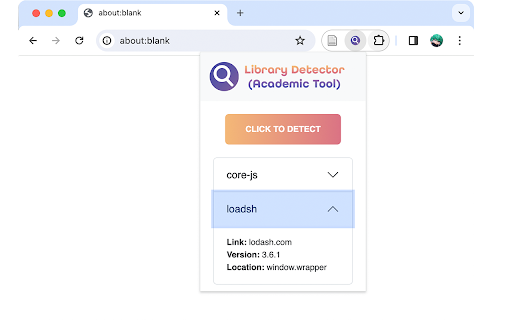

Detect JavaScript libraries used on the current web page. This tool is supported by academic software engineering researches. This open-source tool is developed to accurately detect libraries and frameworks running on the web. It collects 600+ most popular ones, pinpoints the version, and reveals those hidden by web packers or obfuscators. Usage: open a website, click on the icon of this extension (needs to be pinned in the extension bar in advance), and click on the "detect" button in the popup menu, then all the libraries loaded by the website will be displayed. All the detection features used in this extension are auto-generated by the algorithm proposed in recent research papers, ensuring the soundness of detection results. More libraries will be covered in later releases. For further information visits GitHub: https://github.com/aaronxyliu/PTV. Feedback please send to aaronxyliu@gmail.com.

Retire.JS
Scanning website for vulnerable js libraries. Icon by studiomx Retire.js Security Scanner is a Chrome extension that helps you detect outdated and vulnerable JavaScript libraries running on websites. This tool uses the Retire.js vulnerability database and scanning engine to identify libraries like jQuery, AngularJS, React, and many others that are known to have security flaws. ### Features: - ✅ Passive scan of all visited websites - ✅ Checks for known vulnerabilities in JavaScript libraries - ✅ Works offline using a local copy of the Retire.js signature database - ✅ Minimal impact on browser performance This extension does **not collect or transmit** any user data. It runs entirely in your browser.

PPC SideClick
A second screen for the Amazon Advertising which helps you to rapidly supercharge your campaign management. NOTE: This extension is an add-on to the service "PPCProphet", if you do not have an account with PPCProphet it WILL NOT WORK. It is NOT a stand-alone extension. PPC SideCLick is a "second screen" tool to help you supercharge your Amazon Advertising campaign management. You can perform hours of Amazon Advertising optimisation and analysis in just a few minutes. The way it works is simple: When you're in the Amazon Advertising Console, the extension keeps an eye out for two pieces of information: the account you're working with, and the campaign name you're viewing. Then on a second screen, either on your same computer or even a totally different machine, PPC SideClick (powered by PPCProphet) gives you a wealth of options and analysis about that account (or campaign). You can at the account or campaign level - view all of the keyword performance - view all the search term performance - see your top performing keywords, targets, - see your conversion rate, budget performance and more. If you've added your Weekly Checklists / or Standard Operating Procedures, this would allow you to perform bulk operations in just one -click. (This is the part where you save hours of time every single week) For example: Say every week you want to Negative Exact every Search Term with 20 clicks and no conversions. Rather than using bulk files or having to click into every campaign on Amazon to analyse and find those search terms, you can use PPC SideClick. 1. Visit the Account 2. Choose your SOP "Neg Exact 20 clicks, 0 conversions" 3. Click "Negative Exact" Done. This would negative exact any search term across the entire account.

AidKit for Webflow
Unlock a suite of tools made for Webflow developers. Customize & automate your development process using industry best practices. DESCRIPTION: Introducing AidKit for Webflow – the multi-functional toolkit every Webflow developer needs. Experience a seamless development workflow with a suite of practical features. AidKit for Webflow enhances your workflow, allowing you to focus on what truly matters: creating exceptional websites. PAGE SETTINGS: Feature 1 (Character Count Display): Real-time character counter for your text inputs for more precise content editing. Feature 2 (SEO Text Length Indicator): Receive instant feedback on the length of your meta descriptions and titles. Know when content is too short, optimal, or too long. Feature 3 (Title Tag Length Limit): Receive real-time character limitations for your title tags, ensuring they are optimized for search engine visibility. Feature 4 (Meta Description Length Limit): Automatically restrict a 160 character count for your meta descriptions, ensuring they are optimized for search engine visibility. Feature 5 (OG Image URL Enhancer): Easily paste the same link as the open graph image from your home page with a single checkbox. Feature 6 (Expand page settings): Adds a expand button near the duplicate and trash button for page settings to be able to toggle your view between normal and full screen for easier page settings editing + using the code editor. Feature 1 (Undo/Redo): Webflow's very useful undo and redo buttons were relocated. Reapply the original undo and redo buttons ensuring a smoother design process. Feature 2 (Active Breakpoints): When designing in webflow, you can sometimes loose track that you have been working in a non base breakpoint for quite some time... that forgetfulness can cause alot of pain when you come to realize all the work you did needs to now be redone in the base breakpoint... with this new feature you have a peripheral visual when designing for that mental reminder. Feature 3 (Change Webflow Designer Color Appearance): In Webflow's major rebranding, they introduced a much darker designer... some like it, some not as much... this feature brings back the original webflow designer appearance... but also introduces new colors for different moods... including a much wanted light mode. Feature 4 (White Label the Webflow Designer): Change the webflow logo atop left of the designer to your brand logo for a professional look. Useful when screen recording videos or screenshots for clients. Feature 5 (Sound for Alert Triggers - Notifications): Each time a webflow alert gets triggered, you will now get a ding along with the Alert. Feature 1 (Copy to Clipboard): This features adds a copy to clipboard button for the site code, so you can easily copy the entire sites code, for HTML, CSS, & JS Feature 2 (Fullscreen Code Mode): Adds a button to enable viewing the page settings code on the entire screen Feature 1 (Prevent Width & Height Confusion): This features dims widths in heights, and heights in widths, to remind you about misusing it. Feature 3 (Add Hidden CSS Units): This feature adds the following CSS Units: DVW, DVH, LVW, LVH, VMIN, VMAX Feature 4 (Highlight Multi Elements Selected): This feature highlights whenever your element is being used more than once anywhere on the site. Feature 5 (Lorem Ipsum Generator): This feature adds a button to generate Lorem Ipsum text according to the length you choose. Feature 1 (CMS Shortcut): Streamline your workflow with quick access shortcut to the CMS, making it easier than ever to switch between the designer and the CMS with a simple click of "C" on your keyboard. Feature 2 (Alert: Multiple Affected Elements): Receive an alert when you first change the styles of a class used by multiple elements. Feature 3 (Top Bar Breadcrumb): Moves the breadcrumb bar in the webflow designer from the bottom, to the top. Stay tuned for more new features to come! You can email support@aidkit.io for any questions, concerns, feedback, or any inquires.

JS Vulnerability Detector
JavaSript Vulnerability Detector is a result of my Master Thesis at Brno University of Technology, Faculty of Information technology, graduation year 2022. The extension aims to add security features to the end-users of various websites containing vulnerable JavaScript library code. The principle of extension is following: 1. After page loads the extension scans all the JavaScript contained on the page and sends it to background script for processing. 2. If the script contains a known vulnerability (initial version focuses mostly on jQuery), it is tracked and shown in the extension popup. After detection the vulnerable script can be blocked, patched or left as is and only tracked. All data is stored locally and can be cleared by a "Clear" button in the extension popup. There is no server communication going on, no data leaves the browser. Extension runs in 4 modes: 1. disabled - no action 2. analyze - standard analysis only mode - no patching or blocking of vulnerable scripts 3. bloc - vulnerable scripts are removed from website 4. repair - experimental, vulnerable scripts are patched if possible Currently it can detect vulnerable versions of jQuery (all up to 3.5.0) and repair them by updating them in runtime to 3.5.0 and couple more (around 30, including some of lodash, remarkjs, axios, handlebars and other vulnerabilities).
