
lhpcbmfcafkilngbpbndoaaiaifiebeg


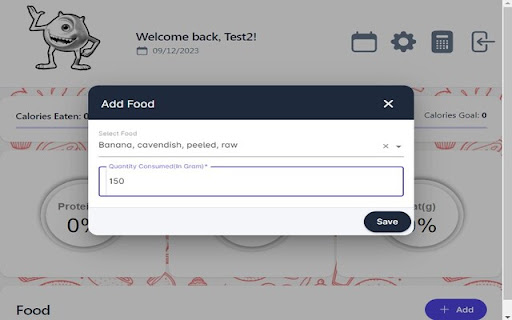
Calorie Monster is a powerful calorie and macro-nutrient counter with a pleasant user interface. You'll also find a cheeky monster on the main page that grows in colour as you progress towards your goal throughout the day. It combines Angular and mySQL technology to produce an engaging and robust calorie counting applicaiton that features a calendar function alongside a massive database of food items.

Vacagotchi
Gamify your productivity with your virtual pet companion A virtual productivity pet designed to keep you focused, motivated, and entertained while you work, study, or exercise. Vacagotchi gamifies your daily life by introducing a virtual pet-style creature that lives on the side of your screen. As you complete tasks and stay focused, your pet grows, evolves, and unlocks new rewards. Whether you're a student, a remote worker, a creative, or just someone who wants to build better habits, this extension is your perfect companion. How it works You begin with a mysterious egg. Over time, based on your productivity and focus, the egg hatches into a unique pet. Each user experiences different evolutions depending on how they engage with their tasks and the app. Assign estimated completion times and priorities Complete tasks to earn points and coins Watch your pet grow, evolve, and become happier as you stay productive Built-in features 1. Task Tracker Organize your to-do list inside the app. Break down your day into actionable steps and visually track your progress. Every task you complete helps your pet thrive. 2. Pomodoro Focus Mode Integrated Pomodoro timers allow you to enter deep work mode. Customize session lengths and breaks to suit your rhythm. While in Focus Mode, your pet monitors your progress and rewards your consistency. 3. Integrated Music and Radio Stay in the zone with a built-in radio that includes curated lo-fi beats, ambient tracks, and relaxing sounds ideal for working, studying or meditating. The audio continues playing in the background while you navigate other tabs or apps. 4. Market and Customization Use the coins you earn from tasks to unlock new rooms, outfits, background themes, soundtracks and more. Personalize your experience and express your mood or style while staying productive. 5. Lightweight and unobtrusive The pet lives on the right side of your screen. It doesn't interrupt your workflow and is always ready to cheer you on or remind you to stay on task. It's playful and nostalgic, without being a distraction. Why it works Productivity often suffers due to lack of structure, low motivation, or burnout. This extension turns daily routines into a small adventure. The visual feedback, rewards system, and gentle companionship of the pet create a sense of progress and engagement that helps you stay on track. It’s a modern take on gamified productivity, built with love for people who appreciate a retro aesthetic and want a more playful workday. Who it's for Students looking to manage study sessions and assignments Professionals seeking structure and motivation during remote work Creatives and freelancers who love customization and light gamification Anyone nostalgic for the old school virtual pets era who wants to bring joy into their task list Key Features Summary 3 different virtual pet that evolves with your progress Customizable tasks with difficulty levels and rewards Pomodoro timer with adjustable focus and break intervals Built-in relaxing soundtracks and radio station Market with unlockable content (rooms, clothing, music) Minimalist, fun, and nostalgic pixel-style interface Designed for right-side screen use to stay out of your way Get things done, grow your pet, and make your day feel like a game. This extension is more than a productivity tool — it’s a companion.

Breathe
A Chrome extension for guided breathing. This extension is designed to help users take a small break from their stressful lives and do a few cycles of guided breathing. Taking a moment to de-stress can provide much needed relaxation and clarity!

Calorie Calculator
CalorieDeficit.org is a dedicated resource aimed at providing individuals with comprehensive information and tools to understand and implement calorie deficit strategies for weight loss. The website offers a wide range of content, including educational articles, practical tips, and interactive tools to help users achieve their weight loss goals. CalorieDeficit.org features a clean, user-friendly design with easy navigation. The website is responsive, ensuring a seamless experience on both desktop and mobile devices. Each section is clearly labeled and organized to help users quickly find the information they need.

FYBR
fybr is the new generation of email management. Increase your productivity and your ease of mind by using fybr to clean your email inbox. fybr links to your gmail seamlessly - just open the extension once a day, and see who’s clogging your email.. Then, you can choose which senders you want out of your inbox. These emails aren’t deleted, they’re just tucked away in a fybr folder, accessible with all your other gmail folders. And just like that, emails from those senders will automatically move out of your inbox (and new emails will redirect to the fybr folder too!). From there, you can either delete those emails or undo the process at any time in our extension! How we’re different from all the other email apps: We help you automate and clean your inbox. It’s no longer a manual process - we will give you recommendations of who to block. fybr uses a simple sorting algorithm to parse through your emails, and determines whether or not you’ve ever responded to this sender. Don’t worry – we never read your emails or collect your data. You can also block any number of senders you want, just with a simple click of a box. You can also unblock emails through the same process. Again, nothing is actually deleted either, you’ll have your own fybr folder to see the emails! We want to reduce the headache of dealing with a messy inbox in a way that doesn’t waste your time!
