
lhmckpbbfjnkbgekjinmhpcaojjiifcd
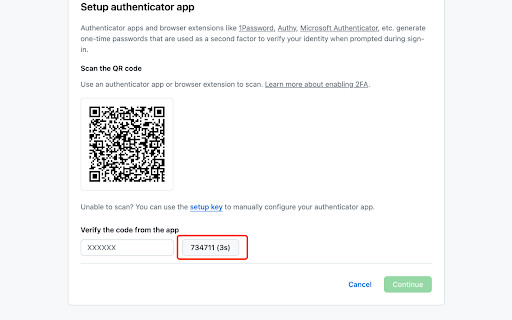
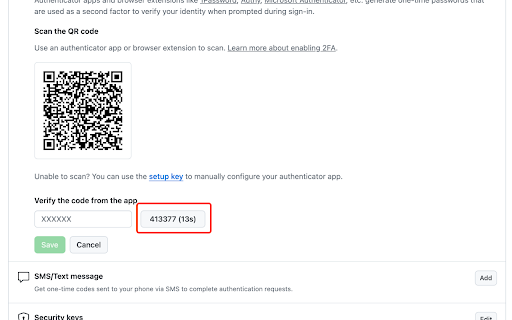
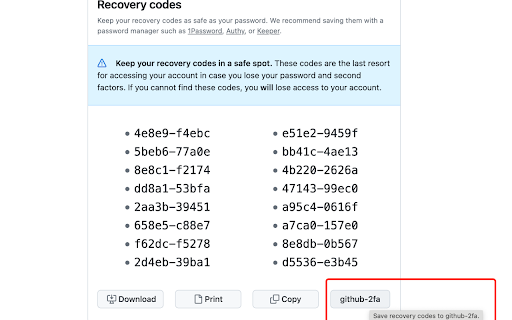
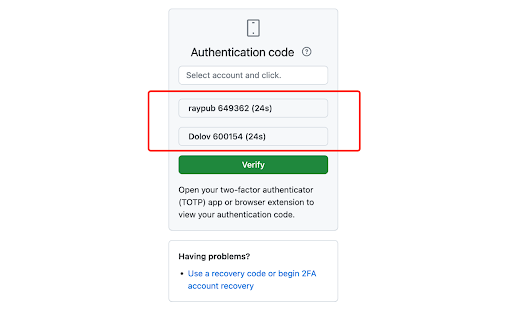
一款专为安全与效率打造的开源免费 2FA 扩展,支持二维码自动扫描、选区扫描、表单输入与上传二维码,轻松应对多平台账户管理,界面优雅、体验出色。 你是否经常在不同网站登录时被 2FA 验证搞得头大?要么切 App、要么翻手机,还得自己输验证码,繁琐又麻烦?😵💫 别急,Authenticator 🧩 插件来拯救你!它是一款通用型 TOTP 二步验证器,安装到浏览器中即可随时查看验证码,无需切换页面,无需掏出手机! 简洁优雅的界面 + 极速访问体验 ✨ 让你登录验证快人一步,不再手忙脚乱! 开启无忧验证,就靠这一个扩展!🔐⚡️ 核心功能: ✅ 支持多平台账号,多样化数据录入:二维码自动扫描、手动输入、导入截图,轻松便捷。 🔗 深度集成 GitHub、NPM 等平台,实现无缝验证码填充。 🎨 多款主题色自由切换,界面更个性更舒适。 💾 支持存储恢复码,快速恢复账号安全保障。 🆓 完全开源免费,代码透明,安全可信赖。 更多功能持续开发中...

2FA Authenticator
Free 2FA Authenticator app, Chrome extension alternative to Google Authenticator. 2FA Authenticator is a powerful extension designed to enhance your online security by generating time-based one-time passwords (TOTP) for two-factor authentication (2FA). With 2FA Authenticator, you can easily manage your 2FA codes for various websites and services directly within your browser. No more switching between apps or devices—this extension keeps all your 2FA tokens conveniently in one place, making your online accounts more secure and access more efficient. Simply scan QR codes, enter your secrets, and start protecting your accounts with ease. 🔥 Securely store and manage your 2FA codes. 🔥 Automatically generate one-time passwords for quick login. 🔥 Simple and easy-to-use interface for hassle-free setup. 🔥 Compatible with a wide range of websites and services. Stay safe online with 2FA Authenticator—your trusted companion for enhanced security.

2FA Authenticator
This extension generates 2FA authentication codes in your browser. 2FA Authenticator is an alternative Chrome extension to Google Authenticator. You no longer need to use your phone to authenticate. This extension provides you with 2-step verification codes directly in your browser. Features: - OTP code verification in your browser - One-click verification code autocompletion - Scan QR codes from the page - Display QR codes for quick scanning - Upload QR code images - Backup your accounts in Google Drive - Open source

划词翻译
一站式划词 / 截图 / 网页全文 / 音视频 AI 翻译扩展,支持谷歌、DeepL、ChatGPT、百度、有道等 22 个国内外主流翻译服务,且均可用于全文翻译。能在 PDF 里使用。 划词翻译最初发布于 2013 年,距今已有 11 年历史,且仍在持续更新当中。 - 内置高准确度的谷歌翻译,能确保翻译结果跟 translate.google.com 是一致的。 - 鼠标划词功能,支持丰富的设置项,比如黑 / 白名单、关闭鼠标划词后通过快捷键来触发翻译等。 - 鼠标悬浮取词。 - 语音朗读。 - 内置独立翻译窗口,用于翻译浏览器外的文本。可以勾选持续监听剪切板,在任意程序复制文本即可自动弹出并翻译。 - 网页全文翻译,可以切换原文 / 译文 / 双语对照、自动开启等。 - 截图 / 图片翻译。 - 内置 PDF 阅读器,用于在 PDF 文件上实现鼠标划词、鼠标悬浮取词、截图翻译等功能。对 PDF 进行全文翻译的功能正在加紧开发中。 - 麦克风翻译。 - 音视频翻译(内测中),翻译网页中的音频 / 视频。 - 支持历史记录和收藏夹。收藏夹内容可以导出成多种文件,例如 json 和 csv。 完整功能介绍请查看 https://hcfy.ai/docs/guides/summary/ 英文单词会提供音标、详细释义、美音 / 英音朗读和词根,词根可以被点击,点击后即可查看词根的翻译结果。如果你需要,划词翻译也可以在划词后自动朗读被划选的单词。 默认使用弹窗在文本附近显示翻译结果,也可以固定在一处显示。 支持在任意程序里复制文本后,按下 Ctrl + Shfit + 1(macOS 将 Ctrl 改为 Command)查看翻译结果,无需切换回浏览器。这个快捷键是可以修改的。 支持历史记录和收藏夹,这两个功能也可以关闭。 如果你遇到了问题或者想要新的功能,可以在评论区留言,我基本上都会答复。官网(https://hcfy.ai)里也有其它反馈渠道。

TOTP Authenticator
Get 2FA OTP instantly from your mobile. Works with TOTP Authenticator mobile app. This extension empowers you to easily transfer and access the 2-factor authentication codes from your mobile to your browser. No need to manually type in the codes ever again! Now available with push notification support, send code request straight to your phone through the extension (current support only for Android devices). 2-factor authentication adds an extra layer of security to your accounts. In 2FA, apart from your email and password, you also have to enter a security code to log in. This temporary code is generated by a secure algorithm. Enabling 2FA can prevent you from upto 80% of the cyber attacks. 2FA is supported by majority of the online services including: Google, Facebook, Github, Epic Games, Evernote, etc. The extension only acts as a supplement to the TOTP Authenticator mobile app. To use this extension, please install and setup the Chrome Extension feature of the app. Read the complete setup guide: https://www.binaryboot.com/totp-authenticator/guide/android/chrome-extension
