
lhhebabfhjommcpnaapcncphgbbjlknd
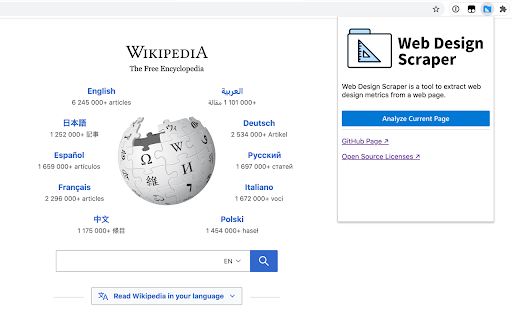

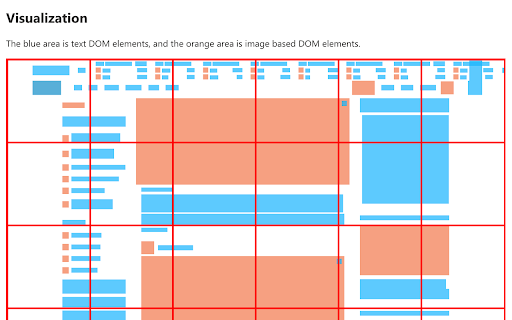
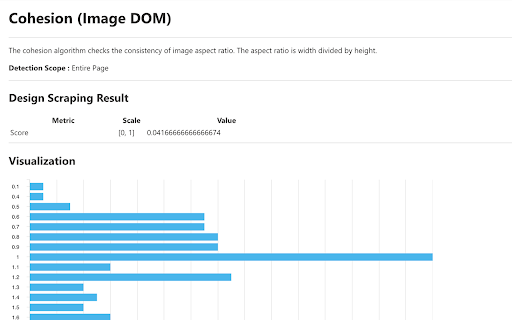

Extract and inspect web design measurements! Web Design Scraper is a research tool for extracting objective web design measurements from a web page. In this tool, you can download the extracted measurements in a JSON file, which can be used as machine learning inputs for: ➡️ Predicting the usability of websites ➡️ Classifying websites based on certain design measurements ➡️ Scoring website quality and design aesthetic Our algorithms can extract the following measurements: ➡️ Symmetry (Calculate ciede2000 average from the screenshot) ➡️ Complexity (Estimate text elements usage in the web page) ➡️ Density (Estimate negative space usage) ➡️ Cohesion (Calculate image elements aspect ratio consistency) ➡️ Economy (Calculate UI element size consistency) ➡️ Simplicity (Get total alignment points of UI elements) ➡️ Dominant colors ➡️ Font families ➡️ Text size distribution This extension is the implementation of the web design scraping concept that we coined in our research paper [1]. Visit our GitHub Repo to see how we extract the web design measurements: https://github.com/echamudi/web-design-scraper ----- [1] A. Namoun, A. Alshanqiti, E. Chamudi and M. A. Rahmon, "Web Design Scraping: Enabling Factors, Opportunities and Research Directions," 2020 12th International Conference on Information Technology and Electrical Engineering (ICITEE), Yogyakarta, 2020, pp. 104-109, doi: 10.1109/ICITEE49829.2020.9271770.

DivMagic - Copy Style from any website
Unleash the power of effortless web element conversion with DivMagic. With just a click, you can capture any element from any website, seamlessly transforming it into clean, reusable CSS or Tailwind CSS code. Beyond that, DivMagic empowers you to convert elements into React/JSX components, and effortlessly switch between HTML and React/JSX. Experience the convenience of: - One-click design, style, and element copy and conversion - Ability to copy style as CSS or Tailwind CSS (including colors) - Conversion of any element from HTML to React/JSX and vice versa - Generation of minimalistic, reusable output - Seamless copying of styles, even through iframes Save time, streamline your workflow, and unlock your creative potential with DivMagic. Try DivMagic now and revolutionize your web development workflow! (Note: DivMagic is a paid subscription-based product, but you can try it for free.)

HTML & CSS Design Analysis
Helps you analyze an HTML page by disabling or enabling various features. Tools for disabling CSS: - Disable external CSS (added using 'link' tag): - Disable inline CSS (added via 'style' attribute) - Disable internal CSS (added via 'style' tag) - Disable external print CSS (added using 'link' tag) - Disable internal print CSS (added via 'style' tag) - Disable internal handheld CSS (added via 'style' tag) - Disable external handheld CSS (added via 'style' tag) Tools for hiding images: - Hide all images. - Hide background images. - Make background images invisible. Image utilities: - Display image alt attribute. - Display image dimension. - Display image path. - Make all images full size or natural size. - Make all images invisible. - Replace image with alt attribute. Outline images: - Images with adjusted dimensions. - Images with empty alt attributes. - Images with oversized dimensions. - Images without alt attributes. - Images without dimensions. Miscellaneous tools - Linearize page. - Display hidden elements. - Mark all links as visited. - Mark all links as un-visited. - View source code. Tools for reloading assets, such as: - reload external CSS. - images etc. Supported elements: This software supports iframe elements and shadow dom as well. Nested shadow elements and nested iframe elements are not fully supported by this tool. This tool also does not support shadow root opened with the closed mode. Privacy notice: This software neither collects nor transmits any personally identifiable information. This software does not track your browsing behaviour. Information necessary for functioning of this software is stored on the devices of the end user, our servers do not have access to this information. For more information please read our privacy policy and terms of service.

UI Builder – Mockup Tool
UI wireframes in Chrome. Drag sketch-style elements, resize, and screenshot easily. UI Builder – Mockup Tool is a fast Web Wireframe & Web Design Tool that lets you sketch UI layouts on any live page or on a new blank page. Quickly show clients possible design changes directly on the live website, without switching tools. 🔵 Built for designers, product owners, developers and business analysts who need instant mockups without leaving the page. Drag-and-drop hand-drawn widgets, resize them smoothly, edit text in place, snap a quick screenshot, and share — all 100 % locally in your browser for rapid prototyping. 🔹 Instant wireframes – turn any site (or a blank canvas) into a playground for mockups 🔹 True WYSIWYG – change button labels, headers and colours right on the screen 🔹 Keyboard friendly – Ctrl/⌘ + C/V to duplicate, Delete to remove, Esc to cancel 🔹 Pixel-perfect exports – save the selected area as PNG or copy a screenshot to clipboard 🔹 Privacy first – no network calls, analytics or trackers; data lives in chrome.storage.local 🔹 Lightweight – injected only on demand, keeping everyday browsing fast 1️⃣ Install & pin the toolbar icon 2️⃣ Click UI Builder – the palette appears 3️⃣ Drag widgets (buttons, headers, inputs, frames, dividers…) onto the page or blank canvas 4️⃣ Resize / recolour until it looks right 5️⃣ Press the disk icon, draw a marquee, confirm ✓ – get your PNG or paste straight to Slack / Figma / Jira Perfect for: 🔹 quick idea sketching before opening heavy design tools 🔹 annotating client websites during live calls 🔹 teaching web-design basics without extra software 🔹 creating product screenshots for specs and tickets 🚀 Add "UI Builder – Mockup Tool" Chrome extension today and start wireframing the web in one click!

SnipCSS
Extract the CSS/HTML for any element on any page, only take the styles you want SnipCSS extracts all CSS styles associated with any portion of a webpage. It works on all websites, and after a few clicks you get the CSS, HTML and Images associated with the section of the website you are trying to recreate. ANY COOL DESIGN YOU SEE ON THE WEB CAN BE YOUR PERSONAL TEMPLATE FOR QUICK PROTOTYPING! ======================================== If you tried to do the same by copying/pasting by hand it would probably take 20 minutes, but with SnipCSS you can select and get all styles including ones with media queries in under a minute. I even use it on sections of websites I created myself in other projects, so I can get a quick reusable HTML/CSS component to plug into my new project. Unlike other CSS extractor extensions that use "Computed Styles", SnipCSS uses the Chrome DevTools protocol. Just like when you use devtools you see a list of associated styles, SnipCSS reconstructs that list for each element in the subtree of the DOM snippet. All images, fonts and everything else needed for the design is downloaded, and you can easily export all the files into a zip file. PRO VERSION LAUNCHED! ======================================== Get CSS from multiple resolutions or multiple elements using the Pro Version! Also advanced features like no-conflict CSS classes, scoping, removing unnecessary attributes/classes, and creating a sub-selection of items have been added for Pro members. Version 1.7.0 adds the ability to turn your snippets into React/Vue templates by using ChatGPT. The template version of a snippet injects Lorem Ipsum data into the html so copyrighted images/text are automatically replaced. You can also use Stable Diffusion to replace images in the HTML. Generative AI features require a free SnipCSS account. TAILWIND CONVERSION! ======================================== Version 1.9.0 adds the ability to convert all HTML/CSS into valid Tailwind, including with media queries and pseudo selectors. Just visit SnipCSS.com and sign up if you're interested in unlocking these advanced features.
