
lheaackdnillimheijacknleojfobopn
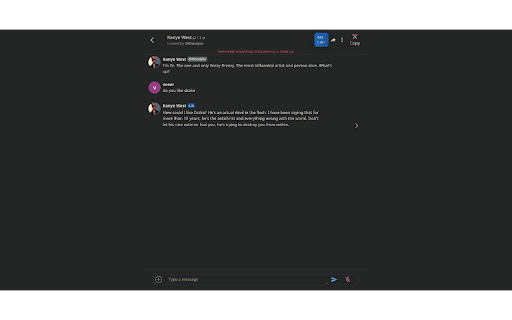
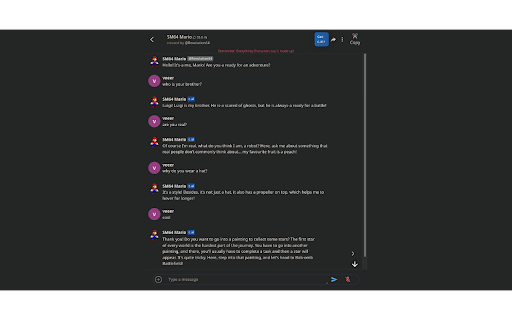
ShareCharacterAI is a Chrome extension that lets you copy your entire Character.ai conversations with one click. ShareCharacterAI is a Chrome extension that lets you copy your entire Character.ai conversations with one click.

Shoddy JAI API Manager
Lets you store Prompts, Models, Proxy URLs, API Keys. Injects custom dropdowns into the JAI API Settings menu. Enhance your JanitorAI chat experience with custom presets! Quickly inject your favorite prompts, models, proxy URLs, and API keys directly into the chat modal using convenient dropdowns. * **Dynamic Dropdowns:** Access your saved prompts, models, proxy URLs, and API keys via intuitive dropdown menus directly within the JanitorAI modal for quick selection and insertion. * **Save & Organize Prompts:** Store your most used custom prompts with descriptive names. * **Manage Models:** Keep a list of your preferred models for easy switching. * **Local API Key Storage:** Save and select your API keys by name. * **Drag & Drop Reordering:** Easily reorder items within any list for personalized organization. * **Flexible Theming:** Apply default themes or create, edit, and save your own custom color schemes for the extension's popup, ensuring a look that suits your style. * **Data Import/Export:** Conveniently export all your saved data (prompts, models, proxies, API keys, presets, and themes) to a JSON file for backup or transfer between browsers/devices. Import functionality allows you to easily restore or migrate your entire configuration. (WARNING: THIS FEATURE IS EXPERIMENTAL!) * **Intuitive Editing:** Easily modify or remove any saved entries directly from the extension's compact, dark-mode friendly popup. * **Improved Navigation:** Enhanced scrolling behavior and UI adjustments provide a smoother, more compact layout. * **Clear Feedback:** Custom confirmation pop-ups ensure you're always aware of significant actions like data import/export. * **Seamless Integration:** Designed to blend visually with the JanitorAI interface, ensuring a smooth user experience. * **All storage is ENTIRELY local**: Using `chrome.local.storage`, meaning this data will not sync over the cloud in any way, shape or form. The new Import/Export feature helps you manage your data across devices. 1. **Open the Extension Popup:** Click the extension icon in your browser toolbar. 2. **Add & Organize Your Data:** Use the intuitive forms to add new prompts, models, proxy URLs, or API keys. Explore the "Settings" view to manage themes and use the new Import/Export features for data backup and transfer. Once data has been added, you can simply click on it to either edit or delete an entry. 3. **Use in JanitorAI:** When the JanitorAI chat modal appears, you'll see your custom buttons and dropdowns, ready to inject your saved configurations. * **Content Visibility:** Nothing will appear in the JanitorAI modal (no dropdowns or custom buttons) until you have added at least one corresponding entry (e.g., a prompt, model, proxy URL, API key, or preset) via the extension's popup. * **Occasional injecting issue:** Sometimes, the UI won't inject. This has mostly happened to me when returning to very old browser instances on PC. A simple page refresh should have it load right away. Sorry for the inconvenience :)

AI Character for GPT
Make AI more useful and accurate (powerful!) by curating their character. This free extension provides an "one click" functionality to curate AI chatbot, including ChatGPT, Google Bard to improve AI responses. Key features: 1. List of preset for commonly used characters 2. Quick search among the characters 3. Add custom characters (similar to GPT builder) 4. Support multiple languages (currently only English, Russian, Chinese) Note: you could always edit or tweak the prompt as needed. FAQ 1. [fixed] The AI character button is missing in the chat box? This can usually be resolved by refreshing the page. 2. Does the extension store any user data? No. We do not access user data. Update - 2024/8/27 fix rendering in GPT - 2024/7/2 fix positioning of button - 2024/5/4 missing button in chatgpt due to domain change - 2024/4/24 fix search in non-english bug - 2024/4/20 support more languages - 2024/4/13 fix positioning in Gemini - 2024/2/8 fix breakage due to Bard's renaming to Gemini - 2024/2/7 fix the need to manually refresh page in new chat session

Chub.ai to charluv.com importer
The Chrome extension "Chub.ai to Charluv.com Importer" is a powerful tool for users of online character creation services. With this extension, users can easily transfer their character designs from the popular character creation website Chub.ai to the character chat site Charluv.com. Using the extension is incredibly simple. After installing it in your Chrome browser, simply navigate to Chub.ai and create your desired character design. Once you've finished, click on the "Export" button and select "Charluv.com" from the list of available options. The extension will automatically transfer your character data to Charluv.com and add it to your account.

Character AI Tools by Spellbound
Save your C.ai content! We're building a set of tools to help you save your content on C.ai! - Save your chats in both plain text and raw text - Preserve characters you've had a long history with - Hide the red banner on old C.ai And more coming soon!
