
lhddmeceobpjibpjghmmicaengjbnncp
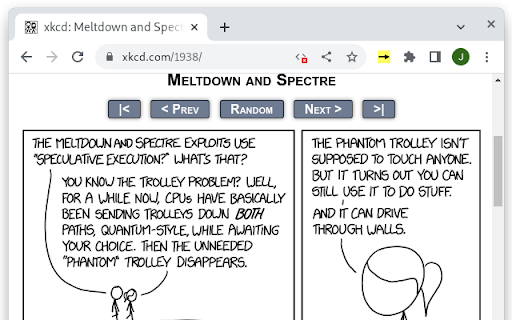
preload the next page of a webcomic for faster archive binging This extension speeds up webcomics by pre-loading the next page in the background. This way, when you decide to go to the next page of the comic, you don't have to wait for it. To activate the extension (per tab): - open the webcomic you want to read - press the arrow symbol in the extension bar; the arrow should turn yellow To teach the extension how to find the next page, just click the link to the next page as normal. After a few seconds, the page should change, and the arrow should turn green. If the arrow doesn't turn green, the extension failed to identify the pattern for the "next page" link; if there are multiple links to the next page, try clicking a different one. To go to the next page of a comic, either click the normal link to the next page or press enter.

urlNeXT
urlNext is simple navigator button that ease you to do sequences pages (next page) based on link in the page or the URL of the page. The urlNeXT button will simple shown when it find previous/next link or numbers on the URL that you browse to. By clicking the button it will bring you to the next page. As example if you are browse to http://domain.name/page100.html by clicking the urlNeXT button will bring you to http://domain.name/page101.html Or you can use hot keys: - CTRL-SHIFT-LEFT ARROW - CTRL-SHIFT-RIGHT ARROW At first, urlNeXT will use link found on the page for previous or next link. If it does not found the link, the url numbers will be used. There is an animated page with arrow indicate the action occurred. The arrow may have 2 background color: - Blue is mean scanned linked is used - Green is mean numbers on the url is used If you feel this animation consumes much cpu, please let me know your CPU, GPU, OS, Chrome version. The animation is purely css (script only trigger to start the animation), so it's really depend to the chrome it-self how the animation being handled. For news,update, and/or response on comments, you can read at http://peprasetya.blogspot.com/search/label/urlNeXT Please see the change log below for feature list. If you find any problem and want to let me know, please don't just say "It's not work". Please give more detail, at least the url that you browse. Change Log: Version 2.0.0 (2 Jun 2026) - Update to manifest 3 and adapt new API call Version 1.7.6 (14 Aug 2014) - No new feature, just fixing to compatible with Goole Code Practice, otherwise it will not work Version 1.7.5 (6 Aug 2014) - Nothing changed except Chrome Extension meta as Google want update some meta files Version 1.7.4 (15 June 2012) - Update scan mechanism for Google Search, as Google may use some different page location. - Change the animation arrow following Google Chrome animation in Mac OS X when using swipe gesture on back and forward history. Version 1.7.2 (4 November 2011) - Link Scanner now scan https page. This only because now chrome by default use https in search page. So to be able activate link scanner, we have to allow the https being injected. Version 1.7.1 (16 September 2011) - Preload arrow image, fix on some occasion that the arrow not shown. - Add layer that pulled by the arrow to visualized new page is pulled for next/previous page. Version 1.7 (14 September 2011) - Animated arrow on next or previous action. The animation is taken between loading page time. So if the next/previous page load so fast, the animation may not occur or just half the progress, even the arrow image does not shown. - The animated arrow may indicate the type of the link used. If scanned link used for the next/previous link, it will use blue background. But if count number on the url, it will shown with green background. - Force scan links if the page does not fully loaded. On case the page load in very long time, it prevent urlNeXT to scan links. Version 1.6 (1 July 2011) - Scan links for blogspot base site and use older link for next page and newer link for previous page Version 1.5.4 (4 May 2011) - Update Google Search scanning method as Google change the navigation panel Version 1.5.3 (19 Nov 2010) - Use dynamic link URL, urlNext will use the latest url in the scanned links, so it can adapt if the page change the url on the fly. - Changed for Google Instant Search, the search result in re-scan on each action and adapt to latest change. Known issue, the icon will not adapt automatically if you change the search term, nor click the navigation on the result page. Version 1.5.2 (27 Aug 2010) - Change Icon - Bug fix for Url start with "/search" as reported by Devmake. Now it will scan links on the page. Version 1.5 (23 Apr 2010) - Bug fix with empty href attribute. The link will be no use if the href is empty. Version 1.4 (22 Apr 2010) - Bug fix with next link scanned from the page but does not have number in URL, It was not perform to the next page - Bug fix in scanning algorithm for finding next and previous text. Version 1.3 (21 Apr 2010) - Scan links on the page (https will be not scanned) to finding specific link for Previous and Next Link based on REL attribute or text for the link. - Custom page scan to find the links for search engine Google, Bing, and Yahoo. This will lead a malfunction if the search engine change the result page HTML structure. - There is 2 dot on top of urlNeXT icon to indicate the availability on prev and next link. Red dot means unavailable, while blue mean available for the link. Left top dot for previous link, right top dot for next link. Version 1.2 (12 Apr 2010) - Adding Hot Keys (CTRL-SHIFT-LEFT ARROW and CTRL-SHIFT-RIGHT ARROW). These hot keys only work on regular http, as I do not want to inject secure page (https)

Link Protector
Adds the noopener attribute to links (third-party only) and prevents websites from accessing the opener window. Link Protector extension is designed to potentially improve your online security. For all link elements (hyperlinks) within the page, if the link opens in a new tab and does NOT have an opener attribute (rel=noopener), this addon adds this attribute to the link to prevent the new window from accessing the opener window (previous tab). Please note that this addon only works if the links have a third-party href, otherwise it won't change the attributes at all. By adding the noopener attribute, it can potentially improve your online security and privacy, as the third-party website does not have access to the opener window (the tab in which the hyperlink is opened), therefore your online data will not be exposed to other websites. The toolbar button serves as an ON, OFF switch to quickly turn the extension ON or OFF. Badge icon text shows the number of hyperlinks that are being changed. This addon does not have separate options or settings page. If you have a feature request or found a bug to report, please fill the bug report form on the addon's homepage (https://mybrowseraddon.com/link-protector.html).

MyCache
MyCache automatically stores saved copies of the pages you visit. MyCache is a Chrome extension for saving copies of the pages you visit automatically or on request for offline viewing. It also provides a user interface for viewing all pages stored in the filesystem. By using MyCache you agree to the terms of use and privacy policy (https://github.com/msindwan/msindwan.github.io/wiki/MyCache-Terms-of-Use-and-Privacy-Policy) MyCache does not send your data to the vendor or any third-party vendors. All files are saved on your desktop. If saving all files by default, please make sure to keep sensitive files saved by MyCache safe and secure.

TooSlow? - Load Websites Faster
Browse websites faster and smoother with advance caching, pre-loading and no-refresh mechanism. Transform your web browsing into a lightning-fast experience. TooSlow is an ultimate tool for impatient surfers. This extension deploys advanced techniques to accelerate your favorite websites, dramatically reduces the amount to load. 🚀 No-Refresh: Accelerates pages/links without the annoying full page reloads. It converts any site into a smooth single-page application for seamless navigation. 🚀 Instant Loading/Caching: Don't waste time fetching the same content repeatedly. It intelligently caches requests, ensuring instant access to previously visited pages. 🚀 Pre-Load Requests: Load content before you even click, ensuring lightning-quick browsing. It only preloads when there’s a good chance that you will visit them. By default this extension is enabled for all website with all the features. You can enable or disable features on a per-website basis. While it works on most of the websites, it may affect some complex JavaScript-dependent ones. Easily disable the extension or specific features for these websites. Say goodbye to slow-loading websites and significantly improve your browsing speed with TooSlow, the ultimate web accelerator chrome extension. No more frustrations with pages loading at a snail's pace. TooSlow is your go-to solution for turning "Too Slow" into "Too Fast" when browsing the web. This chrome web speed optimizer guarantees lightning-fast web page loading and enhanced internet speed, making slow old web pages a thing of the past. With TooSlow's webpage load accelerator and website speed booster, you'll experience immediate page access, fast loading, and reduced page load times. We understand that slow websites can be frustrating, which is why we've designed this chrome extension to eliminate those annoying delays. Don't let your browsing experience be "Two Slow" when you can supercharge it with TooSlow. Our chrome site speed booster intelligently caches requests, ensuring instant access to previously visited pages. It eliminates the need to repeatedly fetch the same content, saving you valuable time and providing a more responsive web experience. Whether you're looking for a chrome speed utility, a website performance enhancer, or a tool to accelerate web navigation and fix slow websites, TooSlow has you covered. Say hello to faster internet surfing and bid farewell to the days of "Too Slow" web browsing. Experience the power of TooSlow and transform your online experience today. Download our chrome extension now and enjoy the benefits of instant page access, fast loading, reduced load times, and enhanced website speed. Say goodbye to "Too Slow" and embrace the lightning-fast web with TooSlow!
