
lhbjcjhlgiblnlfigbfhnamoghgfppoh
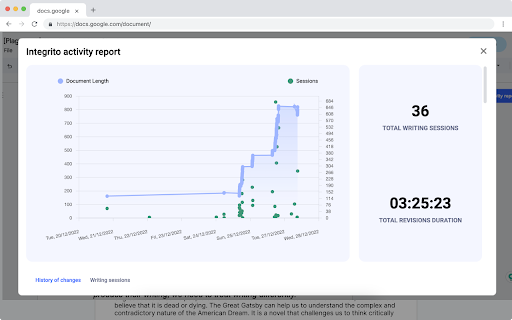
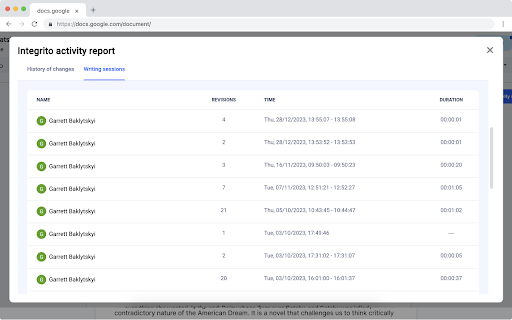
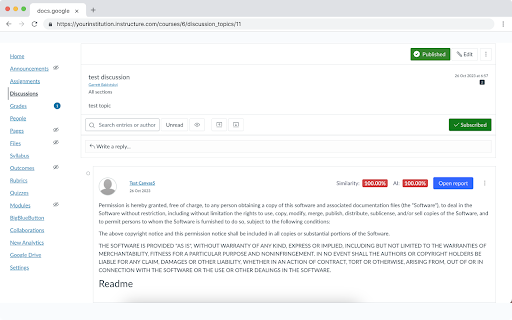

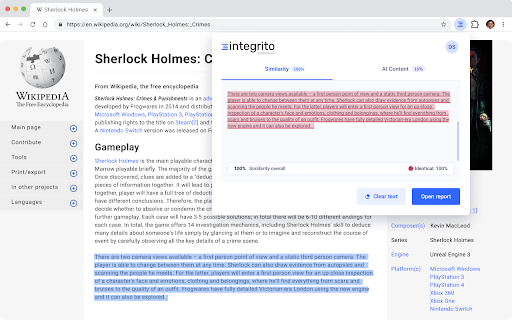
This extension is a helpful all-in-one tool for education and working with texts. Integrito allows you to: ✅ Prove or disprove text authenticity by exploring the writing process and identifying suspicious events in Activity reports ✅ Check Quizzes & Discussions in Canvas for Plagiarism and AI ✅ Check any web content for Plagiarism and AI in 1 click Integrito Activity reports allow to track writing and contribution progress to see: - how the text was written - how much time was spent on writing it - if suspicious events like pasted text happened and compare them to the final version - if there were any other contributors to make sure contract-cheating didn't take place. With Integrito Activity reports, students can easily prove they didn’t use AI and wrote the assignment on their own by showing the writing process. This way they can get a fair grade no matter what AI detectors say. For teachers, Integrito gives confidence in assignment authenticity by tracking suspicious events like pasted text or outsourcing the writing to a third party. Activity reports provide an extensive overview of what AI detectors and plagiarism checkers are missing. Integrito by PlagiarismCheck.org helps teachers, students, and content creators check for plagiarism and AI-generated content Integrito Plagiarism checker Chrome extension makes the process smoother: scan any webpage and get a clear report within seconds. ✅ How it works: - Select the text you want to check. - Launch Integrito extension. - Click “Check”. - Get a similarity and AI percentage in no time! - Access a detailed report to analyze the similarity sources. - Download the PDF report to share it with others. 🔧 Integrito extension includes a comprehensive toolkit to enhance your workflow: - Check plagiarism swiftly and accurately with our sophisticated algorithms and constantly updated databases. - Trace potentially machine-written content with our precise AI detector. - Check Discussions from Canvas or Brightspace. - Analyze any assignment right in your LMS. - Stay mistakes and typo-free with the Writing Assistant. 🧑🏫 Why customers choose Integrito by PlagiarismCheck.org: - Plagiarism detector provides deep Internet search along with specific databases, some of which are not available on the web. - AI-detector with 97% accuracy distinguishes between human and machine writing and catches content from popular AI generators - including Google Bard and ChatGPT checker. - Responsive customer Support is available 24/7, fixing problems and answering questions. - The team offers free unlimited training for the faculty. - The tool is improving along with technologies, helping you to be one step ahead of AI and plagiarism-related challenges! ⚙️ How to set Integrito Plagiarism & AI Detector Chrome extension: - Click “Add to Chrome”. - Click on the extension's icon on the extension bar. - Click “pin” near the Plagiarism and AI Checker. - Register/log in with your email or Gmail. - Enjoy! Integrito is a powerful tool for text analysis in Google Doc history that leaves no doubts in the text's authenticity and originality. If you have ever wondered how to prove you didn’t plagiarize or use AI, Integrito was created to help you! Try it now and tell us what you think in Reviews! ⭐⭐⭐⭐⭐

Chatgpt Plagiarism Checker - GPT-4, GPT-3
Identify your GPT3, GPT4 and ChatGPT text with our Free Chatgpt Ai Plagiarism Checker tool. A simple extension for use Chatgpt Plagiarism Checker - GPT-4, GPT-3 in your PC, Mac, and Windows. The 'Chatgpt Plagiarism Checker - GPT-4, GPT-3' extension is a simple Google Chrome extension that enables users to easily check Chatgpt Text Plagiarism from their Windows or Mac computer. 📭 Step 1: Firstly, click on the extension icon after installing it. You will see a Text box which name is "Enter Text Here" 🧑🎨 Step 2: So, Copy Text from your article or any soruce, then paste to the text box, Then Click "Check Plagiarism" Button. 🧑🎓 Step 3: Then Wait Few moment, You will see the result. Enjoy! 👍 ChatGPT 3.5 and ChatGPT 4 , OpenAi Text plagiarism detector 👍 Simple and lightweight. ⭐️ Compatible with Google Chrome browser on PC, Windows, and Mac. 🔐 Respects user privacy 100%. 🆓 Forever free to use. 👍 Easily accessible with just one click from any tab. First, install this extension. Then, click Icon and Add text on "Text Box" You will see a field to add your text. Simply add it here and click the "Check plagiarism" button. After that, you will be able to see the full plagiarism result. The ChatGPT for Windows extension works seamlessly with all your favorite websites!

Blog Săn Sale - Free Plagiarism Checker
Đây là công cụ hỗ trợ săn sale của blogsansale.vn. Bên cạnh đó Blog Săn Sale miễn phí SEO Tools kiểm tra trùng lặp nội dung. Công cụ của BlogSanSale.vn để tổng hợp mã giảm giá và những sản phẩm Hot Deal theo khung giờ hiện tại của các sàn Shopee Lazada. Đây là công cụ săn sale chuyên nghiệp, hiện tại chúng tôi lọc Flash Sale với các tiêu chí như sau: ★ Sản phẩm giảm giá cao, trên 70% ★ Sản phẩm bán chạy (trên 40% tổng đơn hàng chạy Flash Sale) ★ Sản phẩm thuộc shop uy tín trở lên. (Shop Yêu Thích, Lazada Mall, Shopee Mall) Kể từ phiên bản 1.2 ★ Hỗ trợ công cụ kiểm tra trùng lặp nội dung. (Free Plagiarism Checker) Tùy theo nhu cầu của các bạn, chúng tôi có thể cải thiện nhiều tín năng nữa trong tương lai.

Quetext
Quetext is the leading platform for plagiarism detection. Write better, Build citations and proof your original content. Welcome to Quetext, trusted by more than 10 million students, teachers, and professionals to write with integrity and confidence. From catching unintentional copying to identifying AI-generated text, Quetext gives you a complete picture of your work before you submit it. Quetext comes packed with tools to support every stage of your writing: an AI Humanizer, AI Summarizer, Grammar Checker, Citation Generator, and source exclusion. Paid accounts also unlock additional users and bulk file upload. GET THE CHROME EXTENSION Quetext for Chrome brings its plagiarism checker and AI Detector into your browser. Highlight any text on a page, click the extension icon, and get instant results, no tab switching, no copying and pasting into a separate tool. Open the Chrome Web Store and search for "Quetext," or follow the link on our website. Click Add to Chrome, then confirm by selecting Add Extension. Once installed, click the puzzle icon in your toolbar, find Quetext, and pin it for easy access. Click the Quetext icon and sign in, or create a free account to get started right away. Highlight any text on a webpage or paste your content into the extension panel and run your scan. From the extension, you can scan content, check your plagiarism and AI score, and access your reports, all without leaving the page you're on. Quetext's DeepSearch™ technology understands context, word placement, and sentence structure to catch all forms of copying and plagiarism. The AI Detection engine goes a step further, identifying text that may have been generated by major LLM tools like ChatGPT or Gemini and giving you a clear probability score. Results are displayed through ColorGrade™ Feedback, which visually distinguishes exact matches, near-matches, and AI-flagged passages so you can review everything side by side. Quetext also checks your grammar as you write, supporting 6 dialects of English and 9 additional languages. Paid plans include bulk file upload. Plans to Fit Your Needs Free: Access all tools without signing up, for up to 2,000 words per feature. A good way to try things out before committing. Essential: Starting at 8.25/mo. per user. Up to 100K words per month, downloadable originality reports, and batch uploads of up to 20 files at once. Professional: $16.50/mo. per user. Up to 200K words per month per feature, unlimited users, and batch uploads of up to 100 files. By installing the extension, you agree to Quetext’s Terms of Service (https://www.quetext.com/terms-of-service) and acknowledge that you have read Quetext’s Privacy Policy (www.qutext.com/privacy-policy).

Trace GPT AI Detector by PlagiarismCheck.org
Check content, websites, and emails for AI presence with an accurate Trace GPT AI Detector by PlagiarismCheck.org Find out whether the text is human-written or AI-generated with our ChatGPT Detector and be confident in the web content's authenticity. Browse safely 🔒by using a secure AI Writing Detector and ensure the posts on blogs or social media, reviews on the websites, and web texts are human-written. An accurate and free AI Detector Chrome Extension becomes handy in your everyday browsing, teaching, or business routine. Just select the text you want to check on the webpage and launch our AI Detector Chrome Extension, or paste your text in the Extension window to get an accurate, reliable result in no time. How you can benefit from Trace GPT AI Detector: 💡Rely on the real 97% accuracy with extremely low false-positives 💡Catch popular AI generators, including Google Bard and ChatGPT 💡Get convenient and clear reports in one place 💡Download a pdf report to share with others 💡Check your texts for FREE How to use: ✅ Click “Add to Chrome” ⬇⬇⬇ ✅ Click on the extension's icon in the extension bar ⬇⬇⬇ ✅Click “pin near TraceGPT AI Detector ⬇⬇⬇ ✅ Register/Login with your email or Gmail ⬇⬇⬇ Enjoy! 🏁 Select the text from a webpage and launch our extension to see the result, or copy-paste text or a file in AI Detector Chrome Extension by PlagiarismCheck. 🙌🏼 We would appreciate you leaving us a 5-star review 😉
