
lhbhkafjchembicicfgmonddbafaheac


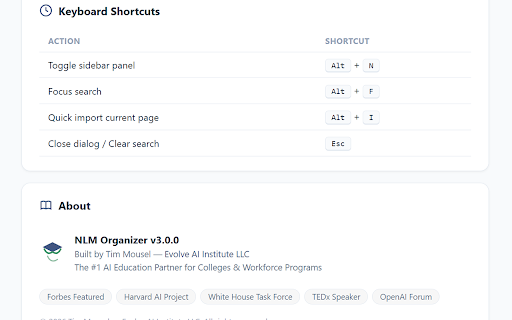

Organize NotebookLM with folders, tags, favorites, smart rules, prompts, stats, and drag-and-drop. By Tim Mousel. NLM Organizer — The Most Powerful NotebookLM Management Tool Take full control of your NotebookLM library with NLM Organizer, the all-in-one sidebar that brings professional-grade organization to Google's NotebookLM. • Nested Folders — Create unlimited folders and subfolders with custom colors and icons to organize your notebooks exactly how you want. • Tags & Labels — Add multiple tags to any notebook for flexible, cross-cutting organization. • Favorites — Star your most important notebooks for quick one-click access. • Smart Search — Instantly search across all notebooks, folders, and tags with real-time filtering. • Drag & Drop — Drag notebooks directly into folders from the sidebar. Reorder folders with intuitive drag-and-drop. • Resizable Sidebar — Adjust the panel width to fit your workflow. Your preference is saved automatically. • Auto-Assign Rules — Set up rules that automatically sort new notebooks into folders based on title patterns (contains, starts with, or regex matching). • Save, organize, and reuse your favorite prompts right from the sidebar. • Group prompts by category for easy browsing. • One-click copy to clipboard with visual confirmation. • See your library at a glance: total notebooks, favorites, archived, folders, and tags. • Visual bar charts showing notebooks per folder and tag usage distribution. • 30-day activity timeline tracking your NotebookLM usage. • Automatically detects notebooks with similar or duplicate titles. • Dedicated Duplicates filter to review and clean up your library. • Add private notes and annotations to any notebook via right-click context menu. • Notes are indicated by a small icon overlay on the card. • Import sources from URLs, YouTube videos, and more directly into NotebookLM. • Export your organizational data (folders, tags, assignments) as JSON for backup or transfer. • Bulk operations for managing large libraries efficiently. • Recent Notebooks — Quick access to your most recently visited notebooks. • Notebook List — Scrollable sidebar list with checkboxes for bulk selection. • Archive — Archive notebooks you're not actively using without deleting them. • Context Menus — Right-click any notebook card for quick actions. • Keyboard Shortcuts — Alt+N to toggle panel, Alt+F to focus search, Alt+I for quick import. • Dark Mode — Automatically matches your system/browser theme. • Multi-language — Available in English, Spanish, Portuguese, French, German, Japanese, Korean, and Chinese. • All data is stored locally in your browser using Chrome's storage API.

YouTube to NotebookLM
Send YouTube videos to NotebookLM with one click. Add any video or playlist as a source for AI notes without leaving the page. The "YouTube to NotebookLM" extension adds a seamless integration button right on YouTube pages. Whenever you are watching an insightful video, tutorial, or documentary, you can instantly send it to your NotebookLM as a source with just a single click—no need to copy and paste URLs manually. Key Features: • Inline YouTube Integration: A native-looking NotebookLM button is added right next to the YouTube Like & Share buttons. • Instant Source Import: Send the currently playing video directly into any of your NotebookLM notebooks. • Select Your Notebook: Click the button to see a dropdown of all your existing NotebookLM notebooks and choose where the video should go. • Create New Notebooks: Start a completely new notebook directly from the YouTube interface. • Multi-Page Support: Works flawlessly on regular videos, YouTube Shorts, Playlists, Channel pages, and even Search Results. • Batch URL Export: Use the extension popup to select and copy multiple video URLs from playlists or feeds. How it works: Once installed, simply log into NotebookLM in your browser. The extension securely talks to NotebookLM on your behalf to fetch your notebook list and add sources. Disclaimer: This is an independent tool and is not officially affiliated with, endorsed by, or sponsored by Google or YouTube. "NotebookLM" and "YouTube" are trademarks of Google LLC.

Kortex-NotebookLM
Transform NotebookLM into your ultimate knowledge hub. Save prompts, export chats, and organize all your interactions seamlessly. Kortex Notebooklm / Cortex Notebooklm - Your Power Toolkit for Google NotebookLM! Tired of your valuable intellectual work getting lost in different chats or locked inside research sources? Kortex / Cortex is the browser extension that transforms Google's NotebookLM into a dynamic, interconnected knowledge base. It seamlessly bridges your AI conversations from LLMs, captures insights from any webpage, imports social media content, and adds powerful tools to manage, export, and organize your work. 1. One-Click LLM Archiving An integrated "NotebookLM" archive button in ChatGPT, Claude, Gemini, and Perplexity captures your full conversation and seamlessly imports it into NotebookLM as a perfectly-cited source. Select an existing notebook or create a new one with a single click. 2. Social Media Import Import threads, posts directly to NotebookLM. Capture complete conversations, discussions, and social insights with full context, author information, and source URLs. Perfect for tracking trending topics, discussions, and professional content. 3. Highlight & Snipe Highlight any text on a webpage, right-click, and send it directly to NotebookLM as a new, perfectly-cited source. Perfect for capturing web insights and research snippets on the fly. Works on any website - no subscription required. 4. Bulk Import Tools (Pro Features) • Google Docs Bulk Sync: Sync all your Google Docs as sources to NotebookLM with one click • Link Importer: Import multiple URLs at once from a list • Tab Importer: Import all open browser tabs as sources • RSS Feed Importer: Subscribe to RSS feeds and import articles • CSV Importer: Bulk import sources from CSV files • Web Crawler: Automatically discover and import linked pages 5. Source Downloader Easily export all sources from a notebook into a single, convenient ZIP file. Select multiple sources from within a NotebookLM notebook and export them in PDF, Markdown, Text, or ZIP formats. Download individual sources or entire notebooks with one click. 6. Versatile Chat Export Export your entire Q&A history from within NotebookLM into clean Markdown, plain text, PDF, or JSON files. Copy conversations to clipboard for free, or use the export feature with checkbox selection to create curated briefings with only the messages you need. Toggle user messages on/off for cleaner exports. 7. Curated Briefing Notes Checkbox-select the most important AI responses in a NotebookLM chat to generate a concise, shareable briefing document with just the key insights. Perfect for creating focused summaries and reports. 8. Studio Notes & Artifacts Exporter Export AI-generated notes, study guides, quizzes, briefings, FAQs, and timelines from NotebookLM's Studio panel. Select multiple notes at once and export them in Markdown, Text, or PDF formats. 9. Audio Overview Manager Generate AI-powered podcast-style audio overviews of your research. Manage, download, and organize your audio overviews with custom titles and descriptions. Perfect for consuming your research on the go. 10. Podcast Feed Generator Create custom RSS podcast feeds from your NotebookLM audio overviews. Subscribe in your favorite podcast app and listen to your research anywhere. Automatic feed updates when new audio is generated. 11. Prompt Holder Save, organize, and manage your NotebookLM prompts with folders and tags. Create custom folders with color coding, add descriptive tags, search and filter prompts, and quickly access your saved prompts directly from NotebookLM. All prompts are securely synced across all your devices via cloud storage. 12. Source Views Create custom views to filter and organize your notebook sources. Save your favorite source filters (by search term or filter type) for quick access. Search sources by name and apply filters like "All", "PDFs", "Web", "Google Docs", "Text", and "YouTube". All views are synced across devices. 13. Advanced Dashboard • All Sources View: See all sources across all notebooks in one unified table with search, filtering, and bulk actions • Smart Notebook Search: Search and filter your notebooks directly from the NotebookLM dashboard with real-time search • Global Search (Ctrl+K): Instantly search across notebooks, sources, notes, and actions with keyboard shortcuts • Collections & Tags: Organize notebooks with custom collections and tags for better categorization • Favorites: Mark important notebooks as favorites for quick access 14. Automation Rules • Auto Researcher: Automatically trigger research based on notebook titles or source additions • Podcast Curator: Automatically generate audio overviews when conditions are met • Pipeline Automation: Chain multiple actions together for complex workflows 15. Source Management Delete sources from your notebooks with bulk selection. Remove unwanted or outdated sources to keep your notebooks clean and organized. Select multiple sources and delete them at once. Identify and remove "bad sources" that failed to process correctly. 17. Feature Management Customize your NotebookLM experience by toggling features on or off. Control which Kortex features appear in your interface to create a personalized workflow. Get Support When You Need It: In-app support request system lets you get help directly from the extension. Submit support requests and receive assistance quickly. Transform NotebookLM into your ultimate research and knowledge management hub with Kortex.

NotebookLM Organizer
Organize your notebooks with custom tags and advanced filtering. Enhance your NotebookLM workspace with a professional, integrated, and privacy-first organization system. NotebookLM is an extraordinary tool for information analysis, but as your projects grow, managing notebooks on the main screen can become complex. NotebookLM Organizer fills this gap, offering a fluid user experience that feels like a native Google functionality. Categorize your notebooks visually using a color-coded tagging system. Assign vibrant colors to your projects to identify them at a glance and keep your library under control, no matter how many notebooks you manage. ➤ Find any notebook instantly by combining text search with dynamic tag filters (AND/OR logic). Locating your information has never been faster or more precise. ➤ The extension has been designed under the "digital craftsmanship" concept, respecting every shadow, font, and spacing of Material Design to blend seamlessly with the original interface. ➤ Automatic adaptation: full support for NotebookLM's light and dark modes. ➤ Clean interface: automatically hides the limited preview of featured notebooks in the main tab, removing visual clutter so you can focus exclusively on your workflow. Your data belongs to you. That is why NotebookLM Organizer is built on principles of absolute transparency: ➤ Total privacy: the extension never reads, accesses, or processes the content of your documents or sources. It only manages organizational metadata. ➤ Control and sovereignty: export and import your tag configuration and associations in JSON format at any time. Your data is never held captive by the platform. ➤ Synchronization: your tags follow you across all your devices securely via Chrome Sync. ➤ Interface fully localized in English, Spanish, and Catalan. ➤ Total flexibility: use the automatic detection system based on your browser's language or choose your preference manually from the settings. ➤ This is an open-source project, free and it will always be. ➤ Lightweight engineering: built with Vanilla JS to ensure maximum performance and lightness, without heavy dependencies, frameworks, or trackers. Install it now and take your NotebookLM productivity to the next level with total independence!

NotebookLM Source Management
Folder and drag-and-drop sorting for the NotebookLM sources panel. NotebookLM Source Management helps you keep large source lists organized inside NotebookLM. It runs directly in the sources panel, so you can sort, group, filter, and clean up PDFs, links, and uploaded files without leaving the notebook page. Key features: - Organize sources with folders and nested groups - Reorder sources and groups with drag and drop - Add tags and color labels for faster filtering - Batch-select and delete multiple sources - Isolate one group when you want to focus on a smaller set of sources - Resize the panel for long and crowded source lists Privacy: Settings and saved state stay in local browser storage. This extension does not send NotebookLM content to external servers and does not include analytics or telemetry.
