
lhbdjaomnaobfljmhkmcfhhnihaaangh

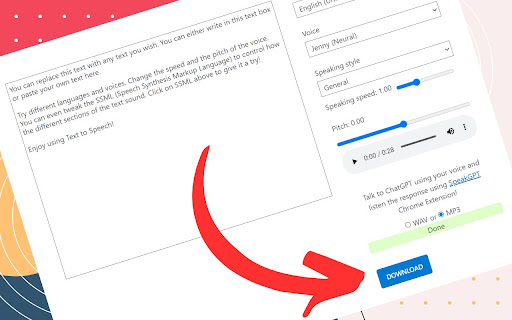


Save audio from various text-to-speech tools for personal use, with support for platforms like ElevenLabs, Azure, Google, and more. After installing this extension, simply visit one of our supported sites listed below and begin generating voice from your text 🌱: 🤖 ChatGPT from OpenAI 👉 You need to click the speaker button download the voice https://chatgpt.com/c/your-conversation-id Supported browsers: 🍪 All browsers that support Chrome extension installation (including Android, iOS, and Windows) are compatible with AudioTTS. 👉 We bring Azure Text-to-Speech Demo Page back to Life! Looking to download text-to-speech audio files from Microsoft Azure, Google, or HeyGen demo pages? Look no further than AudioTTS, the easy-to-use Chrome extension that makes downloading these files a breeze! 👉 With AudioTTS, simply install the extension and visit any of the supported demo pages to get started. Click the "Download", "Speaker Button" or "Speak" button, and your audio file will be ready to download in either MP3 or WAV format. 👉 And if you run into any issues with AudioTTS, our friendly support team is here to help. Just head over to the Support Tab to submit your question or suggestion or quick chat with me https://wa.me/6287889486240 👉 We are excited to announce that our extension is now available as a paid version! With the paid version, you'll get access to even more powerful features and functionalities that will enhance your browsing experience. Upgrade today and take advantage of everything our extension has to offer! 👉 As of version 2.0.35 in ChatGPT, you can change the file type to MP3 or Opus instead of the default AAC. Alt+Click anywhere on the ChatGPT website to change the audio format and download behavior.

telegram video downloader - Telegram Download Assistant
Telegram Video Downloader: Effortlessly download videos and other media files from Telegram with a simple, user-friendly tool. Telegram Download Assistant - Your Ultimate Content Saver Telegram Download Assistant is a versatile and user-friendly tool that helps you effortlessly download audio, video, images, and other media files from Telegram directly to your computer. Whether for personal use, academic research, or archiving, this extension ensures you can access your favorite content anytime, anywhere. We emphasize the importance of respecting copyright laws and encourage users to download only content they have permission to use. --- 🚀 Key Features One-Click Bulk or Single Download Easily select and download multiple files at once, or choose individual files with a single click. The process is fast and hassle-free. Wide Format Support Download various media formats, including: - Videos - Images - GIFs - Music - Audiobooks - Other media files All supported in one convenient tool. Access Restricted Channels and Groups Save audio and video files from restricted or private Telegram channels and groups directly to your device. Secure Private Content Extraction Safely download media shared in private chats or personal messages. No Password or API Required Start downloading instantly without additional credentials or API keys. 24/7 Support Enjoy round-the-clock technical assistance for any issues you may encounter. Effortless Downloads of 1GB+ Content Handle large-scale media downloads with ease. Comprehensive Compatibility Supports both Telegram Web versions: - https://web.telegram.org/k - https://web.telegram.org/a Ensuring seamless access to all your content. --- 🔧 How to Get Started 1️⃣ Install the Chrome Extension Add Telegram Download Assistant from the Chrome Web Store. --- 2️⃣ Pin the Extension 1. Click the Extensions icon next to your profile picture in the browser toolbar. 2. Locate the newly installed extension. 3. Click the Pin icon to add it to the toolbar for quick access. --- 3️⃣ Open Telegram Web Access Telegram Web in your browser: - https://web.telegram.org/k - https://web.telegram.org/a --- 4️⃣ Batch Download Chat Content 1. Browse the channel or group chat history you want to download. 2. The extension icon will display the number of captured resources. 3. Click the extension icon to open the plugin window. 4. Select the desired files and start batch downloading. --- 5️⃣ Batch Download Group Media 1. Enter the channel or group page. 2. Open Group Information. 3. Click: - Download All Media - Download This Month’s Media Quickly save all media files from the group. --- 6️⃣ Single File Download Inside a chat window you will see a Download button below each media file. Supported files include: - Music - Videos - Images Simply click Download to save the file instantly. --- 📝 Disclaimer This extension is independently developed and is not affiliated with Telegram or its services. Users are responsible for ensuring compliance with local laws and regulations when downloading content. Please do not download copyrighted material without proper authorization. --- Why Choose Telegram Download Assistant? ⚡ Efficiency Save time with one-click downloads for both single and multiple files. 🔄 Flexibility Supports multiple Telegram versions and a wide range of media formats. 🔒 Privacy Securely access and save private or restricted content. 🎯 Simplicity No technical expertise required. Just: 1. Install 2. Pin 3. Start downloading --- Start saving your Telegram content today with Telegram Download Assistant!

NaturalReader - AI Text to Speech
Read aloud any text with realistic AI voices, compatible with webpages, kindle Ebooks, Google Docs, PDF, Emails, and more. NaturalReader - Text To Speech, is a chrome extension that converts text online into natural sounding audio. Simply press play and have your Emails, Websites, PDFs, Google Docs and Kindle Books read aloud to you! By using our voice reader, our users enjoy the benefits of saving time, by listening at speeds faster than they can read, and being more productive, as they can listen in times they cannot read such as commuting to work or school, walking the dog, or while making dinner! With an extensive free version, and two paid premium plans there is a price range for every budget. v7.0.12 added new plus and pro voices. -- AI Powered Smart Reader: Using powerful AI technology we have trained our voice reader to not read aloud interrupting, and unwanted text. Page headers and footers, citations, image captions and urls can all be automatically skipped creating a natural listening experience. -- Customizable Listening Experience: Choose your optimal listening experience by selecting your favorite voice and the listening speed that's best for you. For extra focus, try our immersive reading function which eliminates any distractions found on the page. -- Voices + Languages: 150+ Voices across 20+ Languages with free, premium and plus voice tiers. Paid users can enjoy unlimited use of our top of the line, natural sounding voices. -- NaturalReader Online + App Account: Have access under the same NaturalReader account to our free online text to speech reader, and our free mobile application. -- Advanced Compatibility: Advanced compatibility with any website, Gmail, Outlook, Google Docs, PDFs and Kindle Books. -- Continue listening: Seamlessly save your listening to your mobile phone, so you can continue listening on the go, with the NaturalReader App. -- Download to MP3: Download your file into MP3 audio so you can listen without wifi connection or cellular service. -- User Friendly Features: One click to start reading, highlight word functionality, Immersive reader for greater focus, light and dark mode compatibility. Free version limitations: You can listen with the Free Voices unlimitedly, Premium Voices for 20 minutes per day, and Plus Voices for 5 minutes per day.

Text to Speech (TTS) | AI Voice Generator with Realistic Voices – AIVocal
Let AIVocal be your most powerful AI voice generator and your closest-to-human-voice text to speech (TTS) assistant, delivering results comparable to ElevenLabs in natural-sounding audio quality. Use our online AI voice generator and best synthetic voices to convert text to audio that sounds remarkably like a human voice, offering a cost-effective alternative to Minimax Audio with similar high-fidelity performance. Instantly transform your text into natural-sounding speech with our advanced TTS technology and download it as an MP3 audio file. Features: ✅ Free to Use AI Text to Speech Text to speech from AIVocal lets you listen to docs, articles, PDFs, email, and other formats — anything you read. It’s one of the fastest growing voice generator extensions in the Chrome store. ✅ 600+Natural AI Voices 600+ realistic voices across 30+ languages for the most human-like listening experience. So you can understand and remember more. ✅ Read Any Text Out Loud Turn any text, article into clear, natural audio with our AI Voice tool. And let AI read this to me aloud — perfect for multitasking, learning, or hands-free listening. ✅ Listen on desktop or mobile devices. Anything you’ve saved to your voice library instantly syncs across devices so that you can listen to anything, anywhere, anytime. Saved artifacts are synced to the cloud and accessible across all your devices. ✅ Download to MP3 We help you download the audio files you create locally in MP3 format. User Cases 1️⃣ Students & Learners – Convert notes, textbooks, or research papers into audio for faster comprehension and multitasking. 2️⃣ Professionals – Lawyers, doctors, or business users can listen to reports, contracts, and lengthy documents hands-free. 3️⃣ Accessibility Support – Designed for users with dyslexia, vision impairments, or reading difficulties. 4️⃣ Content Lovers – Turn blogs, ebooks, and articles into podcasts you can enjoy while commuting, exercising, or relaxing. FAQs ➤ Is AIVocal free to use? A1: Yes, AIVocal offers a free version with standard voices. Premium plans unlock unlimited access to high-quality AI voices. ➤ Can I download the audio for offline listening? A2: Absolutely! You can export your TTS audio as MP3 files and listen without internet access. ➤ What file types does AIVocal support? A3: You can use AIVocal with Google Docs, PDFs, emails, web pages, and even image-based text via OCR. ➤ Does AIVocal work across devices? A4: Yes. Your saved files sync to the cloud, so you can seamlessly switch between desktop and mobile devices. ➤ What makes AIVocal different from other TTS tools? A: AIVocal combines realistic AI voices, image-to-speech conversion, cross-device sync, and MP3 export, making it an all-in-one productivity and accessibility tool. AIVocal is a completely free, lightweight, and easy-to-use embedded AI voice generator tool, providing a budget-friendly substitute for premium options like ElevenLabs or Minimax Audio. Use it now to experience the best AI-driven text to speech generator and effortlessly convert text to audio! Contact Us Have questions, feedback, or need support? We’d love to hear from you. Join our user group on Discord: https://discord.gg/Hz7W34mmep Or email us at aivocalio@gmail.com 🐦 Twitter/X: @aivocalio Learn more: https://aivocal.io/

Telegram Media Downloader: TG Video Downloader - TG Download
Save videos, images and audio files from Telegram Web. Supports single and batch downloads. Telegram Media Downloader is a powerful, fast, and easy-to-use Chrome extension that helps you download videos, photos, images, GIFs, audio files, music, audiobooks, documents, and other media directly from Telegram Web. It also supports exporting chat history and media information for backup purposes. Whether you're browsing public channels, private channels, group chats, personal conversations, or restricted communities, this extension makes it easy to save valuable Telegram content to your device for offline access, archiving, and long-term storage. Telegram has become one of the world's most popular messaging platforms, where users share videos, educational content, documents, ebooks, images, music, and other valuable resources every day. However, Telegram Web provides limited options for managing and downloading media in bulk. ✅ Download Telegram photos and images ✅ Download Telegram audio and music ✅ Download Telegram documents and attachments ✅ Support private channels and groups ✅ Compatible with Telegram Web K and Telegram Web A Easily download videos from Telegram chats, groups, and channels. Perfect for saving educational content, business materials, and personal collections. Save images and photos from Telegram, including: Enjoy your content offline anytime. Build your own personal GIF collection with ease. Perfect for work, study, and content organization. Select and download multiple: With a single click, improving productivity and saving time. Export Telegram chat history for: Organize and preserve important conversations more efficiently. Download media from private channels and groups that you have permission to access through your Telegram account. For channels and groups that are accessible through your account, the extension can help you save: Quickly and conveniently. Fully compatible with: 📖 How to Use Install the extension from the Chrome Web Store. Sign in to Telegram Web. Open the chat, group, or channel containing the media you want to save. Click the extension icon. Browse available media resources. Select the files you want to download. Save them directly to your device. 🎯 Who Is It For? Telegram Users Save valuable media and files for offline access. Backup media shared within groups and channels. Collect learning materials, documents, and educational resources. Organize and manage media assets efficiently. Archive important files and work-related content. Yes, provided you have access to those channels. Yes, if the content is accessible through your account. Does it support Telegram Web K and A? Telegram Media Downloader is an independent third-party browser extension and is not affiliated with, endorsed by, sponsored by, or associated with Telegram Messenger LLP, Telegram Web, or any related Telegram services. Users are solely responsible for ensuring they have the legal right to access, download, store, and use any content obtained through this extension. Please respect copyright laws and applicable regulations in your jurisdiction.
