
lhbbnmodgimabaafjdifcokabggngpmh
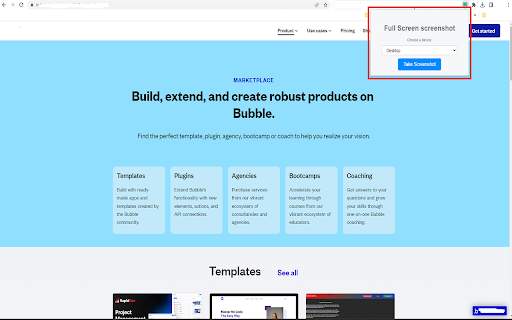
Our Full-Page Screenshot Capture Extension offers a solution to the tedious process of capturing multiple screenshots of long… Our Full-Page Screenshot Capture Extension offers a solution to the tedious process of capturing multiple screenshots of long webpages. No more scrolling and taking multiple screenshots or using the print screen button and editing later. With our extension, you can capture an entire webpage, including scrolling pages, with a single click! The extension uses a cloud-based screenshot service to render the whole webpage and return a full-page screenshot. It supports both desktop and mobile views, so you can get the screenshot as it would appear on a variety of devices. Full-Page Screenshots: Capture the entire content of a webpage, even those with long content that requires scrolling, in one single image. Desktop and Mobile Views: Choose whether to capture the screenshot as it would appear on a desktop browser or a mobile device. Automatic Downloads: Screenshots are automatically downloaded to your default download folder, saving you the hassle of manually saving images. Simple to Use: Just input the URL or use the auto-detect feature, select the device view, and click capture - it's that simple! How to Use: Install the Extension: Add the Full-Page Screenshot Capture Extension to your browser. Navigate to the Page or Input URL: You can either navigate to the webpage you want to capture and click the extension icon, or manually input the URL into the extension popup. Select Device View (Optional): Choose whether to capture the screenshot in 'desktop' or 'mobile' view. Click Capture: Click the 'Capture' button and wait for a few seconds as the extension captures the full-page screenshot and automatically downloads it to your device. Simplify your screenshot process and enhance productivity with our Full-Page Screenshot Capture Extension. Try it today!

CocoShot: Screenshot & Screen Recorder
Capture full page screenshots and record screen to MP4 with annotations. PDF export with clickable links included. 🚀 CocoShot: The Ultimate Screenshot, Screen Recorder & AI Video Editor Capture, Edit, and Record with the most powerful all-in-one productivity tool. From full page screenshots to high-definition screen recordings with AI subtitles, CocoShot does it all. 🎥 Pro Screen Recorder & AI Video Editor • High-Quality Recording: Capture your desktop, tabs, or webcam in crisp HD. Perfect for Zoom, Google Meet, and MS Teams. • AI Auto-Subtitles: Save time with our magic Auto-Caption feature. Automatically generate subtitles for your recordings with high accuracy. • Powerful Video Editor: Trim, crop, split, and merge your recordings within the browser. No external software needed! • Real-time Markup: Annotate with arrows and text while you record to create professional tutorials or bug reports. • Export to MP4: Save and share your videos in the most compatible format instantly. 📸 Advanced Screenshot & Screen Capture • Full-Page Capture: Automatically scroll and snap entire web pages perfectly. • Smart PDF Export: Convert screen captures to PDF with clickable hyperlinks preserved—ideal for research using Web Clippers. • Image Annotations: Use our robust editor to blur sensitive info, add markup, or apply professional filters to your screenshots. 🌟 Use Cases & Solutions: • Remote Meetings: Best Zoom/Google Meet recorder with AI captions for meeting minutes. • Content Creators: Record tutorials, edit videos, and add subtitles in one flow. • Developers: Record bugs with annotations for GitHub, Jira, and Slack. • Educators: Create accessible learning materials with automatic subtitles. Join thousands of users and upgrade your workflow. Get CocoShot today—the only Screen Recorder and AI Video Editor you will ever need!

Pixelshot - Full Page Screenshot
Pixelshot - Capture and save Full Page Screenshots instantly in just a single click Pixelshot: Capture Webpages Exactly As You See Them Capture Full Page and Visible Area screenshots of webpages with Pixelshot. Pixelshot is a free, lightweight Chrome extension that delivers pixel-perfect captures of entire webpages (full page) or just the visible area, free from bloat, ads, or unnecessary permissions. With Pixelshot, you can: ✓ Capture screenshots with Precision: Pixelshot mirrors your screen exactly, including scrollable content, to capture every detail of the webpage in stunning clarity. ✓ Flexible Capture Options: Choose between capturing the full page or just the visible area, giving you the freedom to grab precisely what you need. ✓ High-quality PNG screenshots: Capture crisp, detailed screenshots in the universally compatible PNG format, optimized for clarity and precision. ✓ Easy to use: Designed for simplicity, capture screenshots in a single click without navigating through complex settings. ✓ Optimized Performance: Pixelshot is a lightweight and resource-friendly extension to capture screenshots quickly using the native Chrome debugger. ✓ Privacy-focused: Your screenshots are stored locally on your computer and never uploaded to any servers, ensuring complete privacy. Pixelshot is Ideal for: ★ Effortless Sharing: Capture and share screenshots of articles, tutorials, news, recipes, or interesting visuals you find online with ease. ★ Convenient Saving: Keep important webpage information at your fingertips for reference, research, or offline viewing. ★ Creating presentations and reports: Incorporate high-quality screenshots into documents and presentations for clear and impactful communication. ★ Bug reporting and troubleshooting: Provide visual evidence of website issues to support teams for quick resolution. ▸ Capture full-page screenshots, including all scrollable content. ▸ Capture screenshots of your current viewport area. ▸ Easily download screenshots in PNG format. Pixelshot is completely free, developed with a focus on user experience and privacy. Install Pixelshot today and and experience a seamless way to capture webpages exactly as you see them!

FullPage Screenshot – Full Page Screen Capture & Webpage Capture Tool
Capture full page screen or selected webpage sections. Edit, download, and share high-quality screenshots easily. FullPage Screenshot is a powerful and user-friendly Chrome extension for capturing full page screen content in one click. Easily take a screenshot of an entire webpage — vertically or horizontally — and edit, download, or share with ease. 🔹 Key Features Auto Scroll & Full Page Capture: Automatically scrolls vertically or horizontally to capture the entire webpage. Instant Screenshot Preview: Instantly opens the screenshot in an editing & download interface. Flexible Export Options: Save in PNG, JPG, WebP, or PDF with your preferred export quality. Smart Editing Tools: Add annotations, arrows, blur sensitive info with mosaic. One-Click Sharing: Share your screenshot to social or messaging platforms instantly. Whether you're a designer, developer, student, or content creator, this tool helps you capture, edit, and share any full page screenshot with ease. Note: Some websites may restrict full-page capture due to technical or copyright reasons. 🔥 What's New (June 2025) ✅ Export Quality Settings: Choose from High, Medium, or Low quality when saving your screenshots. ✅ Horizontal Scrolling Support: Now you can capture horizontally scrolling pages — perfect for wide tables, dashboards, or spreadsheets. ✅ Export as WebP: Added WebP export format for optimized image size and modern browser compatibility. Full Page Screenshot 是一款功能强大、操作简便的 Chrome 扩展程序,可一键捕捉整个网页(支持垂直和横向滚动),并支持编辑、导出和快速分享。

Full Page Screenshot
Capture and save full webpage screenshots locally A browser extension that captures scrolling screenshots of entire web pages with real-time progress display. - **Smooth Scrolling Capture**: Takes screenshots while automatically scrolling through the page - **Real-time Progress**: Shows capture progress as you scroll - **Smart Overlap Handling**: Intelligently handles the last page overlap for seamless results - **Auto-save**: Automatically saves your screenshots - **Position Memory**: Automatically returns to your original scroll position after capture is complete - **Click Anywhere**: Start capturing from any position on the page with a single click 1. Click the extension icon or anywhere on the webpage to start 2. Watch as it smoothly captures the entire webpage, showing progress in real-time 3. Once complete, you'll automatically return to your original position 4. The final image is saved to your downloads folder - Fixed elements (like headers on YouTube) may appear multiple times in the final screenshot - Currently working on a solution for handling fixed position elements Found a bug or have a suggestion? Please leave a comment in the reviews section. Your feedback helps make this extension better! Tags: screenshot, scroll capture, full page screenshot, webpage capture, screen recorder, auto scroll, position memory
