
lgomdonlldenlbghpmjgkebcbhnimbai
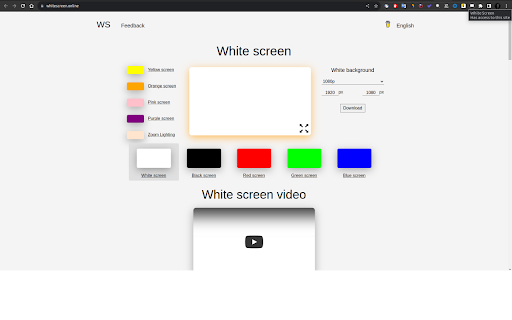
Helps you to access White Screen tool Quickly access the White Screen tool with a click! The White Screen Chrome extension simplifies your workflow by opening the White Screen tool in a new tab whenever you click on the extension icon. No more manual typing or searching—effortlessly initiate a blank canvas for your creative ideas. Experience a seamless transition to www.whitescreen.online with just one click! * Instantly open White Screen in a new tab. * Streamlined access for creative brainstorming. * Simplifies your workflow with a single click. * Install the White Screen extension. * Click on the extension icon in your Chrome toolbar. * Enjoy a new tab with www.whitescreen.online ready for your ideas! Enhance your creative process with the White Screen extension. Open a world of possibilities in a blank canvas effortlessly.

Boss Hub | Signal YES
By Whatsapp & Telegram & SMS & Email send Stock & CryptoCurrency & Gold dynamic trade price Signal & Notification & Message to you. BOSS HUB: https://bosshub.up.railway.app By Whatsapp & Telegram & SMS & Email send Stock & CryptoCurrency & Gold dynamic & realtime price Signal & Notification & Message to you. Boss app is your copilot that facilitates the creation of LLM applications by employing multiple agents capable of interacting with one another to tackle tasks. 1️⃣ Features ✅ Support 100+ tasks & workflows according your prompt, command

Blank New Tab Page - White Smoke
A blank new tab page with White Smoke background, which also supports dark mode. This extension replaces the default new tab page with a white smoke background blank page, which also supports dark mode and incognito mode. You may hide the toolbar icon by right click on it.

Hide Youtube Video Button Text (CSS)
Hides the button text (including number of Likes) on Youtube videos using a CSS rule. You know all those extensions that slightly alter a website? Well this is another one. It removes the text next to the main buttons under a Youtube video. The buttons stay there, just not the text. So you can still like, dislike, share, etc the video, you just click the button. It saves some screen space, you know? Also, it hides the number of Likes a video has. Maybe this is a deal-breaker for you, I don't know. I personally don't like seeing how many Likes or Dislikes a video has, so I like it. You can always make your own extension if you want to, Google's tutorial is pretty clear about how to do it, although you'll need to learn a little CSS.

Blank White Screen
Blank White Screen is a simple yet powerful tool designed for anyone who needs a fast and distraction-free blank white screen. Blank White Screen is a simple yet powerful tool designed for anyone who needs a fast and distraction-free blank white screen. Whether you use it for testing, as a light source, or for pure focus, this extension delivers clarity right in your browser. It helps in moments when you want a Blank White Screen without extra clutter. Many users rely on it to brighten their monitor, check dead pixels, or create a clean workspace background. Everything works instantly once you open it. 👥 Why people use it ✅Test monitors for display issues in seconds ✅Use a bright white screen as a light source ✅Practice focus or meditation with no distractions ✅Display simple backgrounds for recording or streaming Instead of searching for “a white blank screen” online, you can have it directly in Chrome. This saves time and ensures you always get a consistent, clear view. No ads, no unnecessary extras. Many users also choose this extension when they need white blank screen tools for work or study. It helps when reviewing designs, cleaning the mind before tasks, or creating even lighting for photography or when using projectors. ✨Key features you will enjoy 🔹Fullscreen mode for maximum clarity 🔹Quick toggle between black screen and white 🔹Easy access from the browser toolbar 🔹Stable, smooth performance without delays 🔹Designed for minimal distractions The extension also supports red screen and other colors. This makes it versatile for pixel checks or eye-resting exercises. A blackscreen option is included for those who want complete darkness on their display. If you ever need variations like bright white screen or white screen bright, the extension can provide just that. You can switch modes quickly depending on your setup or use case. How it works in three steps 1️⃣ Install the extension in Chrome 2️⃣ Click the toolbar icon to open your chosen screen 3️⃣ Switch between color modes like full black screen or white with one click Some users need a black screen full screen mode for deep focus. Others prefer a full page black screen during breaks to reduce eye strain. Both are available in the extension for easy use. It can also generate a white screen online instantly, making it useful when you need light but don’t want to search through different sites. You always get reliability and speed. 🚀Use cases include - Designers reviewing color balance with a plain blank white screen - Teachers projecting a simple blank screen white during class pauses - Developers testing brightness and contrast - Everyday users needing a soft white light at night Privacy is also important. This extension works locally in your browser and does not store or share any personal data. Your black screen image or white screen online sessions stay private and secure. For those who want complete darkness, the full pitch black screen option helps turn your display into a seamless dark canvas. For light testing, a white blank screen mode provides maximum brightness. 💡Advantages you get 🎯Fast performance with no lag 🎯Works even offline after setup 🎯Options for black full screen or white 🎯Smooth transition between normal and full screen modes You can choose between different color options depending on your needs. The black screen image is useful for detecting bright pixels, while the full screen blank mode helps block distractions. When brightness is needed, you can switch back to a clean blank white screen in just one step. Flexibility is always at your fingertips. 📌Can I switch between white and black screen full modes? 💡Absolutely 📌Do you support any other colors besides white and black? 💡Yes, you can set a custom color In daily life, this simple tool saves you from wasted searches. No need to type “white screen online” or “black screen full screen” again and again. Just open Chrome, click, and you’re done. With support for both blank white screen and deep black modes, it adapts to many tasks. From testing monitors to calming your mind, it stays useful every single day. Install Blank White Screen today and keep a Blank White Screen always within reach. Clean, fast, and effective—your browser becomes a reliable source of light, focus, and clarity.
