
lgmkkajbhmnfeodbooicfgjekpbbpmco
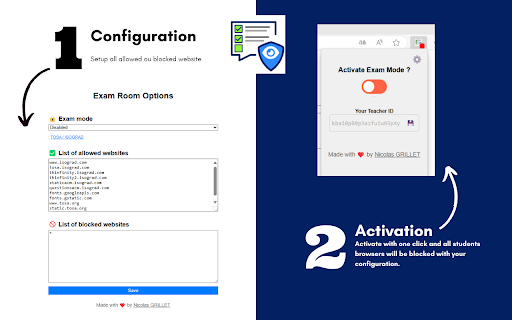
Activate an exam environment and block/allow specific websites for all students in your class This extension works with "Exam Room" and allows you to remotely control its activation or deactivation. The perfect tool for teachers or training center managers to control internet access during an online exam such as the TOSA or other exams.

iboss Classroom Management for Students
Classroom distractions and misuse of digital resources can greatly hinder student engagement and productivity. The iboss Classroom… Classroom distractions and misuse of digital resources can greatly hinder student engagement and productivity. The iboss Classroom Management provides visibility and control over student devices, empowering educators to maintain focus and enhance learning—whether students are in the classroom or learning remotely. With this extension installed on student devices, teachers can: - View student browser tabs and applications to monitor engagement and ensure students are on task. - Create allow lists to restrict browsing to approved educational resources during class. - Block distracting websites to keep students focused during class. - Open and close browser tabs remotely to guide students to the right materials. - Enable Focus Mode to minimize distractions and maximize attention. - Provide access to a teacher-curated educational video library. - Support student participation with a built-in hand-raising feature for questions and interaction. Seamlessly integrated within the iboss Zero Trust SASE platform, this powerful tool gives educators the control they need to create a safe, distraction-free digital learning environment. Install iboss Classroom Management for Students today and take charge of your digital classroom with confidence.

Edform for Teachers
Import any PDF to Edform and transform it into interactive auto-graded activity. Edform for Chrome allows you to upload PDF documents to Edform in just a few clicks. After installing Chrome Extension, any PDF file opened in Chrome will have an Open With Edform button. By clicking the button, the file is immediately imported to the Edform, and you can continue working with it by creating an interactive worksheet. The teacher can upload the document into the builder to modify it by adding different question types, video, and audio materials, combining with pages from another document. Then set the assignment in student-paced or live mode when the activity is ready to use, depending on the specific lesson objectives. Moreover, teachers can monitor students` progress, grade their work instantly and provide meaningful written, audio, or video feedback to improve students` knowledge. Edform allows users to integrate with tools they already use, such as Google Drive, Dropbox, and One Drive, and share assignments in Google Classroom and other Learning Management Systems. The platform's interactive features save teachers' time and increase students' productivity.

Test Bro - Smart Web Test Assistant, Exam Helper & Homework Quiz Solver
Smart AI based test assistant, quiz resolver, homework helper. Solve online tests, pass exams, improve skills for skill assessments. Test Bro app is a simple Chrome extension that can assist and help you to pass online tests. It can help you pass all tests containing text-based questions and text-based answer options. ⚡ Just click the ASK button and see the correct answer for apps and websites where Test BRO is fully optimized (see the optimized for section). ⚡ You can use SELECT TEXT and ask Test BRO through the context menu to resolve online tests. ⚡ If text selection is protected, you can SELECT AREA using the context menu to pass the exam. (https://youtu.be/xUwYspJpU_U) ⚡ The Context Menu is also blocked - use the capture feature in the side panel. (https://youtu.be/xUwYspJpU_U) 🚀 NOW TEST BRO OPTIMIZED FOR! 🚀 ✅ For LinkedIn skill assessments. (https://youtu.be/rjKEXb_8tbk) Check out how it works. I think you'll find it enjoyable. Let's try it, and be sure it will help you pass LinkedIn tests. It's not guaranteed to give you a 100% result, but you can watch the video (https://youtu.be/hXI_bKhOsNk). I passed the LinkedIn assignment and ranked in the top 15% of other people. It's a success! I've never read about Django. I don't even know what it is. Is it a programming language? Is it a framework? :) I don't know... 🚨(If you want your quiz site to be fully optimized for Test Bro, please write to me with the quiz site URL.)🚨 Just click the Test Bro button and get the test resolved. 😠 - How do you do the LinkedIn assessment? 🧐 - Use Test BRO, it will increase your productivity and save your time, Bro. 🙄 - Can you cheat on LinkedIn assessments? 🤫 - I ask you a small secret, use Test Bro, to pass axam - save your time... no one else, shh... 🤔 - What about the LinkedIn assessment quiz answers? 🕵 - You don't need answers. Don't waste your time. Use Test Bro. 🤷 - How can I pass the LinkedIn assessment? 🤦🏼 - Seriously? Pass the exam with Test Bro. 🗣 - How often do people fail LinkedIn assessments? 🗣 - Did you score above 70% on the LinkedIn assessment test? 👨👨👧👦 - We never fail assignments; we always score over 70% because we use Test Bro! 🤩 Let's try it out! And please add a 5-star review if it helped you!!! 🤩

Classroom View Pro
Classroom View Pro Extension Use the Classroom View Pro as a classroom management tool to monitor activity of all students Chromebooks. - You have complete view over what students are doing on their Chromebooks. - This application provides you with a live picture of the students Chromebook screens. - You can block internet on Chromebooks. - You can present your computer screen on Chromebooks. - You can lock Chromebooks. - You can send a message to Chromebooks. - The student Chromebook screens are represented in the table with a customizable number of rows as thumbnails.
