
lgjpbnljfbeibichnannkdkniodcgmen

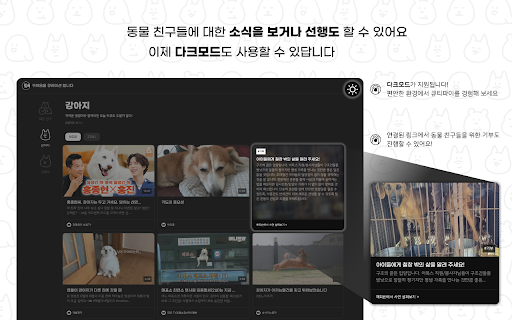

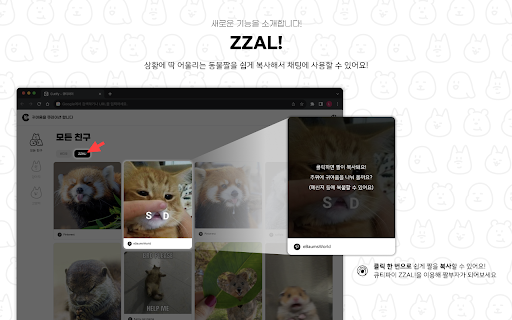
귀여움을 큐레이션 합니다 We Love Cute Animals! Cutify - 큐티파이 귀여움을 큐레이션 합니다! 귀여운 걸 보면 스트레스가 풀린다는 연구 결과는 찾지 못했어요. 하지만 저희는 그걸 본능적으로 알고 있죠. 일상에 지친 당신을 위해 귀염둥이들을 모아왔어요. 귀염뽀짝한 영상들로 심신을 달래 볼래요?

SuperDev Pro
One extension that replaces all your browser tools — inspect, design, modify, capture, scrape, automate, and more in a sidebar. SuperDev Pro packs 50+ developer, designer, marketer, and power-user tools into a single keyboard-driven sidebar. Stop hoarding one-off extensions — open one sidebar, get everything. ⌨️ Open with Ctrl+Shift+E (Cmd+Shift+E on Mac). Hit Ctrl+Shift+S for the command palette and jump straight to any tool. • CSS Inspector — live styles + computed values, copy any rule • Layout Tools — box model, flex/grid overlays, parents/children • Ruler & Measure — click two points: distance, angle, ΔX/ΔY • Color Picker — eyedrop + history + HEX/RGB/HSL • Color Palette — extract every color used, highlight where it appears • Site Stack — detect frameworks, CMS, analytics, CDN, server • SEO Meta — full on-page audit: meta, social, headings, images, links • Page Speed — Core Web Vitals, resources, page weight • Accessibility — contrast, alt text, ARIA, headings, labels • AI Assistant — BYOK chat over any OpenAI-compatible API with page context • Font Changer — pick element, 50+ Google Fonts, live preview • List Fonts — detect every font on the page, highlight usage • Pattern Background — 8 patterns, presets, copy CSS • Dark Mode — force dark on any site, per-domain control • Code Injection — JS / CSS / HTML per-domain with snippet library • Live Text Editor — click to edit, track changes, export HTML • Image Replacer — drop file or URL, persists across reloads • Move / Delete Element, Page Outliner — surgical DOM tweaks • Screenshot — visible, area selection, or full-page (JPG / PNG) • Save as PDF — live preview, A4 / Letter, custom margins • Table Capture — every table on the page to CSV / TSV / JSON / Markdown • Export Element — pick any element, send HTML + matched CSS to CodePen • Web Scrape — auto-detect lists & tables, scrape, export • API Tester — any origin, CORS-free, request history • URL Opener — bulk-open URLs with pause / stop control • Extract Images — img + background + SVG + favicon + og, bulk download • Broken Link Checker — parallel HEAD checks, live progress, CSV • Webpage → Markdown — page / main / picked element to GFM • Stripe Analytics — charges, MRR, refunds, breakdowns • Subreddit Insights / User Analyzer / Cross-Post Finder — full Reddit toolkit • Todo — per-site task list • Sticky Notes — drop notes anywhere, drag, 6 colors, per-site persist • Tab Manager — list, filter, bulk close / copy / move • UTM Builder — campaign URLs with templates and custom params • Cookie Editor — list, search, add, edit, export cookies • Clear Browsing Data — this site or all, 11 categories, time-range • Redirect Path — trace full chain with status + headers • Currency Converter — live FX, detect amounts on page, 30+ currencies • Email Finder — scan text, mailto, obfuscated, group by domain • QR Code — URL, vCard, Wi-Fi, custom color, embedded logo • JSON Formatter — format, minify, sort keys, validate • Encoder / Decoder — Base64, URL, HTML, hex, Unicode, MD5 / SHA • World Clock — multi-timezone with floating widget Everything runs locally in your browser. Zero tracking, zero analytics, zero telemetry. Your data never leaves your machine unless YOU explicitly send it somewhere — Export to CodePen, BYOK AI calls, etc. 16 tools are free forever. The rest are free during a 7-day trial (extendable to 14 days), then require a one-time lifetime license. No subscription, all future updates included.

Typed
Typed Web Extension You can easily add web resources to Typed with just a click by installing the web extension, no longer needing to copy and paste URLs. Features provided: - Save the URL to your Typed library - Link the URL directly to specific document or folder - Be mouseless and use keyboard shortcuts to save even faster

LiveWiki: YouTube Summarizer
We help you quickly grasp the core of complex YouTube videos, so you can make smarter choices. 🙋♂️ Ever needed the information from a YouTube video, but felt it was too overwhelming to watch it all the way through? 🧭 LiveWiki will be your guide to YouTube summaries, helping you quickly understand even complex videos. 💡 Now you don’t have to watch it all — you keep the important parts, and make smarter choices for yourself. 📝 Instant Note-Taking The Sidebar allows you to draft notes directly on any web page, capturing inspiration immediately without leaving the current context. 🔍 A smarter way to engage with information — start your first habit with LiveWiki from now on. ✅ Simple instructions: 🔺 Click the ‘Add to Chrome’ button to install the extension. 🔺 Click the ‘Use LiveWiki extension now’ button and visit the YouTube video you want to summarize. 🔺 Click the ‘Summarize Video’ button on the right side of the video screen to instantly access LiveWiki’s Key Summary, Article, and Timeline sections. 🙆♀️ Perfect for people who: - Want the information from YouTube, but feel overwhelmed watching the whole thing. - Prefer reading over watching. - Like to learn fast by focusing only on what matters 🖱 Just one click and you're in - One tap on “Summarize” button gives you a clear breakdown instantly. - First time using it? No worries — it's very simple to get started. 🌍 Works with any language - Summarizes videos in all languages — not just English or Korean. - Enjoy global content without hitting the language barrier. Q. Why should I use LiveWiki? - LiveWiki is a service that summarizes YouTube videos quickly and accurately. Using AI summarization technology, it helps users easily grasp the core content of videos, ensuring that busy individuals don’t miss important information. Q. What is YouTube summarization? - YouTube summarization is a feature that helps you quickly understand the key points of a video. LiveWiki uses AI technology to extract and summarize the essential parts of the content. Q. How can I summarize videos using LiveWiki? - You can install the Chrome/Whale extension or use it directly via PC and mobile web browsers. If you want to know how to install it, please refer to the ‘How to Use’ section above. Q. Can I summarize videos from platforms other than YouTube? - Currently, LiveWiki only supports YouTube summarization. We are focusing on improving the speed and accuracy of YouTube summaries and don’t support content from other platforms yet. Q. Can LiveWiki summarize all YouTube videos? - No, LiveWiki can only summarize YouTube videos that have captions. Videos that don’t have auto-generated captions, private or members-only videos, and live streaming videos are not supported. Q. Why can’t LiveWiki summarize videos without captions? - LiveWiki provides summaries based on captions. Without captions, extracting the content automatically becomes difficult, making summary unavailable. Q. Is LiveWiki free to use? - Yes, LiveWiki is available for free. You can use the Chrome/Whale extension or access the service directly through PC and mobile web browsers without any additional charges. Q. Can LiveWiki summarize videos in languages other than Korean? - LiveWiki supports videos in all languages, with particularly high summarization accuracy for English and Korean. We are also continuously improving the quality of summaries for other languages to provide accurate and effective content summaries. Q. How long does it take to generate a summary? - Once you click the ‘Start Summary’ button, the summarization process begins in a short time. Regardless of the video length, LiveWiki quickly extracts the key points. And we are continuously enhancing the process to ensure users won’t experience delays or inconvenience. Q. How can I view the summary results on LiveWiki? - On PC and Mobile web browsers, clicking the ‘Summarize’ button will take you to a dedicated summary page where you can view the summarized content. If you are using the extension, the summary will appear directly on the right side of the video screen. 📧 Contact Us: If you have any questions, please contact us at dl_livewiki@snowcorp.com.

Pikurate
Bookmarks to Knowledge Save the link you want right away with Pikurate. You can create your own knowledge repository with bookmarks using Pikurate. Save webpages faster and easier with the Pikurate extension. ▶ Easy Link Save • Open Pikurate Extension Program in the webpage that you want to save. You can save it easily with the shortcut key “Shift+Ctrl+K”. ▶ Save links in One Scoop • Open them all on one window and try saving them all together. You don't need to save them one by one. ▶ Efficient Link Management • Organize the links how you want to and write a brief description. You can find the links you need when you need them. ▶ Access the links from anywhere • Saved links with extension program can be found directly on your PC or mobile app. Manage links everywhere.
