
lgiodoobcplekppgfljfnmhaplcpechj
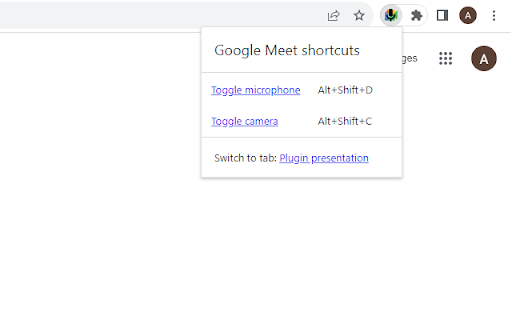
Adds browser-wide shortcuts to toggle microphone and camera in Google Meet Features: - shows microphone status in toolbar icon - allows to toggle microphone and camera from toolbar icon's menu - adds shortcuts to toggle microphone and camera, shortcuts work in any browser tab No tracking, no ads, no cookies, no user data collection. Just plain and simple little extension.

Mirror Mode for Google Meet™
Mirror Mode for Google Meet this is mirror for all videos in your meeting Our FREE Mirror Mode for Google Meet™ allow you quickly enable/disable Mirror Mode for all videos in your meeting Use it from the sidebar right in the meeting window or from extension's popup! ✔ Mirror Videos Mirrors the video from other participants in the Google Meet call

Google Meet Auto Disable Mic/Cam
Provides options for defaulting microphone and camera to disabled when joining a Google Meet meeting This simple extension provides options to default your microphone and camera to disabled. It also displays emojis in the tab title indicating if your microphone is muted or your camera is on.

Zoom in-out Magnifier for Google Meet
Zoom in and out of shared screens and cameras on Google Meet You know when someone share their screen on Google Meet and it is barely readable because their screen is too big, so the letters are too small to read? Well, now you can just zoom in. Just use your mouse wheel to zoom in and out. You can also drag and drop the screen you are zooming! Install, refresh your Google Meet tab and have fun! ;-]

Gmail Mod
Adds an embedded audio and video player to Gmail for playing audio and video attachments. Gmail Mod adds extra functionality to the Gmail website. The current version has the following features: * Embedded video player for video attachments with file extension .mp4/.webm/.ogv/.mov * Embedded audio player for audio attachments with file extension .wav/mp3/ogg * A settings window where you can enable or disable Gmail Mod features. Note that some files may not play because of an incorrect file extension or unsupported codec by the web browser. THE FUTURE When you have a great idea for the Gmail Mod don't hesitate to leave a comment or send an email to codemeteor@gmail.com. SUPPORT When you need help using the Gmail Mod, leave a comment or send an email to codemeteor@gmail.com. You can also follow us on Twitter @codemeteor or visit https://codemeteor.com. If you want to support this project, please consider making a PayPal donation using the following url https://www.paypal.me/codemeteor You can also find the source code on GitLab https://gitlab.com/codemeteor/gmail-mod.
