
lgimkfjngedmbnninbflcddldjahcbkn
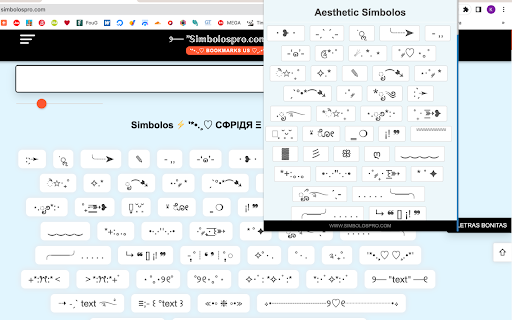
⚫ Aesthetic 𝒮í𝓂𝒷𝑜𝓁𝑜𝓈 《Copiar e colar》*ੈ✩‧₊˚.ೃ࿐*ೃ༄·˚ ༘ˏˋ°•*⁀➷˗ˏˋ ´ˎ˗༊*·˚・❥・⋆·˚ ༘ *ೃ⁀➷✧.*ੈ✩‧₊˚˚ ༘♡ ⋆。˚☄. -‘๑’-- ,,ׂׂૢ╰┈➤: ̗̀ Os símbolos estéticos são uma forma de linguagem visual que transmite emoções e ideias através do uso de formas e símbolos simples e reconhecíveis. Frequentemente usados em arte digital e design gráfico, esses símbolos são uma ferramenta versátil e expressiva para comunicar sentimentos, valores e conceitos sem a necessidade de palavras. Uma das formas mais populares de símbolos estéticos são os emojis. Originários de telefones celulares japoneses no final da década de 1990, esses pequenos símbolos semelhantes a desenhos animados se tornaram uma parte onipresente da comunicação digital moderna. De corações e rostos sorridentes a animais e objetos, os emojis oferecem uma maneira rápida e fácil de adicionar emoção e personalidade às comunicações baseadas em texto. Outra forma de símbolos estéticos são formas abstratas, como círculos, triângulos e quadrados. Essas formas podem ser combinadas e organizadas de várias maneiras para criar símbolos mais complexos, cada um com seu próprio significado e conotações. Por exemplo, um círculo com uma cruz dentro pode representar um alvo, enquanto um triângulo apontando para cima pode simbolizar crescimento ou progresso. Os símbolos estéticos também podem ser inspirados pela natureza e pelo mundo físico. Por exemplo, o símbolo do infinito, que se assemelha ao número 8 deitado de lado, é freqüentemente usado para representar o amor eterno, possibilidades ilimitadas e o universo. Da mesma forma, o símbolo da lua crescente passou a representar o mistério, o subconsciente e o feminino. Nos últimos anos, os símbolos estéticos tornaram-se cada vez mais populares no mundo da moda e do estilo pessoal. Joias, roupas e acessórios com vários símbolos e formas estão prontamente disponíveis e podem ser usados para expressar individualidade e gosto pessoal. No geral, os símbolos estéticos são uma forma versátil e eficaz de comunicação visual que pode adicionar profundidade, emoção e significado a qualquer design ou mensagem. Seja usado em arte digital, design gráfico ou moda cotidiana, esses símbolos oferecem infinitas possibilidades criativas para se expressar e se conectar com outras pessoas.

Conversor de Letras
𝒢𝑒𝓃𝑒𝓇𝒶𝓉𝑜𝓇 - Genera ℭ𝔬𝔬𝔩 y ⓢⓣⓨⓛⓘⓢⓗ texto extraño con ✅ símbolos y emojis. Bienvenido a uno de los mejores sitios web de generadores de letras elegantes, aquí puede convertir su texto normal en texto elegante y elegante. Que se puede utilizar en plataformas de redes sociales como Facebook, Instagram, Twitter y muchas más. Texto elegante que también puede enviar a alguien mediante un mensaje de texto o también puede hacer comentarios en YouTube con su texto elegante. Nuevas fuentes de texto agregadas - ▄︻ デ C̷o̷n̷v̷e̷r̷s̷o̷r̷ ̷d̷e̷ ̷l̷e̷t̷r̷a̷s̷══━ 一 Fuentes de texto comunes - 𓂀 ℂ𝕠𝕟𝕧𝕖𝕣𝕤𝕠𝕣 𝕕𝕖 𝕝𝕖𝕥𝕣𝕒𝕤 𓂀 Fuentes de texto pequeñas - 𝘾𝙤𝙣𝙫𝙚𝙧𝙨𝙤𝙧 𝙙𝙚 𝙡𝙚𝙩𝙧𝙖𝙨 Fuentes de texto de líneas - 𝐂𝐨𝐧𝐯𝐞𝐫𝐬𝐨𝐫 𝐝𝐞 𝐥𝐞𝐭𝐫𝐚𝐬

Favorite Emojis Copy Popup
📋 Streamline work with Favorite Emojis Copy Popup: easily copy and paste emoji, special characters and text snippets! 🌟 Boost Your Productivity with Favorite Emojis Copy Popup: The Ultimate Tool for Effortless Symbol Insertion Are you tired of wasting time searching for special characters, struggling with formatting, or crafting lists in your documents? The Favorite Emojis Copy Popup Chrome extension is here to streamline your workflow and give you complete control over your favorite symbols. Perfect for anyone who needs quick access to frequently used characters, this extension works seamlessly across Excel, Google Docs, Google Slides, and more. 🚀 How Does Favorite Emojis Copy Popup Work? 1️⃣ Quick Symbol Shortcuts Configure up to 3 keyboard shortcuts for your most-used symbols or custom text: ➔ Click Set next to any shortcut to configure the keyboard combination. ➔ Click the symbol box to edit the symbol or text for that shortcut. ➔ Use the shortcut anywhere to instantly insert or copy the symbol. 💡 Pro Tip: When in a text field, the symbol will be inserted directly at your cursor. Otherwise, it will be copied to your clipboard with a notification confirming the action. 2️⃣ Favorites Popup for Quick Access Save up to 32 favorite symbols for fast and easy access: ➔ Click any empty slot (+) to add a new symbol or custom text. ➔ Hover over existing symbols to reveal options for copying or removing them. ➔ Click on a saved symbol to edit or replace it anytime. ➔ Use the favorites shortcut (Alt+V by default) to quickly open the popup. ⚠️ Note: Symbols and custom text are limited to 4 characters maximum, ensuring clean and concise formatting. Moving, Pinning, and Resizing the Favorites Popup The favorites popup is designed for flexibility: • Move the Popup: Use the drag handle (⋮⋮) at the top to drag and drop it anywhere on the page. • Pin the Popup: Click the pin icon (📌) to keep the popup visible even when clicking outside. Click again to unpin. • Resize the Popup: Drag the resize handle (◢) in the bottom-right corner to show more or fewer symbols. The popup will automatically adjust to fit the visible symbols. 💡 Note: The popup remembers its size between sessions. Symbols that don’t fit in the current size will be hidden until you resize the popup. 3️⃣ Insert or Copy: Two Ways to Use Your Symbols The flexibility of Favorite Emojis Copy Popup lies in how it lets you use your favorite characters: • In Text Fields: The symbol is inserted directly at your cursor position. • Outside Text Fields: The symbol or text is copied to your clipboard, with a notification confirming the copy action. 👨💻 Pro Tip: This extension is versatile enough to handle more than just symbols! Use it for emojis, checkmarks, short phrases, or even bullet points to speed up your workflow. 🦾 Save short terms or custom text (up to 4 characters), such as “Hi” or “OK,” to use them as shortcuts in your writing. ✨ Why Use Favorite Emojis Copy Popup? This extension isn’t just about symbols—it’s about creating a seamless experience when working with special characters, lists, and formatting. ➤ Save Time: Stop searching for the right symbol or figuring out how to add special characters in spreadsheets or documents. ➤ Stay Organized: Keep your most-used symbols or text just a shortcut away. ➤ Boost Productivity: Whether you’re making a report, presentation, or spreadsheet, this tool ensures you get it done faster. 🛠️ Perfect for Every Platform The Favorite Emojis Copy Popup extension works smoothly across all popular tools and platforms like Google Slides, Excel, Word, Google Docs, Notion, and more. 📌 Common Uses for Favorite Emojis Copy Popup Symbols are essential for making information clear, organized, and easy to read. Here are some examples of how you can use them: ➤ Notes: Organize brainstorming sessions, meeting agendas, or lecture notes with clarity using symbols or bullet points. ➤ Blog Posts: Format articles with symbols or bullet points for better readability and scannability. ➤ Spreadsheets: Use symbols in Excel to create cleaner, more structured data entries. ➤ Project Management: Streamline to-do lists, task tracking, and action plans with consistent, formatted symbols. ➤ Content Creation: Add creative symbols to social media posts, email campaigns, or marketing materials for a unique touch. 💡 How to Insert Symbols in Google Slides, Excel, or Word One of the most common struggles is figuring out how to add special characters in Excel or how to use symbols effectively in Google Slides. With Favorite Emojis Copy Popup, it’s easier than ever: • Use the hotkey to insert symbols directly into text fields in Excel or Google Docs. • Open the favorites popup to copy and paste symbols into tools like Google Slides, Notion, or any app. • Customize your keyboard shortcuts to match the specific symbols or text style you need for your project. 🎯 Transform Your Workflow Today with Favorite Emojis Copy Popup Say goodbye to formatting frustrations and hello to effortless productivity with the Favorite Emojis Copy Popup extension. Whether you’re dealing with symbols in spreadsheets or organizing your notes with clear bullet points, this tool is designed to enhance your efficiency across platforms. Streamline your tasks and elevate your document formatting with ease!

Kawaii Faces (✿◠‿◠)
Collection of cool and stylish (▰˘◡˘▰) kawaii and text faces for your Instagram, facebook, twitter bio, profile name or comments. On this Kawaii Faces and Text Faces extension, you will get a huge collection of text faces, which you can use in your daily communication on social media platforms or send a text message. With these text faces, you can present your mood and make your chat unique and cool. Here are some examples of Kawaii text faces (✿◠‿◠) (ノ◕ヮ◕)ノ*:・゚✧ \(^○^)人(^○^)/ (づ。◕‿‿◕。)づ ヽ༼ ຈل͜ຈ༼ ▀̿̿Ĺ̯̿̿▀̿ ̿༽Ɵ͆ل͜Ɵ͆ ༽ノ

▷Letras Personalizadas⚡(☉̃ₒ☉)ModificadorLetra
Su Excelente generador de dispositivos de letras aquí puede enmendarse mientras no Intente su contenido para atraer variedades de materia de Dispositivo de letras . Es viable con todos organizaciones sociales como :-All types of social media free-fire, pub g, fonts games, and so on.
