
lgffephbjkjmkdipchghjadbeppgojhk
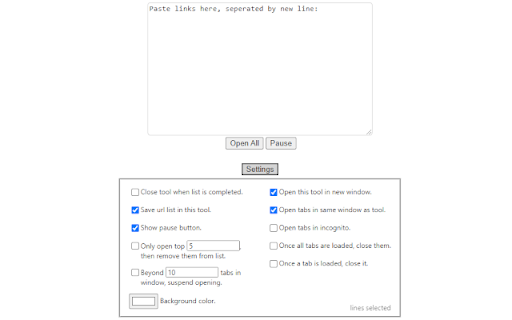
As opposed to other mass-opening tools, this tool may be useful for: - reducing spikes in bandwidth usage - avoiding 503 errors from making too many requests to the same website too quickly - caching lists of websites

GoldDust
Ask a question about a company or a person. If the answer is on the internet - our AI agent will locate, synthesize, and display it. Welcome to GoldDust, the Chrome extension that automates the tedious and repetitive research you need to effectively qualify leads, prioritize opportunities, and customize outbound messaging. ⭐ Seamless Integration: Whether you're scrolling through LinkedIn, checking out a company’s website, checking latest news or deep in your CRM, GoldDust is there to enrich your experience without the hassle of switching tabs or tools. ⭐ Rich Info, On Demand: You've got a treasure trove of information, when and where you need it. It’s like magic, but for work. ⭐ Custom Insights: You’re getting the good stuff – customized insights that matter to you. Say goodbye to info overload and hello to insights that make a difference

Thymeline
Add events to your timeline the easy way Keep track of everything important about your projects all in one place. Meet Thymeline, the free Chrome extension that will magically transform your project chaos into an organized masterpiece. Created for Project Managers. Here is how Thymeline saves you time. No APIs. No integrations. As simple as copy & paste. Easily copy relevant information from any of your existing tools or apps without any hassle. Once you download the chrome extension... Step 1: Visit any website. Step 2: Highlight any text. Step 3: Click on the Thymeline Chrome extension Step 4: Add to existing Thymelines. That’s it! Thymeline can handle as many projects as you’re juggling. Create as many Thymelines as you need! Multiple projects, multiple Thymelines, we can handle it. Keep track of it all in a simple interface. Share with others Share your Thymelines with others on your team with view or edit privileges, keeping everyone on the same page. Want to keep it private? You can do that too.

Add to LinkJoin
Organize and automatically open virtual meetings. Keep all of your links in one central location where they can be sorted, searched for, and opened from any device with just a click. Receive reminders up to 30 minutes before a meeting and automatically opens it when the time comes. LinkJoin Bookmarks store links for access from any device at any time. Add to LinkJoin streamlines this process into a two-click process in your browser. Add to LinkJoin operates in the background so you can open links or open Zoom meetings automatically without any tabs running. Share links and bookmarks with others via the LinkJoin website, transferring your saved information to them as well.

Open tabs in order
This is an extension that updates tabs in order when multiple tabs are opened. “Open tabs in order” is an extension that reduces browser load by loading tabs sequentially when multiple tabs are opened simultaneously. This extension is designed to solve the problem where opening many tabs at once causes all tabs to load simultaneously, slowing down your PC. Normally, in Chrome, opening multiple tabs at once causes each to start loading simultaneously, placing a heavy load on memory and CPU. Using “Open tabs in order” allows tabs to load sequentially, reducing consumption of system resources. This extension adjusts loading timing by pausing tabs, providing a comfortable browsing experience. It is especially useful for users who frequently open large numbers of pages at once, such as from bookmark folders.
