
lgdpchmlpgooalofkdcgciaibpieoofc

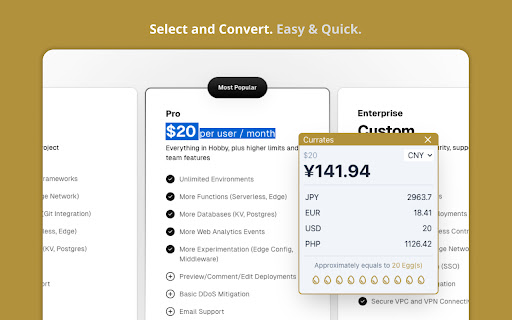
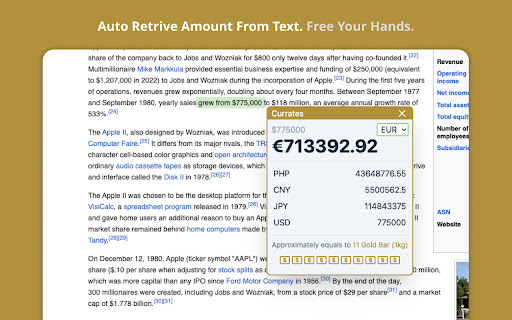
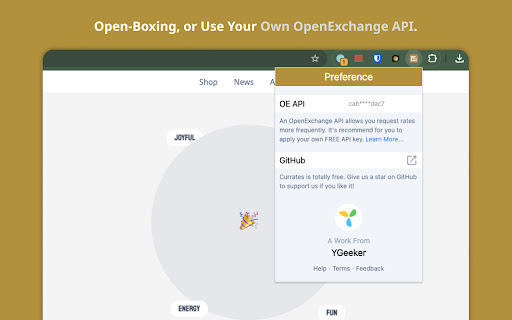
Convert currency in real-time with just select the text. This browser extension can immersively convert the currency to your local currency simply by selecting the text in the webpage. 100% open-source and FREE. You can get quick insight to market and currency value to boost your business, or just explore the world more easily. - Detect & convert currency by selecting text - Display multiple results in one screen - Estimate value based on items - Customize OpenExchange key - Full open-source, no privacy worry - Tiny & Super fast (Only 2kb packed size)

Selection Converter
Instantly convert highlighted prices on the web, with customizable preferences and support for fiat and crypto currencies. Convert prices instantly without leaving your tab. Selection Converter is a lightweight productivity tool designed to eliminate the friction of manual currency conversion. Whether you are shopping internationally, researching travel, or tracking crypto assets, simply highlight a price to see its value in your preferred currency. - Dual Support: Seamlessly handles both global fiat currencies and major cryptocurrencies. - Customizable Base Currency: Set your default currency once and get personalized results every time. - One-Click Toggle: Easily enable or disable the extension via the toolbar menu for a clean browsing experience. - Real-Time Accuracy: Fetches up-to-date exchange rates to ensure your conversions are precise. Why Selection Converter? - Zero Friction: No need to switch tabs, open calculators, or search Google for exchange rates. - Privacy-Focused: The extension only activates on user-selected text. We do not track your browsing history or store sensitive data. - Lightweight: Optimized for performance to ensure it doesn't slow down your browser. How to Use Pin the extension to your toolbar. Select your target currency in the settings. View the converted amount in the immediate popup.

Currency Converter
Use the Currency Converter - extension that converts prices to your currency with a hover, acting as a money converter calculator. Elevate your browsing experience with Currency Converter, the ultimate tool for real-time currency conversion. This easy-to-use Chrome extension allows you to instantly convert prices by simply hovering over any value on a website. Perfect for online shoppers, travelers, and anyone dealing with multiple currencies, this extension provides quick, accurate exchange rates without leaving the page. 🌍 Instant Conversion, Maximum Convenience 💠 Hover to convert: Instantly see the price in your local currency by hovering over any amount. 💠 Live exchange rates: Stay updated with real-time global exchange rates. 💠 No page-switching: Seamless integration means you never have to manually search for conversions again. Currency Converter Features: 📌 Quick Conversions: Convert prices with a single hover over any amount. 📌 Multiple Currencies: Access a wide range of international currencies, including USD, EUR, JPY, and more. 📌 Real-Time Rates: Continuous updates ensure you always have the latest exchange rates. 📌 Customizable Settings: Choose your preferred currency for a tailored experience. Just a handy tool ✴ The exchange rate Currency Converter plugin doubles as a handy tool. ✴ It allows you to watch real money rate exchange in real time. ✴ Whether you need to make an important conversion from SEK to USD ✴ Or do a pricecheck to compare prices in different currencies just for fun, the extension handles all. ℹ️ Key Benefits: ➤ Our currency translator works instantly. ➤ Adjust settings to fit your needs in real time. ➤ Use it as a Currency Converter calculator. 💼 For Travelers and Global Shoppers ⁍ Do you shop often on international websites? The Currency Converter is the perfect tool for you. ⁍ It ensures that you always know how much you’re spending by converting money exchange price directly. ⁍ Never again will you have to worry about miscalculating the cost of an item in your home money. 🔍 Here’s Why You Need It: ⁃ Real-time conversions to give you the best rates while shopping. ⁃ If you need to check the currency exchange rate USD to KRW or convert BRL to USD, it does it all! ⁃ The Chrome Google currency exchange converter has access to major currencies like EUR, USD, and more. 📲 Instant Access to Global Exchange Rates ‣ With our Chrome Google valuta converter extension, get instant price updates. ‣ Simply hover over any price, and the extension will display the amount in your local money. ‣ Whether calculating euro to dollar conversion or comparing costs, the tool provides immediate, accurate data. Notable Aspects ⭐ Automatic Detection: No manual input required—just hover over the price, and the conversion happens automatically. ⭐ Exchange Rate Calculator: Converts rates directly on the webpage, with no interruptions. ⭐ Customizable preferences: Tailor the extension to the currencies you use most frequently. ⭐ Live Exchange Rates: Up-to-date data ensures accurate conversions every time. Maximize Savings with Real-Time Conversions 💰 With our Currency Converter app, you can instantly see how much you're saving or spending while shopping on foreign websites. 💰 From comparing prices to finding the best deals, this tool is indispensable for any savvy shopper. 💰 Whether you're an international businessperson, or a global shopper, our money translator offers features for everyone—from converting the currency rate JPY to USD to handling foreign Currency Converter needs. Features Include: 1️⃣ Price Match: Find the best deals by comparing prices in multiple currencies. 2️⃣ Instant Exchange Rates: Know exactly how much you’re spending in real time. 3️⃣ Easy Management: The Chrome Google money converter calculator simplifies your finances with a powerful conversion. Secure and Efficient 🔒 The Currency Converter is built with robust protocols to ensure your conversions are safe and private. 🔒 Whether you’re browsing the web or making a purchase, you can trust that your data remains secure with the extension. 🔒 A reliable tool for converting money securely across any website. Easy Setup and Seamless Usage 🔗 Our Chrome Google Currency Converter is incredibly easy to install and use. 🔗 Add it to your browser, choose your currencies, and let it run in the background as you browse. 🔗 With its user-friendly design and real-time functionality, you’ll wonder how you ever managed without it. Here’s How to Get Started: ⚙️ Download and install the extension from the Chrome Web Store. ⚙️ Set your preferred currency for quick access. ⚙️ Hover over any price to see an instant conversion to your local currency. Who Will Benefit? ✔️ Travelers managing multiple currencies on the go. ✔️ Online shoppers who compare prices from different countries. ✔️ Business professionals handling international transactions. 💼 Stay on Top of Exchange Rates When Traveling ∙ Before your next trip, ensure you're prepared with the latest exchange rates. ∙ The Currency Converter Google Chrome extension keeps you informed of fluctuating exchange rates. ∙ Essential for travelers converting money exchange rates or checking the currency exchange rates table while web-surfing. 🕹️ Use it to: ◦ Track real-time exchange rates for all major currencies. ◦ Save your time, convert money online using your PC's cursor. ◦ Manage multiple currencies without leaving the page. Why Choose the Currency Converter Extension? 💡 Simple, intuitive, and designed to meet the needs of travelers, shoppers, and investors. 💡 Instant updates so you never miss a change in exchange rates. 💡 Tailored for your needs whether you’re a traveler, shopper, or investor. 💡 The live exchange rate extension gives you up-to-the-minute data for accurate calculations. 💡 The application Currency Converter supports your lifestyle, whether at home or abroad. 🌟 Transform Your Browsing Experience If you're searching for where to convert currency online, our tool is perfect for you! Install our currency exchange rate converter today for instant, accurate price conversions with just a hover and take the guesswork out of money conversions. From quick comparisons to real-time conversions, this tool ensures you always have the most accurate exchange rates at your fingertips. Don’t waste time searching for rates—let the extension handle everything for you.

TaoBao CNY to USD converter
Converts CNY to USD on Taobao based on a 15 cent per dollar conversion rate. Prices are not 100% accurate and not guaranteed. This extension is not guaranteed to work on every Taobao page but it will generally work on search results, item listings, Taobao storefronts, and your favorites list.

PageTalk - Your Browser Q&A Assistant
A browser extension that can read page content and use AI for Q&A ✨ PageTalk - Your Smart Web Reading & Chat Assistant ✨ PageTalk is a browser sidebar AI assistant powered by the Gemini API, making it incredibly simple and efficient to understand and interact with web content. Totally free and opensource! You can find it on Github. * 📄 **One-Click Page Summary**: Tired of wading through long, complex documents? Just tell PageTalk "Summarize this," and get the core content of any webpage instantly! * 🌐 **Multi-Tab Conversations**: Need to synthesize information from several pages? Simply type `@` in the input box to easily select other open tabs and bring them into your current conversation context. * 📺 **YouTube Video Summaries**: Don't have time to watch the whole video? No problem! Paste a YouTube URL to PageTalk, and it will distill the key points for you. * 🖼️ **Intelligent Image Q&A**: Encounter a confusing chart or image? Send a screenshot to PageTalk and let Gemini explain it to you. * 🎓 **Online PDF Q&A (e.g., on arXiv)**: Need AI assistance while reading academic papers? PageTalk supports online PDF content extraction and Q&A, making literature review and research more efficient. * ✨ **Text Selection Helper**: Select any text on any webpage and instantly interpret, translate, or chat about it with AI assistance. Customize your own selection options with personalized prompts. * 🌐 **Proxy Support**: Enhanced connectivity with HTTP and SOCKS5 proxy support for users who need to access Gemini API through proxy servers in restricted network environments. * **Save Time**: Get information quickly and say goodbye to information overload. * **Boost Efficiency**: Handle web content more effectively, whether for study or work. * **Intelligent Interaction**: Go beyond just reading – have in-depth conversations with content. * **Personalized Experience**: Create and manage your own AI agents to customize how you process information. 1. Navigate to "Settings" > "Model" tab and enter your own Google Gemini API Key. 2. Open any webpage, click the PageTalk icon in your browser toolbar (or use the `Alt+P` shortcut) to launch the assistant. 3. Start enjoying a smarter browsing experience! 🔒 **Privacy & Data Handling:** PageTalk processes user data locally and communicates only with Google's Gemini API for AI responses. Your API key and conversation data are stored locally in your browser. We do not collect, store, or share personal information on external servers. For detailed privacy information, please visit our privacy policy. Install PageTalk now and let AI be your powerful companion for exploring the web!
