
lfacobmjpfgkicpkigjlgfjoopajphfc
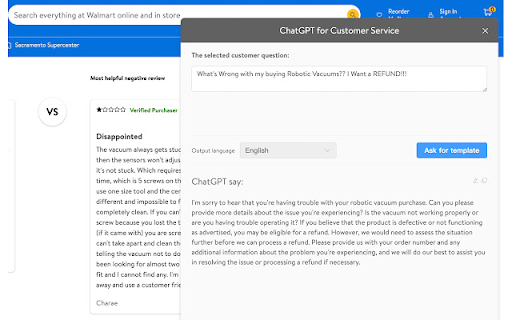
Optimize responses when you message with customers in Aliexpress Aliexpress Customer Service Helper is a Chrome extension to help Aliexpress seller message with customers smoothly. It a free tool like Crisp magicRply or Drift GPT. Simply select the customer's question, then Aliexpress Customer Service Helper will feedback the reply advice that given by GPT-3.5 Chatbot. 🚀 Feature ● Provide canned responses or reply template by ChatGPT base on the question of customers. ● Simply select the question content. ● Edit feedback from OpenAI in Aliexpress Customer Service Helper to reply nicely to customers ● Copy content by one click. ● Multiple output languages. 🚀 Who is Aliexpress Customer Service Helper for Aliexpress Customer Service Helper is made for Aliexpress seller, customer service staff or someone need reply customer's question to solve their problem. 🚀 How to use it ➡️ Make sure you have a ChatGPT account ➡️ Simply select any online content by your mouse ➡️ Click on Cmd+M (Mac) or Ctrl+M (Windows) to open the extension window ➡️ Choose what languages you need, and click "Ask for template" ➡️ The canned responses will displayed in the extension window in a minute.

Yahoo - optimize listing & AI Writer
A free tool with ChatGPT to help you find more keywords, and optimize your listing YahooGPT(Yahoo Shopping:shopping.yahoo.jp) is a free AI-powered listing optimizer that helps Yahoo sellers optimize listing to improve Yahoo search ranking. With the help of YahooGPT, you will never need to search for Yahoo tips or templates for your listings. Just one click, you can get some better listing choices by ChatGPT OpenAI. 🚀 Features ‒ Optimize title of Yahoo listing ‒ Optimize description of Yahoo listing ‒ Keywords finder and Keyword suggestion ‒ Copy optimized listing content with one click ‒ Export optimized listing content as .doc 🚀 How to use 1. Optimize title a. Go to listing page of the product b. Open the YahooGPT and select Title Generator c. Search and pick keywords d. Click Generate Title button and get suggestion. 2. Optimize description a. Go to listing page of the product b. Open the YahooGPT and select Description Generator c. Search and select keywords, and set parameters. d. Click Generate Description and get suggestion. 🚀 How it works YahooGPT analyzes current product information such as title, description, keywords and uses ChatGPT to provide you with optimized listing content.

AllegroGPT:ChatGPT for Allegro Open AI Writer
A free AI writer with ChatGPT to help you optimize your listing. **New Feature: Free Access to ChatGPT Plus, no OpenAi or ChatGPT Account need!** AllegroGPT is a free AI-powered listing optimizer that helps Allegro sellers optimize listing to improve Allegro search ranking. With the help of AllegroGPT , you will never need to search for Allegro tips or templates for your listings. Just one click, you can get some better listing choices by ChatGPT OpenAI. 🚀 Features ‒ Optimize title of Allegro listing ‒ Optimize description of Allegro listing ‒ Keywords finder and Keyword suggestion ‒ Copy optimized listing content with one click ‒ Export optimized listing content as .doc 🚀 How to use 1. Optimize title a. Go to listing page of the product b. Open the AllegroGPT and select Title Generator c. Search and pick keywords d. Click Generate Title button and get suggestion. 2. Optimize description a. Go to listing page of the product b. Open the AllegroGPT and select Description Generator c. Search and select keywords, and set parameters. d. Click Generate Description and get suggestion. 🚀 How it works AllegroGPT analyzes current product information such as title, description, keywords and uses ChatGPT to provide you with optimized listing content.

AliNiche Finder&ChatGPT Review Analysis
Find Profitable Niches on Aliexpress with this Review Audit and Niche Finder Tool 🚀 What is it? ● AliNiche Finder&ChatGPT Review Analysis is a helpful Niche Finder tool for all Aliexpress sellers who wants to get a better review analysis and review audit. It's a chrome extension that uses OpenAI ChatGPT to analyze the reviews and pull out the most important keywords and takeaways. It can help sellers find the suitable product to sell. ● With this extension, you can easily tell if a review is positive, or negative. It's perfect for sellers who want to see what people are saying about the products. These information is presented to the you in an easy-to-understand format, helping you to quickly identify trends and patterns in the reviews. ● It can also search for reviews that have specific keywords. This is really useful if you're looking for feedback on a particular aspect of a product. ● Overall, if you want to know more about what people are saying about a product, this is the perfect tool for you. It's easy to use and provides valuable insights that you wouldn't be able to get otherwise. 🚀 Features Review Analysis: ● Choose the number of reviews you want to analyze: 10, 50, or 100. ● See a summary of common keywords related to the product. ● Check out the high-frequency words or phrases in positive and negative reviews. ● Get advice based on the review analysis. Review Search: ● Search for reviews that contain specific keywords. ● Add multiple keywords, separated by commas. ● Once you find the reviews you want, use the "copy all" function to easily save them.

Universal Keyword Planner box
Universal Keyword Planner box is a keyword acquisition Chrome extension. With this plugin, you can discover much more keywords for SEO purposes. Are you tired of looking for the best keywords across platforms? All you have to do is install the Universal Keyword Planner box instantly. *No bloat, no ads, no unnecessary permissions, just a simple way to search for seo keywords.* To use this automatic data extraction tool, you only need to put your root keyword into the search fields and click the "UK" icon. Then a broad panel will be expanded, on which it displays dozens of long-tail keywords and AI keyword suggestions based on your input. You can copy them or export them to Excel or CSV files (XLS, XLSX, CSV), with no registration or fees required! It integrates with both official APIs and third party APIs to explore keywords as well as their core metrics such as search volume. How to use it? 1. Install Universal Keyword Planner box extension onto your Chrome browser 2. Go to any website we support, and start searching 3. You'll notice a "UK" button (the logo of Universal Keyword Planner box) added next to the original search button 4. Click the button, and you will see multiple lists of keywords showing up underneath the search bar. 5. Free to copy or export the keywords you want Q&A -Q:Do I need to pay for downloading keywords from Universal Keyword Planner box? -A:Absolutely no need - you can use any function of this plugin for free. -Q:What eCom Platforms suppported? -A:We now support expanded keywords on Aliepress, Amazon, eBay and Etsy. -Q: Is Any more platform supporting? -A: We also supported expanded keywords on Google and Youtube search box
