
lepamddghhbdnkaddghdbnpmhjdkkppk
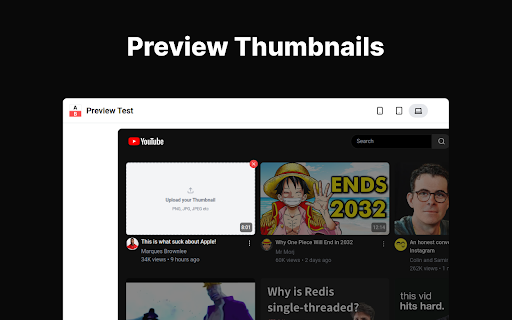


Test and Preview YouTube thumbnails before publishing. Ensure your thumbnails stand out in the YouTube feed. Perfect for YouTube creators and thumbnail designers who want to ensure their thumbnails are eye-catching and effective. Improve your click-through rates with this simple, user-friendly tool. Make sure your thumbnails stand out in search results and suggested videos. Essential for: Try Preview Test Thumbnails today and take the guesswork out of your YouTube thumbnail design!

Viewstats - YouTube video & channel analytics
View video and channel analytics while browsing YouTube Viewstats: Data insights on YouTube videos and channels Discover performance insights into your favorite creators’ videos with a new and exciting way to explore YouTube! The Viewstats Chrome Extension provides video and channel analysis while browsing YouTube. Deep Video Insights: Gain unique insights, all without leaving the YouTube platform! Views Over Time: Explore views over time with the interactive graph. Thumbnail and Title Changes: Uncover changes that remain hidden to others. Ranking System: Evaluate how the video you are watching compares to the creator’s previous nine uploads within the same time frame. Was the video a hit or a miss? Compare Videos: Analyze the performance of multiple videos over various time intervals with just a click. One-Click Channel Analytics: Examine your favorite channels total views, subscribers, video breakdown, and so much more with a single click! Trending Channels: Easily view “Trending channels today” and navigate to their Viewstats page. It Gets Even Better with Viewstats.com! The Viewstats Extension will be the ultimate YouTube companion you never knew you needed. But we didn’t stop there. Visit viewstats.com for the most advanced YouTube analytics, backed by one of the largest databases ever. For more information, please visit: Note: Not every video and channel may be available on the extension. If you find one that we don’t have in our database, you can go ahead and enable tracking for it!

Thumbnail Preview - YouTube Thumbnail Testing
Preview and test your thumbnails directly on YouTube Preview your youtube video thumbnail and title directly within your YouTube homepage / search page or video recommendation and grow your channel to new heights. Let’s get those watch hours up, let’s increase your video virality, let's grow that channel. As a YouTuber, seeing your upcoming video's thumbnail in context is crucial to knowing if it stands out or blends in with other content. A good thumbnail is the entry/growth gate of your video. It does not matter how good your video is if users don’t get to see it. It is said with a good thumbnail preview ● ✅ Bring 30-40% more views to a video ● ✅ Give your video the chance to go viral ● ✅ Increase watch hours of any video No more screenshots of youtube homepage where you paste your thumbnails. With Thumbnail Preview, you simply upload your thumbnail and enter the video title and see it on your live youtube page — no extra steps required! ➤ Unlimited experiments - Test all your thumbnails ➤ Test with your personalized feed - See thumbnail preview in the most common youtube growth areas: Homepage/Search/Video recommendation ➤ Test and preview your youtube thumbnail in search ➤ Free - We’ve been quite lazy so most of it is free ➤ No login needed: Securely use the tool without providing any credentials. Established content creators have admitted to working backwards from a thumbnail & title to actually making the video. Let’s grow your channel!

Youtube Thumbnail Preview | ThumbnailGeek
See what your thumbnail & title looks like before you publish. Youtube Thumbnail Preview is your Ultimate Tool for Perfect Thumbnails and Titles! Are you a YouTube creator who wants to make your videos stand out above the rest? Do you struggle to visualize how your thumbnails and titles will appear to viewers on YouTube? Look no further! Youtube Thumbnail Preview is the must-have extension designed exclusively for you! 🎥 Accurate Representation: Say goodbye to uncertainty! With our extension, you can now see an accurate representation of your title and thumbnail, just as it will be seen by viewers on YouTube. No more surprises or disappointment after publishing! 🛠️ Seamless Editing: Whether you're uploading a new video or tweaking the details of an existing one, our "Youtube Thumbnail Preview" extension offers real-time visual feedback. Instantly see how your changes impact the overall look and feel of your video on YouTube's homepage. 🌓 Dark and Light Modes: Choose your preferred working environment! Our extension features dark and light modes, perfectly aligned with YouTube's homepage colors. Toggle effortlessly without affecting your browsing experience. 🎯 Targeted for Success: Calling all ambitious YouTubers! If you seek to increase the reach of your videos, Youtube Thumbnail Preview is your secret weapon. Make quick decisions about thumbnails and ensure your content grabs viewers' attention from the very first glance. 🚀 Publish with Confidence: Ensure you're presenting your videos in the best possible light! With our extension, you can fine-tune your thumbnails and titles until they perfectly represent your content. Showcase your videos exactly as you intended, and watch your audience grow! 🔒 Privacy First: Rest assured, your data is safe, even from with us! Youtube Thumbnail Preview is optimized to be as efficient as possible while not collecting any personal user identifiable data. Your identity remains yours alone. 🆓 Completely Free: Yes, you read that right! Youtube Thumbnail Preview is entirely free to use. No hidden charges, no subscriptions, just powerful features at your fingertips without spending a dime! Say goodbye to guesswork and hello to success! Install the extension now and take your channel to new heights!

Youtube™ Thumbnail Preview
View youtube thumbnails with a single click. Preview youtube thumbnails in a small chrome extension popup window. Just click on the extension while on a youtube video page, and it will load up the thumbnail image. Click on the image and you will be redirected to the largest size of the thumbnail.
