
leopcflddppgddfhppgachdogbkmdjfa


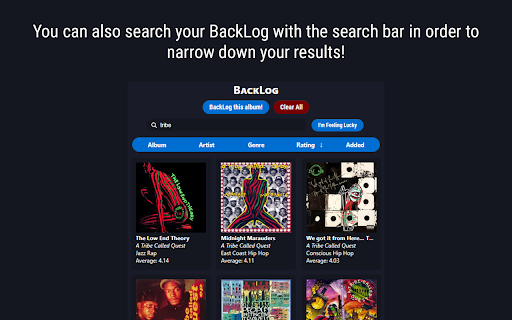


A Rate Your Music extension that allows you to BackLog albums. Do you find it difficult to remember every album you want to listen to while browsing Rate Your Music? Are you tired of your bookmarks being clogged with Rate Your Music links? Well, here's a solution. If you are an avid user of Rate Your Music, you have certainly run into the issue of managing your backlog. Managing and tracking your backlog can be overwhelming and time consuming, and Rate Your Music lacks a way to easily categorize music you would like to eventually listen to. BackLog is here to solve this issue. BackLog will allow you to store the albums you want to listen to in an extension, freeing your bookmarks bar from unnecessary links. With BackLog, you can sort your albums with beautiful cover art, filter by specified criteria, and head directly to the Rate Your Music page to read reviews and rate the album! You can even click the "I'm Feeling Lucky" button if you want BackLog to choose an album from your BackLog for you to listen to! Album Filtering: Backlog includes filtering by all sorts of criteria, such as Album, Artist, Genre, Rating, and Date Added. BackLog Searching: You can also search your Backlog with the search bar in order to narrow down your results! You can filter these results even more by using the filters. BackLog will dynamically filter your search results based off of what you select! BackLog Management: Managing your BackLog is important, so you can individually delete unwanted items from it with a single click. You can even delete your entire BackLog with one button! BackLog installs as an extension on Chrome. Click on the BackLog icon to open the extension. When you find an album you want to BackLog, click the "BackLog this album" button to store it in the extension! If you would like to search your BackLog, you can utilize the search bar and find albums based off of the criteria you provide. If you want BackLog to choose an album for you, click the "I'm Feeling Lucky" button. You can also sort via Album, Artist, Genre, Rating, and Date Added via the blue button under the search bar. Click these buttons multiple times to toggle between a descending and ascending sort. These filters even work when searching! Once an album has been stored in BackLog, you can click on the album to take yourself to it's Rate Your Music page. You can delete albums by hovering over them and clicking the X in the top left corner. You can clear your entire BackLog by hitting the red "Clear All" button. Keep in mind, this is PERMANENT and cannot be undone! BackLog does not collect ANY of your personal data. It simply requires Local Storage permission so that your BackLog doesn’t get erased after you close Chrome or turn off your PC. If you encounter a bug, please contact me on Github or via email!

Hidden Bandcamp Tracks
This extension adds a description underneath the album title of any album on Bandcamp which displays the number of hidden tracks that album has. It does NOT show hidden track names!

Last.FM Unscrobbler
Delete multiple scrobbles from your Last.FM profile. Simply click the extension icon, tick the checkboxes near the scrobbles you want to delete, go to the track menu and press "Delete selected scrobbles".

Better AOTY
Better AOTY enhances albumoftheyear with new features, interface changes, and more. Enhance your albumoftheyear experience with a more modernized layout, and some quality of life features. All current features on albumoftheyear remain, this extension simply builds upon the existing interface to offer many improvements, including: ✔ Auto Score Calculation (can be enabled/disabled) ✔ Modernized Layout (darker colors, rounded ui elements, better format) ✔ Accent Colors (green, yellow, blue, purple and red) ✔ Hide Album Scores (can be enabled/disabled) ✔ Better Rating Colors (can be enabled/disabled) ✔ Unrounded Scores (can be enabled/disabled) ✔ Spotify Stats (year, tracks, and length) ✔ Collaborative lists and rankings ✔ Added site animations ✔ More improvements planned for upcoming releases! If you have any questions, need help or have any suggestions, please email me here: contactplebcy@gmail.com

Nice Playlist Generator
Makes Spotify playlists from rateyourmusic.com and sonemic.com charts or lists If you like this add-on, spread the word. Help us by liking or sharing our Facebook page. Do you want to find new music? Are you interested in this year's releases, are you trying to get into a new genre or get to know 1993's field recordings of melting ice? Would you like to do this without the tediousness of searching single songs and making playlists of them? Do you like simple and functional things? If so, Nice Playlist Generator might be just what you want. Useful data gathered by rateyourmusic.com users in the form of charts and lists can be turned into Spotify playlists in a few easy steps. In your browser, navigate to a rateyourmusic.com's chart or an user submitted list. Click the Nice Playlist Generator icon in your address bar. If the add-on finds at least one item representing an album (or other kind of release) on the current page, the "Get spotify links" button activates. After you click it, the search on Spotify is started. You are informed about the amount of releases successfully found on Spotify and about the ones that could not be found. After the search finishes the "Copy playlist to clipboard" button activates. When you click it, you can go to the Spotify desktop application and choose a newly made or existing playlist you want to add the new tracks into. Click into the content pane of the playlist and paste the tracks found by Nice Playlist Generator into it by pressing Ctrl + V
