
lenngecmknckkoginhkkcbgfpnicelbf
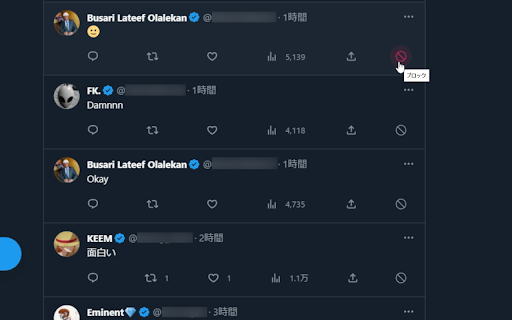
Add buttons to block users with a single click.

Plucker XBD - X(Twitter) Media One-click Downloader
Download and organize X (Twitter) images & videos in one seamless workflow ✨ Plucker XBD enhances your X browsing experience by helping you quickly collect, preview, and manage media from any page — all in one place. 🗂 Smart file organization Customize file names and folder structures to keep your media clean and easy to manage. 🧠 Duplicate detection Automatically skip media you’ve already saved to avoid clutter. 👁 Media preview panel Instantly view images and videos from the current page in a convenient side panel. All features are free to use. Try Plucker XBD and streamline the way you manage X media 🚀 ⚠️ Disclaimer Plucker XBD is an independent tool and is not affiliated with or endorsed by X (Twitter). This extension helps users access and organize publicly available media. Please respect applicable content rights and platform terms when using this tool.

Block button for X(Twitter)
Block users on X(Twitter) easily in a single click! Now with Block + Followers support. Introducing Block button for X(Twitter), a tool crafted to make blocking unwanted interactions as effortless as possible so you can focus on what truly matters: the good stuff. Our intuitive extension adds a discreet block button next to every username, giving you a one-click blocking experience. Seamless, non-intrusive, and intuitive— The tool is designed to integrate effortlessly into your browsing. Try it out and experience the freedom of a clutter-free timeline! • One-Click Blocking: Effortlessly block any X (Twitter) user with a single click. No more navigating through menu or confirmation dialogs. The tool does all the heavy lifting for you! • Intuitive Design: Enjoy an intuitive interface that blends seamlessly into your X (Twitter) experience. Our minimalist design ensures you can block users without distraction. • Convenience: Whether you’re on your feed or exploring profiles, block with a single click. Hope to make your experience better! Cheers!

One-Click Block for Twitter
A Chrome extension that adds a one-click block button to Twitter/X. v1.2.0 [New Features] - Added pop-up settings screen: You can now open settings from the toolbar icon - Extension on/off button: Toggle the block button display with a single click - Customizable display scope: You can set whether to show or hide the button for the timeline, replies, and search results - Block count counter: Displays the number of accounts blocked using this extension in a pop-up (counting starts after the update) v1.1.0 Added support for Twitter’s new domain (x.com). Fixed bugs.

Twitter (X) Ad Blocker
Block ads on Twitter and remove promoted tweets instantly with Circleboom. Hide ads on Twitter/X quickly and safely with Circleboom. Circleboom Twitter is the safest and most reliable way to block Twitter ads and remove promoted tweets across your timeline. As an official developer of Twitter/X, Circleboom ensures a compliant and secure method of blocking Twitter ads without risking your account or breaking your feed. Promoted tweets and sponsored posts disrupt your scrolling experience. The Circleboom Twitter Ad Blocker automatically blocks ads on Twitter, hides sponsored content, and eliminates suggested posts in real time: creating a clean, distraction-free feed that loads faster and feels natural. If you’re searching for a way to how to block ads on Twitter, how to block Twitter ads, or how do I block ads on Twitter without affecting your account, this block Twitter ads extension solves the problem seamlessly. Simply install the extension, and refresh your feed. Your Twitter/X will instantly become ad-free, cleaner, and smoother. Key Features: ✔ Block ads on Twitter/X automatically – remove promoted tweets ✔ Works across Home, Explore, Search, Profiles, and Replies ✔ Blocking Twitter ads happens locally — no account access required ✔ Faster scrolling & cleaner reading experience ✔ 100% compliant with Twitter — safe, private, and secure The Twitter Ad Blocker feature requires a Circleboom account — sign up now at Circleboom.com! Additionally, Circleboom offers a full toolkit of Twitter/X extensions — you can also remove followers, mass block or unblock accounts, and export your Twitter/X data effortlessly. Check them out to manage your profile smarter.
