
lelokahegiopaeanoekjohchkigpcgad
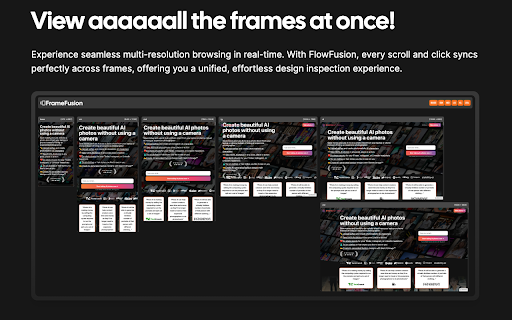
A browser extension to view multiple breakpoints at once. Optimize Your Responsive Design Like Never Before with FrameFusion Dive into the next level of responsive web design visualization with FrameFusion. Experience your websites across multiple breakpoints simultaneously, ensuring every pixel is perfect. Don't just view - interact and see the ripple effect of each scroll and click across all screens. Effortlessly identify discrepancies, streamline design tweaks, and validate layout integrity in real-time. Plus, with dynamic scaling, every breakpoint view snugly fits your screen, ensuring you never miss a detail. • Simultaneous Multi-Breakpoint View: Display your website across multiple screen resolutions at once. • Dynamic Scaling: Adapts each view to fit your screen perfectly, ensuring clarity and detail. • Interactive Synchronization: Unified scroll and click synchronization across all frames. • Customizable Breakpoints: Easily toggle between the breakpoints you wish to inspect. • Intuitive Error Detection: Swiftly spot and rectify responsive layout inconsistencies.

Custom breakpoint indicator
Knowing what viewport you're currently in is difficult so this extension tells you. The system has Bulma's breakpoints set as a default but you can change them to whatever you want.

Codehub for Webflow
Adds a window to save and manage code snippets for Webflow projects. Codehub for Webflow help you manage your codesnippets. THE PROBLEM: If you often find yourself searching through multiple projects to find those handy code snippets you've used before, Codehub is here to simplify your life. THE SOLUTION: This extension provides a centralized hub where you can save, manage, and easily access all your frequently used code snippets. With Codehub, reusing code across your Webflow projects becomes a breeze, saving you time and effort. It's the perfect tool for developers looking to optimize their coding process and enhance productivity on Webflow. Simply copy the snippets that you have saved and paste them where you need them. Also enjoy the premade community snippets!

Window Resizer
Preview websites in different screen sizes. See your website in different screen sizes easily using this extension. This extension will provide a dedicated page once you click on the extension icon in the browser toolbar. See you webpage in different screen sizes across multiple panels. You have full control over the sizing, which panel to preview and how many panels to display.

Sharemaster: Copy Title & URL with Shortcut
Helps you copy the title and URL quickly with keyboard shortcuts Sharemaster enhances your productivity by providing intuitive and customizable keyboard shortcuts to copy webpage titles and URLs in various formats. Copy Page Title and URL: • Windows / Linux: Alt + C • macOS: Option + C Copy Page Title and URL in HTML Format: • Windows / Linux: Alt + H • macOS: Option + H Copy Page Title and URL in Markdown Format: • Windows / Linux: Alt + M • macOS: Option + M Note: These shortcuts can be customized via Chrome’s extensions shortcut settings. Navigate to chrome://extensions/shortcuts to modify them according to your preferences. Sharemaster can also be accessed through the context menu. Simply right-click on any webpage to find Sharemaster’s options, allowing you to copy the title and URL in your desired format without using keyboard shortcuts. Whether you’re compiling reports, blogging, or sharing content with friends, Sharemaster streamlines the process of copying and sharing webpage information!
