
lejohcdoolanljiajadpngekfdeaglof
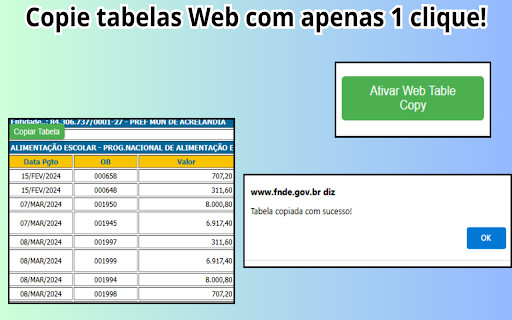

Copie as tabelas do site em 1 clique Facilite o processo de copiar tabelas da web diretamente para suas planilhas com a extensão “Web Table Copy”! Ideal para estudantes, pesquisadores, analistas de dados e qualquer pessoa que precise transferir dados tabulares da web para uma planilha de forma rápida e eficiente. Funcionalidades Principais: • Copie Tabelas com Um Clique: Selecione e copie qualquer tabela de uma página web com apenas um clique. • Integração Direta com Planilhas: Cole as tabelas copiadas diretamente em Google Sheets, Excel ou qualquer outra ferramenta de planilhas. • Suporte a Tabelas Complexas: Funciona com tabelas simples e complexas, preservando a formatação e a estrutura dos dados. • Interface Intuitiva: Fácil de usar, sem configurações complicadas. Basta instalar a extensão e começar a copiar. • Rápido e Eficiente: Economize tempo ao extrair dados sem a necessidade de copiar e colar manualmente cada célula. Como Usar: 1. Instale a extensão "Web Table Copy" no seu navegador Chrome. 2. Navegue até a página web contendo a tabela que você deseja copiar. 3. Clique no ícone da extensão para identificar e selecionar a tabela desejada. 4. Copie a tabela e cole-a diretamente na sua planilha. Quem Deve Usar: • Estudantes e pesquisadores que coletam dados da web para projetos e estudos. • Profissionais de negócios que precisam transferir dados web para relatórios e análises. • Qualquer pessoa que frequentemente trabalha com dados tabulares da web. Agora com suporte a múltiplos idiomas! A extensão detecta automaticamente o idioma do seu navegador (Português, Inglês, Espanhol, Japonês, Hindi e Indonésio). Feedback: Estamos sempre buscando melhorar! Se você tiver sugestões ou encontrar algum problema, por favor, envie seu feedback através da Chrome Web Store.

Web Table Extractor
Effortlessly extract table data from websites and export it to Excel files. Transform the way you handle online data with the Web Table Extractor, the ultimate tool for efficiently extracting and managing table data from any website. This powerful extension allows you to quickly select, download, and manipulate table data straight from your browser, making it indispensable for professionals and students alike who deal with vast amounts of web-based information. Easy Extraction: Instantly extract tables from any webpage with just a click. Whether it’s a simple HTML table or a complex data grid, Web Table Extractor handles it seamlessly. Versatile Export Options: Export the captured data directly into Excel format (.xlsx), ensuring compatibility and ease of use with spreadsheet applications. Customizable Viewing: Toggle view options allow you to either display all rows or focus on specific segments of the data for clarity and ease of analysis. Clipboard Support: Copy the data directly to your clipboard, making it simple to paste into other applications or documents. Real-time Feedback: Instantly know if a page contains extractable table data with our dynamic content script that communicates directly with the popup interface. Streamlined Interface: A user-friendly popup interface equipped with clear, actionable buttons and minimalistic design ensures a smooth user experience. Lightweight and Fast: Built to be both lightweight and efficient, ensuring that your browsing speed remains fast and unaffected. Whether you're a data analyst needing to transfer data to a spreadsheet, a student gathering information for a research project, or just someone who regularly works with online tables, Web Table Extractor is designed to enhance your productivity and save you time. Embrace the simplicity of extracting and managing web table data with Web Table Extractor – your tool for smarter data handling!

Copy Tables
Copying tables. 웹 페이지에 있는 table에서 특정 테이블 행이나 열, 특정 테이블 전체를 간편하게 선택해서 클립보드로 복사할 수 있는 프로그램입니다. 테이블 위에 마우스를 놓고 아래와 같은 단축키와 마우스 클릭을 사용합니다. 1번키 + 마우스 왼쪽 클릭: 테이블에 있는 특정 열을 클립보드로 복사. 2번키 + 마우스 왼쪽 클릭: 테이블에 있는 특정 행을 클립보드로 복사. 3번키 + 마우스 왼쪽 클릭: 테이블에 있는 전체 내용을 클립보드로 복사. 4번키 + 마우스 왼쪽 클릭: 테이블에 있는 전체 내용을 블록으로 선택만. 클립보드로 복사는 사용자가 직접 선택. 프로그램 단축키는 환경설정에서 켜고 끄거나 다른 키로 바꿀 수 있습니다.

tableExtractor - Extract table with styles
Extract table with linkUrls,images & styles from websites. Export to excel, xlsx, csv, markdown, json, sql, png file. Extract Chart 📢 Extract table with styles,links & images from any webpages 🔔 Top Features ✪ Only table capture extension that retain styles,url links & images ✪ No Signup or subscription required ✪ Don't ask permission: "Read and change all your data on all websites" ✪ Output format: csv,markdown,xlsx,microsoft excel,google spreadsheet,png,json,sql ✪ Copies HTML tables to the clipboard or exports them to Microsoft Excel, CSV, Google Sheets, Office 365, etc. ✪ Extract Chart ✪ Lightweight 20kb only ✪ No permission required ✪ no tracking, no Ads ### How to use tableExtractor ## Using Popup window Pin tableExtractor after install extension Click on tableExtractor or (Alt + T ) to open tableExtractor popup Window All table from current webpages are displayed. Select format from format selector Edit table if you want Click on on Copy or download button to export table ## Using Right-click contextMenu Right click over table and select Extract table or Chart option from menu list Table preview dialog popup. Select format from format selector Edit table if you want Click on on Copy or download button to export table You can mail us: docrailhelp@gmail.com

Table Exporter
Simplify data analysis: Export tables as CSV with this Chrome extension. Click 'Export as CSV' for quick, effortless sharing. This Chrome extension streamlines the process of data analysis by providing a straightforward solution to export tables as CSV files. With a simple click of the 'Export as CSV' button conveniently located next to any table on a webpage, users can swiftly download the data they need for in-depth analysis or effortless sharing. This user-friendly tool empowers individuals to extract valuable insights from web-based tables without the hassle of manual data extraction, making data analysis a more efficient and accessible task for all.
