
leflgffnbnehlmfnheafonkfmdidpanj
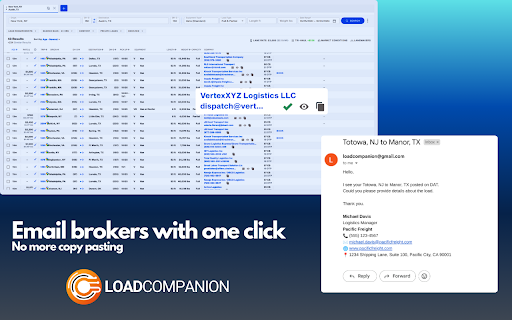


Streamline dispatch with one-click emails from DAT ONE & Sylectus. Features advanced editing, RPM calculations and more. Load Companion: Revolutionize Your Trucking Dispatch Operations Transform your trucking operations with Load Companion, the ultimate Google Chrome extension designed specifically for trucking carriers and dispatchers. Streamline your workflow with one-click emails and advanced customization, seamlessly integrated with top load boards Power DAT and DAT One, Sylectus, more load boards coming soon. 🚀 One-Click Email Magic: Send booking requests effortlessly with just a single click directly from DAT.com. Whether using Gmail or Outlook, our seamless integration lets you communicate faster than ever in the trucking industry. ✏️ Advanced Email Editor: Customize your emails on-the-fly with our sophisticated built-in editor. Make last-minute adjustments without ever leaving your dashboard, ensuring your trucking communications are always precise and on point. 📊 Instant RPM Calculator: Stay ahead of the curve by knowing your numbers at a glance. Calculate rates per mile in an instant and make informed decisions swiftly. Our RPM calculator integrates directly into your workflow, displayed prominently on the DAT Power board. 📈 RPM Column: View real-time rates per mile directly on your board for quick and effective decision-making. ⚙️ Quick and Easy Setup: Get started with Load Companion in less than a minute! Our quick setup process will have you up and running immediately, enhancing your productivity without any hassle. - Speed Up Your Trucking Operations: React to loads up to 10x faster and streamline your booking process with unparalleled efficiency. - Experience Immediate Benefits: See the value Load Companion brings to your trucking operations within just one minute of installation!

FactoRight
Factoright is the Chrome extension designed to seamlessly integrate brokers' factoring scores into your DAT load board experience. FactoRight: Instantly View Broker Factoring Scores in Your Load Board FactoRight integrates brokers' factoring scores into your DAT and TruckStop load boards. Providing immediate access to financial information allows freight brokers and carriers to make informed decisions quickly, minimizing risks when selecting carriers*. Key Features: • Instant Broker Factoring Scores: View brokers' creditworthiness directly on your DAT load board, giving you confidence in your decision-making. • Seamless DAT Integration: Works seamlessly with major load boards, including DAT One, DAT Power, and TruckStop. • User-Friendly Interface: Easily accessible and intuitive design to enhance your workflow. • Risk-Free Carrier Selection: Reduce the risk of late payments or service issues by assessing brokers' financial stability. • Fast Setup: Simple installation and quick setup to get started without delay. How It Works: 1. Install FactoRight from the Chrome Web Store. 2. Log In to Your Load Board (e.g., DAT Power, DAT One, TruckStop). 3. View Factoring Scores: Click the FactoRight icon in the browser to access brokers' factoring scores directly on your load board. 4. Make Smarter Decisions: With real-time financial insights, choose the right brokers and reduce risks in your load management. Why FactoRight? • Faster Decision-Making: Get crucial factoring scores immediately without manually searching for broker financial data. • Better Risk Management: Evaluate brokers based on financial strength, making it easier to choose reliable partners. • Seamless Experience: No manual data entry is needed. FactoRight works in the background while you focus on securing the best loads. • Data Privacy First: FactoRight respects your privacy; we don't collect or store personal information. Add to Chrome FactoRight today and enhance your B2B load board experience with broker factoring scores. *Disclaimer: FactoRight retrieves the available factoring scores from major factoring companies. While we strive to present the most accurate and up-to-date information, please note that the scores are sourced from external providers and may be subject to change. FactoRight does not control or verify the accuracy of these scores, and we recommend double-checking with the relevant factoring companies for confirmation.

RingCentral for Google
For organizations powered by Google Chrome, Workspace and ChromeOS, the browser is the primary engine of productivity. However,… For organizations powered by Google Chrome, Workspace and ChromeOS, the browser is the primary engine of productivity. However, fragmented tools and "context switching" between work and separate communication apps can hinder team focus and data consistency. RingEX for Google makes it easy for your teams to access key phone features without leaving their Google applications, simplifying workflow, and increasing productivity. The new version of RingEX for Google Chrome provides a unified, enterprise-grade and feature-rich communication layer that lives in the Chrome browser where your teams work. At an overview, this version offers: ✅ Eliminate manual dialing or copy-paste using click-to-call and other actions from any browser webpage ✅ Efficient client handoffs with contextual transfer from an AI Receptionist to a staff member ✅ Handle high-volume inbound traffic with integrated Queue Call Handling ✅ Centralize your team communication with a shared SMS inbox and AI writing tools ✅ Capture every important detail automatically using AI-powered Live Notes during calls. ✅ Unified visibility with "Heads-Up Display" (HUD) to see who is online or busy at a glance across the organization. ✅ Maintain a paperless, secure environment with Digital Faxing ✅ Search through your RingCentral, Google, and Microsoft contacts in one centralized list. Ready to modernize your workflows? You can upgrade to the latest version from within the app. For steps to upgrade, visit: https://support.ringcentral.com/article-v2/2104.html?brand=RingCentral&product=RingEX&language=en_US Contact your administrator if installation is restricted by your organization. For admin guide, visit: https://support.ringcentral.com/article-v2/managing-your-ringcentral-for-google-settings-in-the-integration-console.html?brand=RingCentral&product=RingEX&language=en_US New users? Sign up to see how browser-based communication can transform your workflow at https://www.ringcentral.com/office/plansandpricing.html

DAT Snap
Book loads faster with DAT Snap. Our Chrome extension helps dispatchers and carriers book freight faster and more efficiently on DAT. Use your keyboard arrow keys to navigate through different searches. No more clicking. Also set a timer to automatically refresh the load board. Integrate Gmail or Outlook and instantly email brokers for posted loads with one click.

FreightOne
Chrome extension for dat sites. FreightOne: The Ultimate Web Extension for Freight Dispatchers FreightOne is your all-in-one solution for streamlining and enhancing your freight dispatching operations. Designed specifically for freight dispatchers, FreightOne offers a comprehensive suite of features that save time, reduce errors, and improve overall efficiency. Discover the power of FreightOne and transform the way you manage your loads. (DAT Power and DAT One) Key Features: 🚚 Load Information Copying (FREE Usage) Effortlessly copy load details from DAT Power and DAT One Load Boards directly into your system. 💲 Profit Calculator (FREE Usage) Calculate net profits after deducting fuel expenses and deadhead mileage, giving you a clear financial picture. 📧 Auto Email Integration Seamlessly sync with Google Mail and Outlook Mail for automated, professional communication with clients and partners, send UNLIMITED emails. ✉️ Email Copy Feature (FREE Usage) Easily copy email addresses and relevant email content to streamline communication processes. 🔍 Advanced Filters Filter loads by mileage, rate per mile, and deadhead rate per mile. Hide specific states based on your preferences for a more focused search. 🗺️ Location Mapping Function Automatically calculate deadhead mileage, origin, and delivery points, integrating seamlessly with Google Maps. 📏 Rate Per Mile Function (FREE Usage) Display the rate per mile and deadhead rate per mile to provide clear financial insights and help maximize your profits. 📝 Notes Feature Add personal notes for driver performance, driver information, MC numbers, and other essential details, visible only to you. Contact Us: For more information, support, or inquiries, please contact us at:
