
ledhmjoggdmddplpnaegbehbognlnaeo
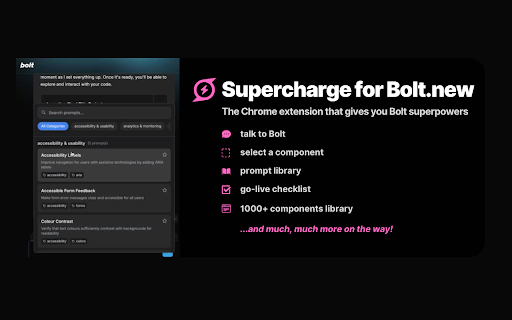
Enhance your Bolt experience with additional features Bolt.new with superpowers! Supercharge is a free Chrome extension for Bolt that speeds up your workflow, improves prompting, gives you incredible design options and reduces token usage. 💬 Talk to Bolt Experience faster prompting with natural conversation flow, making your development process more intuitive and efficient. 🔦 Component Selector Achieve precision prompting by easily selecting and referencing specific components in your project. 📖 Prompt Library Access a comprehensive collection of ready-made prompts for more accurate and consistent results, and add your own custom prompts for easy access. 🧩 Component Library Type "/component" to choose from 1000+ ready-made, expertly crafted designs for hero sections, buttons, forms, AI chat windows and many more components. Then simply copy the coding prompt and paste in your Bolt chat! ⚛️ Recreate any web page Type "/copy", enter a URL and get the React code for Bolt to recreate it. 📄 Create instant API text doc for integrating with any API No more copy/pasting API docs and using up a ton of tokens! Type "/api" to copy all the relevant API docs you need into a single text file. Super easy to get Bolt to refer to it whenever you need to! ✅ Go-Live Checklist Never miss essential tasks with our comprehensive launch checklist, ensuring your project is production-ready. Changelog version 1.4.3 - fixes the issues with slash commands version 1.4.4 - added a text label to Discuss button (chat with Bolt to plan your next steps - around 90% cheaper than standard build mode!)

Lovable.dev Add-ons
Enhance your Lovable.dev experience with powerful features designed to streamline your workflow and boost productivity. Version 2.1.1 – May 18, 2025 R.I.P. Voice Input — replaced with a new, faster voice input system **Version 2.0.0 – May 13, 2025** ✨ New - Lovable.dev 2.0 Theme - Full support for Light and Dark mode 🚀 Major Improvements Voice Input - Faster recognition and better silence handling - Instant stop, low-latency mode - Improved error recovery and speech tracking GitHub Copy Context - Filter files by extension - Adaptive batching and caching - Cancel button and progress bar - Clipboard performance improved - Better error handling and format reuse (XML/Markdown) UI & UX - Modern popup design with rounded corners - Unified button styling and updated icons - Improved layout stability and integration 🐞 Fixes - Resolved voice input bugs and UI cleanup issues - Removed unwanted scrollbars - Fixed layout overflow and duplicate CSS --- **Version 1.9.1 – March 26, 2025** - Added code context copying - Added XML/Markdown format selection - New footer showing ignored files - Removed empty lines from code exports - Improved popup layout and button text - Enhanced error handling --- **Version 1.5.1 – February 14, 2025** - Removed color picker and search functionality from live edit --- Groq AI Integration - Support for DeepSeek Llama 70B, Mixtral 8x7B, Gemma2 9B, LLaMA 3.3 70B SEO Tools - Meta tag generation and validation Bug Fixes - Fixed memory leaks and rendering issues - Fixed storage sync problems - Improved error recovery ---

HTML to Framer
Bring your own website into Framer with a few clicks. Simply copy and paste web elements and edit them directly in Framer. Once you have installed the extension, simply hover over any element such as text, images, buttons, or entire layouts. Click to copy, then go to Framer and press ⌘V (or Ctrl V on Windows) to paste. Your elements will be pasted with a clean layer hierarchy, ready to be further edited or published immediately within Framer. Pro tip: Hold Shift to copy multiple items for even greater speed. To select a parent element of a site item, press Esc while hovering over it. Framer is where teams design and publish stunning sites. Try it for free today at framer.com

MindStudio
MindStudio Chrome Extension Backed by $36M from a long list of prominent investors, MindStudio brings context-aware AI Agents directly into your browser. Click a button and… 👉Instantly summarize long articles, videos, PDFs, all types of documents 👉Generate creative content for marketing materials, blogs, social media 👉Repurpose content across different platforms effortlessly 👉Extract structured data from unorganized web content 👉Analyze complex information for actionable insights 👉Automate repetitive tasks so you can focus on more important work 👉Streamline deep research saving hundreds of hours of time 👉Easily customize existing AI Agents to fit your needs, or build entirely new AI Agents – no coding required. 🚀 Why use MindStudio – your competitive edge! ✅ Works Across All Websites - Whatever your online workflow consists of, MindStudio AI Agents are one click away. No need to switch tabs, write prompts, etc. Just click a button, and choose an AI Agent to run. ✅ Private / Secure - MindStudio is SOC2 Compliant and audited, and the extension is completely open sourced – github. Trusted by large enterprises, and government agencies. ✅ Multi-Model Support - MindStudio AI Agents can access over 90 AI models from the most popular LLM, image, and audio model providers. No need to set up your own accounts on these platforms, we’ve got you covered! ––––WHO'S IT FOR?–––– MindStudio is for professionals who want to dramatically improve their productivity and work smarter online: 💌 Content Creators & Marketers - Generate content for websites, landing pages, articles, blog posts, Instagram, LinkedIn, Twitter, Infographics, PDFs. - Repurpose content across different platforms effortlessly - Generate personalized marketing materials for each client, and stakeholder - Track competitors, and get insights from their positioning - Countless use cases for creators / marketers! 🧳 Business Professionals - Analyze market trends from multiple sources - Summarize lengthy reports and presentations - Draft professional emails and responses quickly - Extract data from web pages into structured formats - Prepare meeting notes and action items efficiently 🎓 Researchers & Students - Summarize dense research papers and articles instantly - Extract key findings and citations from academic content - Generate literature review summaries - Compile bibliographies and reference lists automatically - Generate study guides, quizzes, cheat sheets 💾 Developers & Technical Roles - Generate code snippets and documentation - Explain complex technical concepts in simple language - Convert requirements into technical specifications - Extract data patterns and insights from technical documentation - Debug and optimize code with AI-assisted suggestions 🤑 E-commerce & Sales Teams - Monitor competitor pricing and product features, get differentiation talking points for objection handling. - Compose personalized, persuasive sales emails and follow-ups - Extract customer insights from reviews - Research market trends and customer pain points - All types of lead generation, qualification, enrichment, automation use cases! 🤝 Freelancers & Consultants - Automate repetitive client research tasks - Generate professional proposals and client reports - Extract key data points from industry publications - Create personalized client communications efficiently - Analyze market opportunities with less manual effort Q: How is this different from ChatGPT or similar AI tools? A: MindStudio provides context-aware AI Agents rather than general chat. Our tools understand the webpage you're on and are designed for specific use cases with optimized workflows, making them more efficient and effective than general-purpose AI. Q: What websites does MindStudio work on? A: MindStudio works across virtually all websites, including news sites, research databases, e-commerce platforms, social media, and content creation tools. Q: Do I need a ChatGPT/OpenAI account? A: No, MindStudio runs independently, leveraging multiple AI models for optimal performance across different tasks. Q: Is my data secure? A: Yes! MindStudio is designed with privacy in mind. MindStudio is SOC2 Compliant and audited, and the extension is completely open sourced – github. Trusted by large enterprises, and government agencies – If His Majesty’s Revenue & Customs (British tax authority) trusts us, perhaps you should too. Q: Is it free to use? A: MindStudio offers over 100 completely free to use AI Agents (thanks to our investors). Other agents cost money to use, and fees are clearly stated for each agent. If you build your own, you only pay for usage. Business plans are available with more advanced features and team collaboration tools. Q: Can I create custom AI Agents? A: Absolutely! MindStudio makes it fast and easy to create powerful, custom AI Agents – no coding is required. Over 150k AI Agents have been built with MindStudio and deployed by individuals, SMBs, Enterprises, and Government agencies. For support or feedback, contact us at support@mindstudio.ai Ready for AI Superpowers? Add MindStudio to Chrome today! You can use any AI Agents directly from the MindStudio Agent Store without installing the extension. Simply choose the agent and click "Run". The extension makes MindStudio agents more powerful by allowing them to use the context of the webpage you are on. If would like be alerted of extension releases for other browsers, click here: https://www.mindstudio.ai/#no-chrome

Magic Patterns — Import Website
Import any website into Magic Patterns and edit with AI. Import any website and then edit it with AI on Magic Patterns. Capture your existing styles in one-click. Use cases: - Bring existing designs into Magic Patterns so you can edit them with AI instead of starting from scratch - Use AI to restyle, restructure, or customize the imported design however you want - Export the design to Figma or copy the React code This Chrome Extension is created and supported by Magic Patterns.
