
ldlbfikjagdgcoobnodifjjlhmijehhc

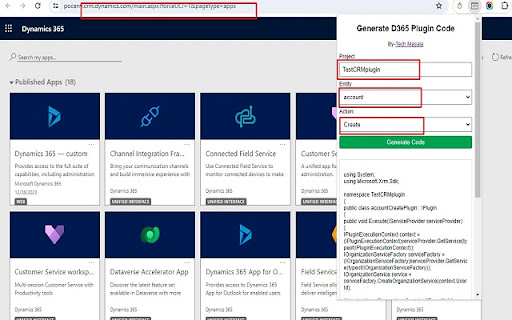

Generate plugin code based on entity name and action The "Plugin Code Generator for MS CRM" Chrome extension likely provides a streamlined and automated way to generate code snippets or templates for plugins in Microsoft Dynamics CRM.

XrmWebTools
Only for *.dynamics.com/* This Chrome extension provides a few XTB tools that are converted to a simplified WEB Version.

Power DevBox Shortcut
Shortcuts to your Power Platform Environments Creates a list of all your environments and buttons to open the environment or add to clipboard (right mouse button): Tag environments for quick filtering Download list of all environments and key data Add tenant id to clipboard

D365 Ribbon Debug Activator
Activates the ribbon debug option in Dynamics 365. Simple add on to activate the ribbon debug flag in your browser. Just keep it activated and the command checker menu item will always be shown.

c! Dynamics 365 Helper
Small and usefull js-functions to manipulate Dynamics 365 [Dyn365] (online). Small and usefull js-functions to manipulate Dynamics 365. You can get information about your user, the environment, the activity-storage-capacity and more. Even the oldschool advanced find is there ;). Also you will get the possibility to manipulate some data, but be aware: Use at your own risk. We do not collect any of your data. Contents of the extension: Area: 'CRM: View': Enabled in Views in Dynamics 365 - '->REST': Open the view-results in REST-Endpoint. Area: 'CRM: Record': Enabled for Records in Dynamics 365 - 'Godmode': Show all fields | No field is required | No field is disabled. - 'SchemaNames': Show all Schemanames of the visible fields on the form. - '->REST': Open in the record REST-Endpoint. - 'Properties': Show the basic properties of a record: CreatedBy and CreatedOn. - 'DirtyFields': Highlight changed fields on the form. - 'Reopen': Reopen a closed activity. - 'All Fields': Show all fields of this record and some metadata of them. - 'Test-Data': Populate all required fields with random data - Good for testing and debugging scenarios. Area: 'Info': Open some usefull links or data. Always enabled. - 'Send Link': Open an email with 2 links directing to the current opened record: One for this app and one teammember-friendly link without an appid. - 'Show my User': Open my User-record in Dynamics 365. - 'adv.Find': Open oldschool Advanced Find. - 'User-Data': Show security-relevant information for your systemuser. - 'open JsAPI': Open external link: Official JS API-Documentation - 'EntityTypeCodes': Show a table of all EntityTypeCodes and -Names (etc, etn) of this organisation - 'Component-Types': Show a table of all Componenttypes. Useful for getting rid of Dependency-errors. Area: 'Admin': Tools to Administrate Dynamics 365. Always enabled. - 'Edit': Pretty oldschool. Open the formeditor of this record in Make.Powerapps. Default Solution. - 'Table' - 'Open': Open the table in Make.Powerapps.com - 'Edit': Edit the table data in Make.Powerapps.com - 'EntityTypeCodes': Show all tables and their ETC. - '#Activities': Count all activities and show them as a table, grouped by year and activitytype. - 'RecordCount': Counts all records from one table. - 'RolesByTable': Get SecurityRoles by table. Filter by user/team. - 'ID': Opens a record with the id only. - 'Copy Roles': Copy BU, Teams, SecurityRoles of one user to another.
