
ldficdikjlfeneogdfanaonbmgoolcjn
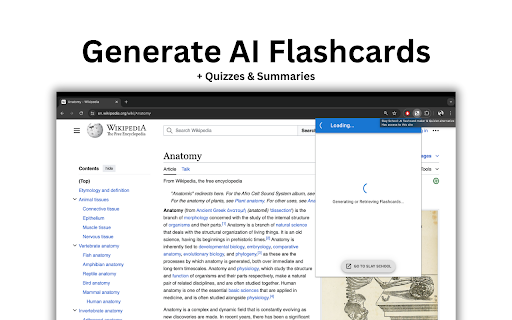

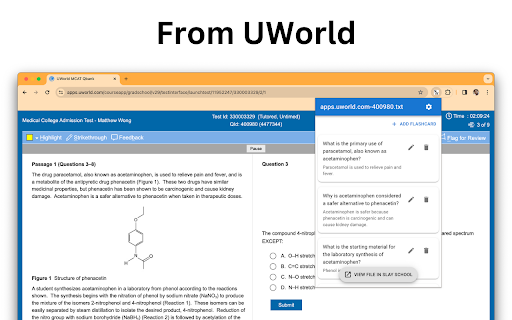


Generate flashcards, multiple choice questions, study guides and summaries from any page on the internet using AI Generate flashcards, multiple choice questions, study guides and summaries from any page on the internet using AI Instantly creates flashcards from any digital content, video, even UWorld questions! Designed for efficiency and effectiveness. it's the perfect study companion for students, with a special focus for those preparing for USMLE, NCLEX, MCAT, and future exams across disciplines. Trusted by over 75,000 students around the world. Works on any chrome browser in any language. - Instant Flashcards: One click generates flashcards from the internet, streamlining study time and enhancing retention. - Edit or Delete Flashcards: Edit or delete flashcards straight from within the chrome extension! - Flexible Study Options: Export to Anki and Quizlet or study directly within the Slay School app. - Video summaries: Instead of watching everything, get the key points faster - Study smarter: Practice test questions from any source material 1. Install: Add Slay School to Chrome. 2. Create an account: Access your new study arsenal. 3. Open the chrome extension any UWorld question and watch flashcards be generated 4. To study or export your flashcards go to https://app.slayschool.com Download Slay School and 10x your studying efficiency today! Download the new Slay School Chrome Extension today & unleash the power of AI to learn better & improve your grades. Join the SlaySchool Community! 👉 We are committed to protecting your personal information and your right to privacy. If you have any questions or concerns about our practices with regard to your personal information, please contact us at jessica@slayschool,com

AI Blaze: Instantly Use AI in Any Webpage
Blazing fast AI copilot on any website: write emails, summarize articles, do research, fix your writing using GPT-5 or Claude Sonnet Open the AI Blaze sidebar on any webpage to chat with AI. You can ask the AI anything you want, or use the built-in prompts. AI Blaze comes with many powerful built-in prompts, including for: 🛠️ Correcting spelling or grammar mistakes 📝 Summarizing a page 🤔 Learning more about a topic ❓ Answering questions ➕ Expanding or ✂️ shortening writing 🌐 Translating text 💬 Replying to messages 🚀 And much more… You can easily customize AI Blaze for your needs by editing these built-in prompts or creating and saving your own new custom prompts. In addition to the sidebar, quick prompts can optionally appear whenever you highlight text in your page. These quick prompts let you trigger a prompt with a single click. Are you a keyboard warrior? Then save even more time with shortcuts. Assign a shortcut to each saved prompt, then type it anywhere to trigger the prompt. For example: 💬 type /reply in Gmail to write a reply 🛠️ type /fix at the end of any textbox to show any mistakes or typos 🪄 type /edit at the end of any textbox to make your writing more professional And much more: ★ Use interactive form fields in your prompts: include text fields, dropdown menus, date and time, system clipboard, etc. in your prompts. These prompts can dynamically adjust based on your input. ★ Use website data: include website data directly into your prompts. This helps the AI focus on your specific request. For example: “Write a short LinkedIn connection request to {linkedin-firstname} who is {linkedin-headline}” “Respond to this comment: {site: comment above your text box}” ★ Share with your team: share your prompt library with your teammates. The prompts synchronize live for all teammates whenever any member updates them. ★ Easily search your prompts: quickly search your prompts from anywhere with the AI Blaze Assistant or right click on any web page to insert a prompt from a menu. ★ Multiple models: easily switch between Claude Sonnet, GPT-4o mini, GPT-4o (powering ChatGPT) as per your preference for speed or robustness. ★ User privacy is a top priority for us. We are SOC 2 certified. AI Blaze is your own personalized AI agent helping you in a variety of use cases: 🤝 Customer Support: Improve response rate to customer queries on platforms like Zendesk, Freshdesk, and Intercom, by providing quick, professional, and accurate answers in line with the query raised. 👩💻 Social Media Managers: Write personalized and dynamic responses for each customer interaction across multiple social channels on platforms like SproutSocial, Hootsuite or Brandwatch. 📡 Social Media Marketers: Plan and execute compelling social media content on Facebook, Twitter, or Instagram with AI-crafted prompts. Ideal for instant caption creations or marketing slogans. 👩💼 Sales Representatives: Draft persuasive responses on CRM platforms like Salesforce, Zoho CRM, and HubSpot, with a customized pitch according to the customer's previous interactions. 💼 Job Seekers: Create compelling cover letters and improve your CV quality on platforms like LinkedIn, Indeed, and Glassdoor. Add AI Blaze now and unleash the power of AI anywhere on the Web! You can contact us at support@blaze.today

QuizSolver AI
Solve online quizzes with AI.Capture multiple-choice questions and get correct answers QuizSolver AI is a Google Chrome extension (Manifest V3) designed to help you solve online quizzes and exams using artificial intelligence. It works by visually capturing any multiple-choice question on your screen and sending it to an AI provider of your choice to get the correct answer in seconds. 📸 SMART QUESTION CAPTURE ────────────────────────── • Activate capture mode with one click and drag to select exactly the area containing the question (crosshair drag). • The cursor changes to a crosshair while selecting. • The selection is automatically sent to the configured AI provider. • The answer appears in a floating popup directly over the page. • Option to directly download the capture as a PNG image. 🧠 MULTI-AI PROVIDER ───────────────────── Supports four artificial intelligence providers, each with selectable models: Each provider has its own API Key field and selectable model. Direct links to each provider's console to obtain the key and add credits. 🎯 CUSTOM PROMPTS ────────────────── • Create your own prompts with a title and content for quick reuse. • Full CRUD system: create, edit, duplicate and delete prompts. • Select any saved prompt to send it along with the capture. • Default prompts per provider: configure a different prompt for Gemini, ChatGPT, Venice and Claude independently. 🕵️ BYPASS SYSTEM (Anti-Detection) ─────────────────────────────────── Scripts that neutralize the most common detection and restriction mechanisms on online exam platforms: 🔓 Anti-Focus (Canvas LMS): Neutralizes tab-change or focus-loss detection. • Blocks focus, blur and visibilitychange events. • Spoofs document.visibilityState = 'visible' and document.hidden = false. • Ideal for Canvas LMS that pauses the exam when you leave the tab. 🖱️ Anti-Context Menu (Right Click): Restores the right-click context menu on sites that block it. • Intercepts events in the capturing phase. • Neutralizes preventDefault() for contextmenu, copy, cut, paste, dragstart. • Allows text selection and copying on sites that disable it. 🔧 Anti-DevTools (Developer Console): Neutralizes all DevTools detection methods. • Function.prototype.toString spoofing to hide proxies. • Fakes outerWidth/outerHeight dimensions to conceal the panel. • Smooths timing of Date.now() and performance.now() during debugger pauses. • Removes debugger statements in eval(), Function(), setTimeout, setInterval. • Neutralizes external detection libraries (devtools-detect, Firebug). 🖱️ Anti-MouseLeave (Cursor Always Present): Makes the site believe the cursor never leaves the window. • Blocks mouseleave, mouseout, pointerleave, pointerout events only when the cursor leaves the viewport (does not break menus or tooltips). • document.hasFocus() always returns true. • Compatible with MutationObserver for dynamically added elements. 📋 PDF GENERATOR (Canvas LMS) ────────────────────────────── On Canvas LMS quiz pages (*/courses/*/quizzes/*) a script is automatically activated that generates a complete PDF of the exam with all questions and options for offline review. 📁 CAPTURE HISTORY ─────────────────── • Stores all captures with date and time. • Thumbnails of each capture with preview. • Button to view the full capture in a new tab (dedicated viewer). • Download any individual capture as PNG. • Delete captures individually or clear the entire history. • Unlimited storage using chrome.storage with IndexedDB. 💾 EXPORT / IMPORT CONFIGURATION ────────────────────────────────── • Export all your settings (API keys, prompts, preferences) to a downloadable JSON file as a backup. • Import settings from a JSON file to restore or share configuration between devices. 🌐 BROWSER CONTEXT MENU ──────────────────────── Options accessible by right-clicking on any page to activate extension functions without opening the popup. 🌍 MULTI-LANGUAGE SUPPORT ────────────────────────── The extension is available in 10 languages: Spanish 🇪🇸 · English 🇬🇧 · Portuguese (Brazil) 🇧🇷 · Portuguese (Portugal) 🇵🇹 German 🇩🇪 · French 🇫🇷 · Italian 🇮🇹 · Japanese 🇯🇵 · Norwegian 🇳🇴 · Swedish 🇸🇪 🏠 Main Panel (main) ───────────────────── The popup home screen. From here you can: • Enable/disable each of the 4 bypasses with switches. • Select the active AI provider (Gemini / ChatGPT / Venice / Claude). • Expand each provider panel to enter the API Key, select the desired model and write the session prompt. • Click "Capture Question" to start area selection. • Access all other panels from the header buttons. ✏️ Prompts Panel (prompts) ─────────────────────────── Full custom prompts manager: • Creation form with title field and content textarea. • Table with all saved prompts. • Edit ✏️, duplicate 📋 and delete 🗑️ buttons per row. • Prompts are saved in chrome.storage.local persistently. ⭐ Default Prompts Panel (defaultPrompts) ────────────────────────────────────────── Allows assigning a different base prompt for each AI provider. The default prompt is sent automatically when no session prompt is selected. 🕐 History Panel (historial) ───────────────────────────── Chronological list of all captures with: • Thumbnail of the captured image. • Exact date and time of capture. • View 👁️, download ⬇️ and delete 🗑️ buttons per capture. • Button to clear the entire history at once. • Access to the full Viewer that opens captures in a new tab. 📤 Export/Import Panel (export) ──────────────────────────────── • "Download" button → generates and downloads the config.json file. • "Import" button → opens the file picker to load a JSON file. 1. Download or build the extension (npm run build). 2. Open Chrome and go to: chrome://extensions/ 3. Enable "Developer mode" (top right corner). 4. Click "Load unpacked" and select the /dist folder. 5. The QuizSolver AI icon will appear in the toolbar. 📌 Recommended: pin it by clicking the pin 📌 in the extensions manager. ════════════════════════════════════ STEP 2 — 🔑 Configure your API Key ════════════════════════════════════ 1. Click the extension icon in the Chrome toolbar. ✅ The Main Panel popup opens. 2. Choose your preferred AI provider using the radio buttons: ○ Gemini ○ ChatGPT ○ Venice ○ Claude 3. Click on the provider name to expand its panel. 4. Paste your API Key in the corresponding field. 💡 Use the "Get API KEY" link to go directly to the provider console if you don't have one yet. 5. Select the model you want to use from the dropdown. 6. (Optional) Write a session prompt or select a saved one. 7. Configuration is saved automatically as you type. 1. Navigate to the exam or quiz on any webpage. 2. Open the extension popup. 3. Click the 📷 "Capture Question" button. → The popup closes and the cursor changes to a crosshair ✛ 4. Click and hold on the top-left corner of the question, drag to include all options and release. → A selection rectangle is drawn as you drag. 5. On release, the capture is processed and sent to the AI provider. 6. The answer appears in a floating popup over the page! 🎉 → You can also view the capture in history to review it. From the Main Panel, activate switches as needed: ┌──────────────────────────────────────────────────────────────────────┐ │ 🔓 Anti Focus (Canvas LMS) │ │ Enable if the exam is on Canvas LMS and pauses when switching │ │ tabs. Prevents the site from detecting you left the page. │ │ │ │ 🖱️ Unlock context menu │ │ Enable if the site blocked right-click or text selection. │ │ You can copy, paste and use the menu normally. │ │ │ │ 🔧 Unlock developer console │ │ Enable if the site detects and blocks the browser DevTools. │ │ Neutralizes all known detection methods. │ │ │ │ 👻 Simulate cursor always on site │ │ Enable if the exam pauses or detects when you move the cursor │ │ outside the browser window. │ └──────────────────────────────────────────────────────────────────────┘ ⚠️ Bypasses activate immediately on the current page. Some may require reloading the exam tab (F5). 1. In the popup, click the ✏️ "Manage Prompts" icon. 2. Write a short title (e.g. "Concise multiple choice"). 3. Write the full prompt in the textarea. E.g.: "You are an expert. Analyze the image and respond ONLY with the letter of the correct option. No explanations." 4. Click "Save". 5. The prompt will appear in the table and be available for selection in the Main Panel when making a capture. 6. You can duplicate 📋 existing prompts to modify them easily. 1. Open the popup and click the 🕐 "Capture History" icon. 2. You'll see a list of all captures with thumbnails and dates. 3. Click 👁️ "View" to open the capture in full screen in a new tab. 4. Click ⬇️ to download the capture as a PNG file. 5. Click 🗑️ to delete an individual capture. 6. Use "Clear all" to wipe the entire history. ════════════════════════════════════ STEP 7 — 💾 Export your Configuration ════════════════════════════════════ 1. Open the popup and click ⬇️ "Export / Import". 2. Click "Download" to save all your configuration to a JSON file (API keys, prompts, selected model, etc.). 3. To restore on another device: click "Import" and select the previously downloaded JSON file. 🔒 Keep your backup file in a safe place as it contains your API Keys. 1. Navigate to a Canvas LMS quiz: (URL like: https://university.instructure.com/courses/.../quizzes/...) 2. The extension automatically detects the URL and activates the generator. 3. A "Generate PDF" button will appear on the quiz page. 4. Click it to download a PDF with all exam questions and options for offline review. • activeTab → Capture screenshot of the active tab. • tabs → Create new tabs (capture viewer). • storage → Save settings, prompts and history. • unlimitedStorage → Store capture history without limits. • scripting → Inject bypass scripts into pages. • contextMenus → Add options to the browser context menu. • downloads → Download PNG captures and generated PDFs. • host_permissions → Work on any URL for captures and bypasses. ━━━━━━━━━━━━━━━━━━━━━━━━━━━━━━━━━━━━━━━━━━━━━━━━━━━━━━━━━━━━━━━━━━━━━━━━━━━━━━ 📝 FINAL NOTES ━━━━━━━━━━━━━━━━━━━━━━━━━━━━━━━━━━━━━━━━━━━━━━━━━━━━━━━━━━━━━━━━━━━━━━━━━━━━━━ • The extension requires a valid API Key with credits from the chosen provider to process captures. • Captures are processed directly from the browser to the provider's API. They are not sent to any external server. • The capture history is saved locally in your browser. • Version: 1.1.2 | Chrome name: QuizSolver AI

Knowt: Quizlet Import, AI Notes & Flashcards
Automatically import flashcards and notes from any video, PDF, article, or flashcard site. Knowt is the fastest way to study. The only AI-powered chrome extension students need - make flashcards & summarized notes from anything on the internet & seamlessly moves your Quizlets to Knowt. Discover a new way of learning with Knowt, the all-in-one study app trusted by 2 million+ students. On top of our Free Learn Mode, Knowt also has unique AI features designed to save you time when studying. What can you do with the Knowt extension? 🧠 Move your Quizlets to Knowt faster Import your Quizlet sets into Knowt with a single click & study them with free learn mode (or one of our other study modes) 🚀 Cut through your teacher’s BS with Video Summaries Import lecture videos into Knowt & we will make summarized notes and flashcards on the most important stuff your teacher covered. 📚 Make Practice Problems from Anything Get ready for your test by testing yourself with practice questions that directly test you your notes, pdfs, videos and more 📌 Instant Flashcards made from your Notes & Videos Interactive flashcards made from your notes and lecture videos, that you cna then study with our free study modes (Learn Mode, Practice Test, Spaced Repetition, Flashcards) Once you import your notes, videos, pdfs, articles or flashcards to Knowt, it’s our job to make sure you understand the material and ace your exams! Download the new Knowt Chrome Extension today & unleash the power of AI to learn better & improve your grades. Join the Knowt Community! 👉 We are committed to protecting your personal information and your right to privacy. If you have any questions or concerns about our practices with regard to your personal information, please contact us at contact@knowt.com.

Quizard AI - Homework Tutor
Study smarter with Quizard! Instant AI answers and explanations for your all your questions to help you learn and succeed! ✨ Homework & AI Answers Solver Are you struggling to understand your homework and study materials? Don’t worry, Quizard is here to help! Take screenshots 📸 and get instant answers, explanations, and related resources for any question. 💁♀️ 🪄 【 Instant and Accurate Solutions 】 ✅ Instant answers: in just seconds receive answers, explanations, and related resources to your question ✅ The #1 AI in accuracy: we are 20% more accurate than ChatGPT and deliver the highest quality, most accurate answers with speed ✅ 24/7 support: use Quizard anytime, anywhere, we’re always there to help you ✅ Math: Quizard can accurately recognize and solve even the most complex math problems that have symbols which can’t be copy and pasted 🔥 【 Take A Screenshot, Get An Answer 】 ✅ Screenshot feature: allows effortless question-asking by capturing a screenshot ✅ Highlight text: simply highlight and solve any question found online ✅ Type In Your Question: you can directly type your question into the text box to receive an instant answer ✅ Universal compatibility: use it on websites like Canvas, Blackboard, Moodle, Google Classroom, and more 🎓 【 Any Subject, Any Level 】 ✅ Any type of question: we can solve multiple choice, short and long answer questions, and provide step by step solutions to your word problems ✅ Help on any subject: from math, history, chemistry, biology you name it we got you covered ✅ Every grade level: whether you’re a college student, high school student, or even an adult looking to brush up on your knowledge, Quizard is the perfect tool to help you succeed. 🗣 【 Clarify Your Understanding 】 ✅ Ask follow-up questions: interact with Quizard to explore complex topics effortlessly ✅ Related resources: we generate you related resources from the web based on the question to confirm the solution we’ve provided and see how others have solved it 💻【 How To Use 】 🟪 Click the “Add to Chrome” button and pin it to the toolbar. 🟪 Log in to your account. 🟪 Press Cmd/Ctrl+Shift+K to wake up Quizard 🟪 Start working with AI! 🗣️【FAQ】 📌 Is it free to use? -Yes, we offer limited use for free. For unlimited access, you can choose the Quizard Pro Subscription. 📌 Is my Quizard Pro Subscription active on both the mobile and Quizard Chrome Extension version? -Yes! If you are a Quizard Pro subscriber link your device in-app or through the Chrome Extension 📌 How can I link my Quizard profile to the extension or from the extension to the app? -From the extension, go to your settings and click “Link Device.” You will then receive further instructions for linking with your mobile device! 📌 ChatGPT is banned in my country. Does it work in my country? -Yes. Our chrome extension works in all countries. 📌 Can I use your service on my phone? -Yes. Quizard is available on all devices (Chrome Extension, iOS, Android). Search up “Quizard AI” in the App Store/Google Play Store
